They were exposed to image left

More
14 years 7 months ago #17379 by monray
hello
New Here, to advise me and help me to solve doubt

I created a category show it to me on the web as a starting and I would like the. They were exposed to image left but not over the text but as shown in the picture attached
Is this possible?
[img


also like to know whether to duplicate a template
"default" could in some so use "User Article" to put in the HOME Site

greetings

Please Log in or Create an account to join the conversation.

More
14 years 7 months ago #17383 by ggppdk
Your English is difficult to read, but i think i understand what you want by the image.
I am guessing that the image is a category that uses template blog.
a. Goto category manager
b. Click on category name to and edit it.
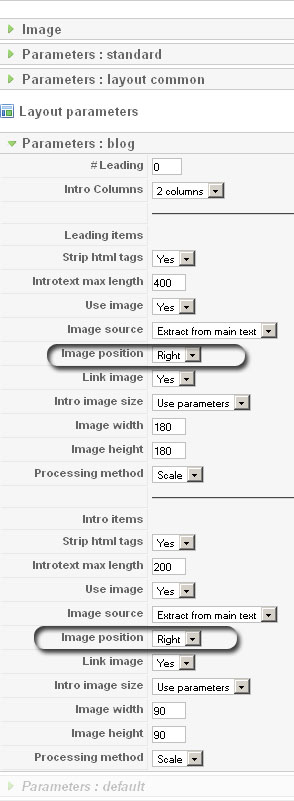
c. Click on "Parameters: blog" and you will see options to place image as you like ... please take time to explore the options ...


To duplicate the default template just copy paste the folder: components/com_flexicontent/templates/default and then rename it.

Then goto file you want,
A. for item it is: item.php

B. for category it is: category.php

Inside category.php, many other files are loaded:
0. echo $this->loadTemplate('alpha');
==> will load the file category_alpha.php to display alphanumeric index
1. echo $this->loadTemplate('category');
==> will load the file category_category.php which will display category details (description etc)
2. echo $this->loadTemplate('subcategories');
==> will load the category_subcategories.php which will display the subcategories of the category
3. echo $this->loadTemplate('items');
==> will load the category_items.php which will display the items of the category (and if enable from subcategories too)

Edit as you like
Regards


-- Flexicontent is Free but involves a big effort on our part.
Like the our support? (for a bug-free FC, despite having a long list of functions) Like the features? Like the ongoing development and future commitment to FLEXIcontent?
-- Add your voice to the FLEXIcontent JED listing with a 5-star review. Thanks!

Please Log in or Create an account to join the conversation.

More
14 years 7 months ago #17389 by monray
sorry
the bad English, It is through goolge translator

I want, is to change the position of the image, now the default is right and I like the image

greetings

Please Log in or Create an account to join the conversation.

More
14 years 7 months ago #17390 by ggppdk
Please follow instructions of my previous message
Regards


-- Flexicontent is Free but involves a big effort on our part.
Like the our support? (for a bug-free FC, despite having a long list of functions) Like the features? Like the ongoing development and future commitment to FLEXIcontent?
-- Add your voice to the FLEXIcontent JED listing with a 5-star review. Thanks!

Please Log in or Create an account to join the conversation.

More
14 years 7 months ago #17391 by monray
I am with it but
my level of programming
is very small

if I can move
of the image position
"category_items"

but the text does not get it

I could help

greetings

Please Log in or Create an account to join the conversation.

More
14 years 7 months ago #17392 by ggppdk
[attachment=0:3ktgmse2]<!-- ia0 -->how-to-image-pos.jpg<!-- ia0 -->[/attachment:3ktgmse2]


-- Flexicontent is Free but involves a big effort on our part.
Like the our support? (for a bug-free FC, despite having a long list of functions) Like the features? Like the ongoing development and future commitment to FLEXIcontent?
-- Add your voice to the FLEXIcontent JED listing with a 5-star review. Thanks!

Please Log in or Create an account to join the conversation.

More
14 years 7 months ago #17393 by monray
as to whether
I do
but the image
I want to
left
but
above
text

I love her as
show in
image
indicated
red

Please Log in or Create an account to join the conversation.

More
14 years 7 months ago #17394 by ggppdk
Use css rules to make this result:

div.image.right { margin-left:100%}
div.image.left { margin-right:100%}

Regards


-- Flexicontent is Free but involves a big effort on our part.
Like the our support? (for a bug-free FC, despite having a long list of functions) Like the features? Like the ongoing development and future commitment to FLEXIcontent?
-- Add your voice to the FLEXIcontent JED listing with a 5-star review. Thanks!

Please Log in or Create an account to join the conversation.

More
14 years 7 months ago #17395 by monray
so nearly perfect :D :D
The only thing is
when he
add item
in above-description-line1
text becomes
under the image
again

greetings

Please Log in or Create an account to join the conversation.

More
14 years 7 months ago #17404 by monray
issue as resolved
been easier
what seemed

changing
in category.css (line 273)
lineinfo.
overflow: auto
I could
solucianarlo
thank you
it's a shame
not know well
your language
thank you
as you deserve

but for
will be clear

THANK YOU

greetings

Please Log in or Create an account to join the conversation.

Moderators: vistamediajoomlacornerggppdk
Cookies user preferences
We use cookies to ensure you to get the best experience on our website. If you decline the use of cookies, this website may not function as expected.
Accept all
Decline all
Essential
These cookies are needed to make the website work correctly. You can not disable them.
Display
Accept
Analytics
Tools used to analyze the data to measure the effectiveness of a website and to understand how it works.
Google Analytics
Accept
Decline
Save