[solved] Date field format changes/wrong (FC 1.5.6 RC9 r1514

More
13 years 4 months ago - 12 years 11 months ago #29687 by kath
Hi,

after updating FC (details below) I have a problem with my FC-date-fields; FC-Backend changes the date formats:

The Details:
I backend-edit my item.
I edit field 'birthday' using the calendar icon, so that I end up with January 16 2010 as the date.
After the date selection via click, my birthday-field shows '2010-01-16'.
I apply the changes to my item.
I check my item at the Frontend for both detail-view and category-view. Both show the correct date, also ordering the category-view by birthday-field works fine.
But: My Edit-Item-View in the Backend now shows '16.01.2010' as birthday (this is german formatted date, just as I want it in FE), not '2010-01-16' anymore.
Because of this changed format, the next 'Apply' will break the field value (, and therefore category ordering aswell.)

All this happens on a stage environment with Joomla 1.5 and FC 1.5.6 RC9 (r1514) installed.
The problem does not happen on my live-site with Joomla 1.5 and FC 1.5.4 stable (r558) installed.

I need this new FC-version to be able to order by dates.
So far I could not see any differences in my php-configs converning dates, locales. Also live and stage are on the same server and same client, just two sibling folders.

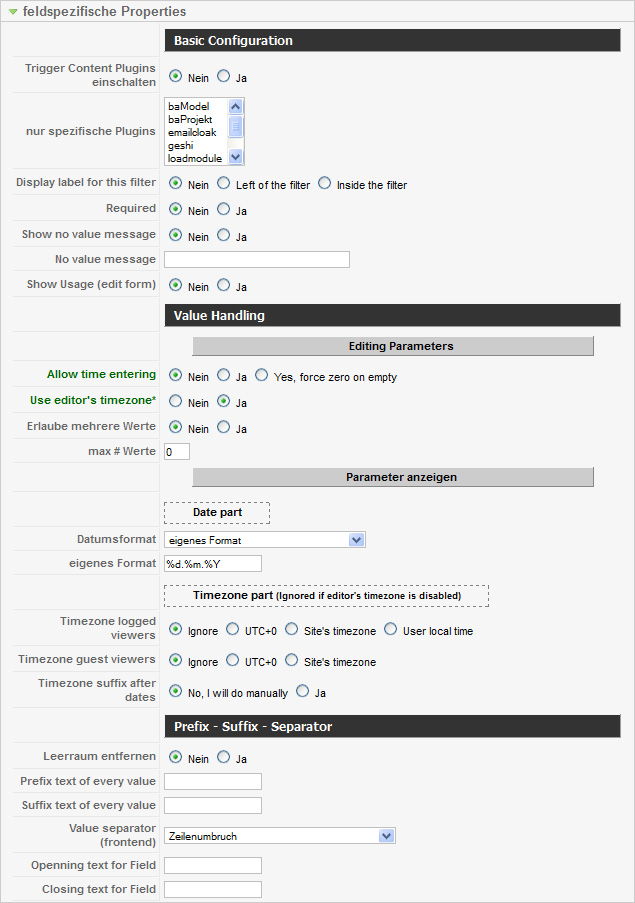
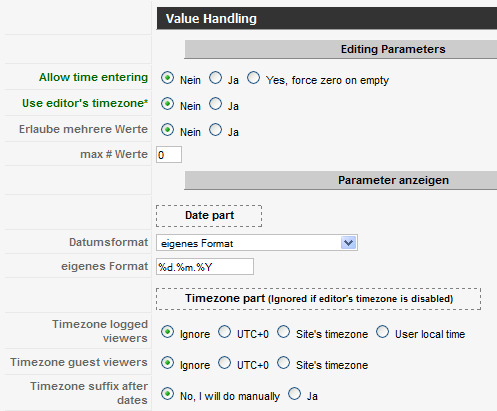
Attached you find a screenshot of my field config.
(I already experimented with own format / '%Y-%m-%d' incl. clearing joomla-cache, without success.)

Thanks for your assistance!
kath
Last edit: 12 years 11 months ago by kath.

Please Log in or Create an account to join the conversation.

More
13 years 4 months ago #29694 by ggppdk
It maybe be related to the mysql SERVER configuration or PHP version,

what mysql / PHP versions do you have?


-- Flexicontent is Free but involves a big effort on our part.
Like the our support? (for a bug-free FC, despite having a long list of functions) Like the features? Like the ongoing development and future commitment to FLEXIcontent?
-- Add your voice to the FLEXIcontent JED listing with a 5-star review. Thanks!

Please Log in or Create an account to join the conversation.

More
13 years 4 months ago #29700 by kath
thanks for your answer.

[stage / ERROR]
mysql: 5.0.95
php: 5.2.17
Datenbankzeichensatz: utf8_general_ci
Webserver: Apache
PHP-Anbindung: cgi-fcgi

[live / OK]
mysql: 5.0.95
php: 5.2.17
Datenbankzeichensatz: utf8_general_ci
Webserver: Apache
PHP-Anbindung: cgi-fcgi

Oh, and my stage-environment has been set up using Akeeba-Backup and -Restore from the live version, then Flexicontent has been updated.

Please Log in or Create an account to join the conversation.

More
13 years 4 months ago #29702 by kath
got a new insight:

i got the attached message from FC after i fixed a date manually via item-edit: "Original content item was IGNORED and RESET because item language is site's default language".

language. ~ locale? is this maybe some new FC-setting that when FC was updated took the site langauge (german) and date formatting? can i change this to what it was before (probably english?) without changing the site langauge? if so, where can i do this? (i don't mind where i set it, can be any layer.)

kath

Please Log in or Create an account to join the conversation.

More
13 years 4 months ago #29713 by ggppdk
Item in site default language e.g. German can not be assigned as translations of other items ...


-- Flexicontent is Free but involves a big effort on our part.
Like the our support? (for a bug-free FC, despite having a long list of functions) Like the features? Like the ongoing development and future commitment to FLEXIcontent?
-- Add your voice to the FLEXIcontent JED listing with a 5-star review. Thanks!

Please Log in or Create an account to join the conversation.

More
13 years 3 months ago #30587 by kath
thanks ggppdk,

since the problem persists i'll try again and be more specific:

[the effect]
1) i create a new item (item id 22383)
2) i save that item, all is well.
3) i open that item, set a date field value ('birthdate') to, say, today, using the calendar. i get '2012-11-08'. (date field id is 20)
4) i save that item.
5) i open that item, my birthdate is now '08.11.2012'! :-(
5 a) a look into db table __flexicontent_items_versions confirms for that item:
version 1: field had no value, not saved.
version 2: field was '2012-11-08'.
version 3: field is now '08.11.2012'
5 b) db table __flexicontent_fields_item_relations shows:
that item has in that field '08.11.2012'.

[more info]
- my date field (field 20) has "Value Handling"->"Date part"->"Date format"="custom format":"%d.%m.%Y". i would like to keep it that way for FE-purposes. but even when i change that to an english format and clear the caches, there is no change in effect.
- there is no joomfish or any other translation engines installed.
- FE language is de-DE
- BE language is de-DE
- even wehen i try and change BE language to english, there is no change in effect at all.

[my setup]
- joomla 1.5.26 Stable [ senu takaa ama busani ] 27-March-2012 18:00 GMT
- php 5.2.17
- mysql 5.0.95

[suspects]
- table __flexicontent_items_ext -> col language -> has de-DE for that item (and all others).
- file /administrator/components/com_flexicontent/elements/fcdate.php ~line 62: "$format = '%Y-%m-%d'"
- file /plugins/flexicontent_fields/date.php ~line 367 "$customdate = $field->parameters->get( 'custom_date', FLEXI_J16GE ? 'Y-m-d' : '%Y-%m-%d' ) ;"
- ...?

thank you again for your assistance!
kath

Please Log in or Create an account to join the conversation.

More
13 years 3 months ago #30588 by ggppdk
I am reading your previous message,

and i need to ask , so the message for item's language occurs when having a date field in item form?


-- Flexicontent is Free but involves a big effort on our part.
Like the our support? (for a bug-free FC, despite having a long list of functions) Like the features? Like the ongoing development and future commitment to FLEXIcontent?
-- Add your voice to the FLEXIcontent JED listing with a 5-star review. Thanks!

Please Log in or Create an account to join the conversation.

More
13 years 3 months ago #30608 by kath
yes. to make things worse: it does not happen always. i can't tell you what makes the difference here.
i attached you the message. thanks!!

Please Log in or Create an account to join the conversation.

More
13 years 3 months ago #30609 by ggppdk
This message is normal to appear when changing the item's language,

also did you put a limitation on author allowed languages via author management tab?


-- Flexicontent is Free but involves a big effort on our part.
Like the our support? (for a bug-free FC, despite having a long list of functions) Like the features? Like the ongoing development and future commitment to FLEXIcontent?
-- Add your voice to the FLEXIcontent JED listing with a 5-star review. Thanks!

Please Log in or Create an account to join the conversation.

More
13 years 1 month ago - 13 years 1 month ago #33130 by kath
ok, general news on this:
problem is still there and pressing, but i did some updates first:
- FC version 1.5.6 RC9b r1601

My admin-interface language is de-DE.
The whole problem is suddenly gone when i change my client's user's language to en-GB! Personally I would be happy with that, but since this is not an option for the client, this question remains:

how can i tell only the FC-plugin "date" to act as if english would be it's language?

please, i'm dying! :)
kath
Last edit: 13 years 1 month ago by kath.

Please Log in or Create an account to join the conversation.

Moderators: vistamediajoomlacornerggppdk
Cookies user preferences
We use cookies to ensure you to get the best experience on our website. If you decline the use of cookies, this website may not function as expected.
Accept all
Decline all
Essential
These cookies are needed to make the website work correctly. You can not disable them.
Display
Accept
Analytics
Tools used to analyze the data to measure the effectiveness of a website and to understand how it works.
Google Analytics
Accept
Decline
Save