Field with file need to open in another window

More
9 years 11 months ago #61594 by melissa.blanchard
Hi,

I'm using FLEXIcontent version 3.0.14-rc2a and Joomla! version 3.5.1.
I created a field with the type File. What I need to do, upload a pdf file and then be able to open the pdf in another window, but the only settings I see is In-browser viewing(which is close but not good enough since it doesn't allow scrolling the pdf file on mobile) and download. Is what I'm asking to do possible, if yes how? and if no what are my other options.

Thanks!

Please Log in or Create an account to join the conversation.

More
9 years 11 months ago #61608 by ggppdk

which is close but not good enough since it doesn't allow scrolling the pdf file on mobile)


the viewing is done by browser software it is not done by FLEXIcontent,
FLEXIcontent only instuct browser to view it if possible, (if browser can do it) if browser cannot do it then it is downloaded


-- Flexicontent is Free but involves a big effort on our part.
Like the our support? (for a bug-free FC, despite having a long list of functions) Like the features? Like the ongoing development and future commitment to FLEXIcontent?
-- Add your voice to the FLEXIcontent JED listing with a 5-star review. Thanks!

Please Log in or Create an account to join the conversation.

More
9 years 11 months ago #61624 by melissa.blanchard
Is there a way to edit the template to add the open in new window option?

Please Log in or Create an account to join the conversation.

More
9 years 11 months ago - 9 years 11 months ago #61634 by ggppdk
Hello

now i see / remember what is happening,
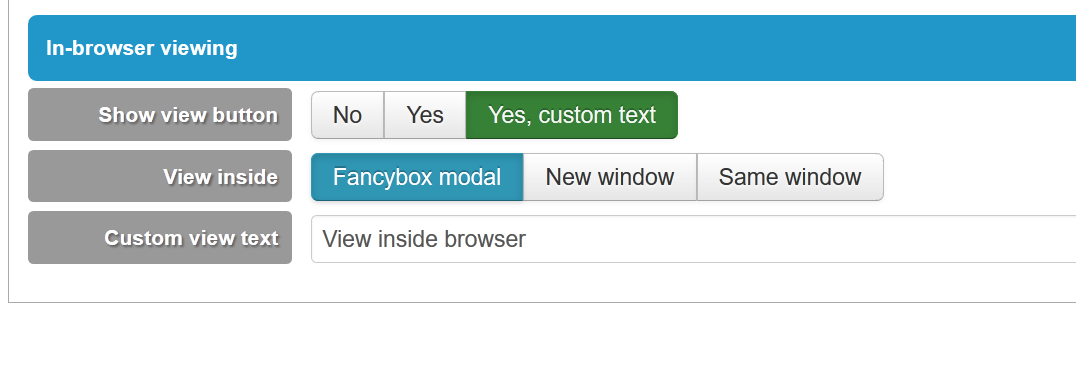
- the file opens in a FANCYBOX modal popup, which will not allow scroll in some Apple devices

i will commit options:
- view inside
FANCYbox modal
New window
Same window


-- Flexicontent is Free but involves a big effort on our part.
Like the our support? (for a bug-free FC, despite having a long list of functions) Like the features? Like the ongoing development and future commitment to FLEXIcontent?
-- Add your voice to the FLEXIcontent JED listing with a 5-star review. Thanks!
Last edit: 9 years 11 months ago by ggppdk.

Please Log in or Create an account to join the conversation.

More
9 years 11 months ago #61635 by ggppdk
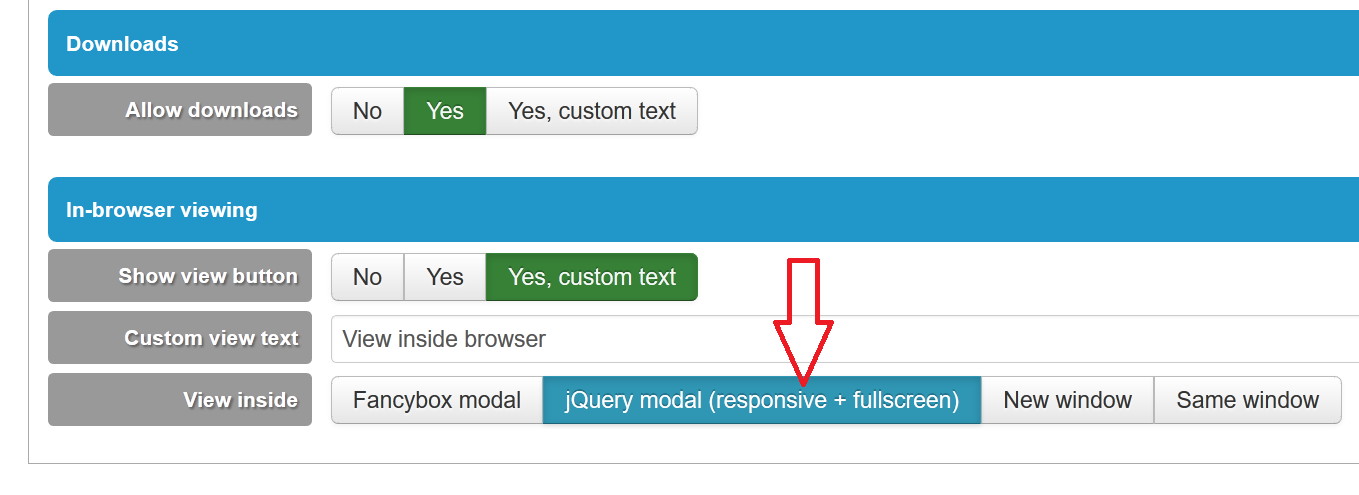
or it is even better to use our jQuery-based modal , it should display properly in all cases and it also autofits screen on resize


-- Flexicontent is Free but involves a big effort on our part.
Like the our support? (for a bug-free FC, despite having a long list of functions) Like the features? Like the ongoing development and future commitment to FLEXIcontent?
-- Add your voice to the FLEXIcontent JED listing with a 5-star review. Thanks!

Please Log in or Create an account to join the conversation.

More
9 years 11 months ago - 9 years 11 months ago #61638 by melissa.blanchard
How do I call the value of the link, I tried this but doesn't work
<?php
echo $this->fields{' pdf '} ->value;
?>
{ } are supposed to be square brackets
Last edit: 9 years 11 months ago by melissa.blanchard.

Please Log in or Create an account to join the conversation.

More
9 years 11 months ago #61647 by ggppdk
Hello

Please install in a test site this:
github.com/FLEXIcontent/flexicontent-cck/tree/3.0.x-stable

click "Download ZIP" and install via Joomla installer
- added a CSS fix for fancybox (test if touch scroll works in mobile)
- added jQuery modal (responsive + fullscreen)


-- Flexicontent is Free but involves a big effort on our part.
Like the our support? (for a bug-free FC, despite having a long list of functions) Like the features? Like the ongoing development and future commitment to FLEXIcontent?
-- Add your voice to the FLEXIcontent JED listing with a 5-star review. Thanks!

Please Log in or Create an account to join the conversation.

More
9 years 11 months ago #61650 by melissa.blanchard
Thank you, its works perfectly!

Now I need to access the file from the template to generate a thumbnail, i tried
Code:
<?php echo $this->fields['pdf '] ->value; ?>
in which pdf is my field but cant get the pdf file name. How do I access it from the template?

Please Log in or Create an account to join the conversation.

More
9 years 11 months ago #61651 by micker
you have an option to generate preview if it possible

FLEXIcontent is Free but involves a very big effort on our part.
Like the our support? (for a bug-free FC, despite being huge extension) Like the features? Like the ongoing development and future commitment to FLEXIcontent?
-- Add your voice to the FLEXIcontent JED listing reviews. Thanks![/size]

Please Log in or Create an account to join the conversation.

More
9 years 11 months ago #61653 by melissa.blanchard
Even if the file is a pdf? I only see the File preview option and the description says that it will show image thumbnail if selected file is an image. I'm using pdf files.

Please Log in or Create an account to join the conversation.

Moderators: vistamediajoomlacornerggppdk
Cookies user preferences
We use cookies to ensure you to get the best experience on our website. If you decline the use of cookies, this website may not function as expected.
Accept all
Decline all
Essential
These cookies are needed to make the website work correctly. You can not disable them.
Display
Accept
Analytics
Tools used to analyze the data to measure the effectiveness of a website and to understand how it works.
Google Analytics
Accept
Decline
Save