File field - missed options.

More
9 years 9 months ago - 9 years 9 months ago #62885 by lipatovroman
Hi!
1. When I upload local file, FC displays file size. But when I add file by URL - no any information about size.
So, FC should count size from external files or we need have ability to enter the file size manually.

2. Some external files can't be downloaded on direct link.
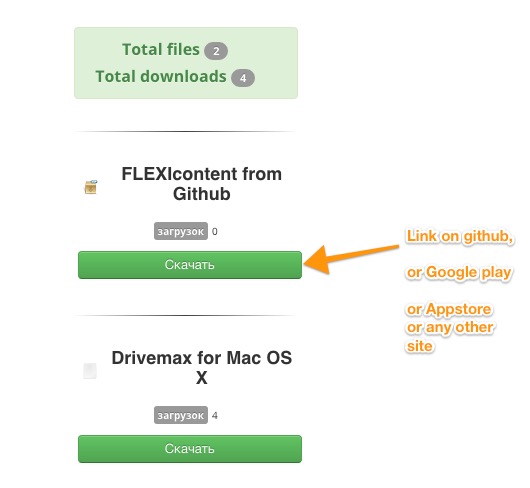
Joomla Download components use option for this cases:


When users press on such link he redirects on external downloads page.
Last edit: 9 years 9 months ago by lipatovroman.

Please Log in or Create an account to join the conversation.

More
9 years 9 months ago #62888 by ggppdk
Replied by ggppdk on topic File field - missed options.
What does this option mean does ?

by default all files and urls of file field are "indirect", they pass through some ACCESS checks, before user can download them


-- Flexicontent is Free but involves a big effort on our part.
Like the our support? (for a bug-free FC, despite having a long list of functions) Like the features? Like the ongoing development and future commitment to FLEXIcontent?
-- Add your voice to the FLEXIcontent JED listing with a 5-star review. Thanks!

Please Log in or Create an account to join the conversation.

More
9 years 9 months ago #62899 by lipatovroman

ggppdk wrote: What does this option mean does ?

by default all files and urls of file field are "indirect", they pass through some ACCESS checks, before user can download them


Some developers not provide direct links on files.
To download this files users should be redirected on external download page.
For example Adobe Flash Player or any application from Google Play.
If so - we just enable this option, and users will be redirected on external page.

Please Log in or Create an account to join the conversation.

More
9 years 9 months ago #62902 by ggppdk
Replied by ggppdk on topic File field - missed options.
Hello

thus you mean add an extra "flag" to indicate that the file is not directly downloadable

and ... display it differently, when the file field is displayed and has such a url

how the display of it would be ?


-- Flexicontent is Free but involves a big effort on our part.
Like the our support? (for a bug-free FC, despite having a long list of functions) Like the features? Like the ongoing development and future commitment to FLEXIcontent?
-- Add your voice to the FLEXIcontent JED listing with a 5-star review. Thanks!

Please Log in or Create an account to join the conversation.

More
9 years 9 months ago #62904 by lipatovroman
It should displays same as regular file. Difference only in action after click on download button..
When users press on regular file - it downloading. When user press on "external file" - users redirects on external download page.
But we can add some label, for example "External file".


Also on pressing - downloads counter should increase, same as in usual mode.

Please Log in or Create an account to join the conversation.

More
9 years 9 months ago #62905 by ggppdk
Replied by ggppdk on topic File field - missed options.
Hello

so how do you get the URL will be treated differently ?

or you need an extra field for a 2nd URL ?


-- Flexicontent is Free but involves a big effort on our part.
Like the our support? (for a bug-free FC, despite having a long list of functions) Like the features? Like the ongoing development and future commitment to FLEXIcontent?
-- Add your voice to the FLEXIcontent JED listing with a 5-star review. Thanks!

Please Log in or Create an account to join the conversation.

More
9 years 9 months ago - 9 years 9 months ago #62913 by lipatovroman
See. I have downloads site.
Some files stored on the local server.
Some files stored on external server - but we have direct links for them, like site.com./folder/file.zip
Some files stored on external server, but they don't have direct links. Users can download those files only from developers sites.


So, we enable "external" mode and when users press on this link they goes to external site.

Last edit: 9 years 9 months ago by lipatovroman.

Please Log in or Create an account to join the conversation.

More
9 years 9 months ago #62914 by lipatovroman
Ooops...

It seems this option works by default...

Please Log in or Create an account to join the conversation.

More
9 years 9 months ago #62917 by lipatovroman
So, is it possible to add Manual file size option?

Please Log in or Create an account to join the conversation.

More
9 years 9 months ago #62919 by ggppdk
Replied by ggppdk on topic File field - missed options.
Hello

about size in URLs

since we have this DB column already for normal files (to make easy to do DB operations with it),

it makes sense to allow user to set it for URLs


-- Flexicontent is Free but involves a big effort on our part.
Like the our support? (for a bug-free FC, despite having a long list of functions) Like the features? Like the ongoing development and future commitment to FLEXIcontent?
-- Add your voice to the FLEXIcontent JED listing with a 5-star review. Thanks!

Please Log in or Create an account to join the conversation.

Moderators: vistamediajoomlacornerggppdk
Cookies user preferences
We use cookies to ensure you to get the best experience on our website. If you decline the use of cookies, this website may not function as expected.
Accept all
Decline all
Essential
These cookies are needed to make the website work correctly. You can not disable them.
Display
Accept
Analytics
Tools used to analyze the data to measure the effectiveness of a website and to understand how it works.
Google Analytics
Accept
Decline
Save