How to display only first value from Select Multiple Field?

More
8 years 11 months ago - 8 years 11 months ago #67086 by lipatovroman
Hi!
I have Select Multiple Field.
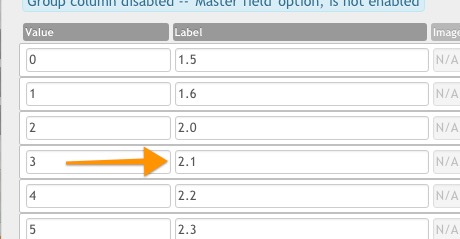
This field have many Android versions.
For example, item have several Android versions: Android 4.2, Android 4.4, Android 5.0, Android 5.1, Android 6.0, Android 7.0.
All this versions needed to displays in filters.
But in Item View I need only display "Android 4.2 and higher".
So, how to display only first value?
Thanks.
Last edit: 8 years 11 months ago by lipatovroman.

Please Log in or Create an account to join the conversation.

More
8 years 11 months ago - 8 years 11 months ago #67087 by lipatovroman
I think I need get Values array.


Then I need to find the smallest number.
Then I need to display Label for this value and add text "and higher" in template.
But how to do this?
Last edit: 8 years 11 months ago by lipatovroman.

Please Log in or Create an account to join the conversation.

More
8 years 11 months ago - 8 years 11 months ago #67088 by lipatovroman
Ok. In my case Label are float numbers, so I can use min php operator.
How I solve my problem:
Code:
<?php $valuesarray = explode(", ", $item->fields["android-compatibility"]->display); ?> <div>Android <?php echo min ($valuesarray); ?> and higher</div> <?php } ?>

But this code didn't work correct, because array contains "& n b s p ;".
So, I edited file /plugins/flexicontent_fields/selectmultiple/selectmultiple.php

and replaced all "& n b s p;" to simple space " ".


Why you use & n b s p instead simple space?
Is it possible to fix it in future FC release?

Thanks.
Last edit: 8 years 11 months ago by lipatovroman.

Please Log in or Create an account to join the conversation.

More
8 years 11 months ago - 8 years 11 months ago #67091 by ggppdk
Hello
Code:
$field_id = 19; // Use in ITEM view / Category (multi-items) view $fvals = $item->fieldvalues[$field_id]; // or $items[$i] for category view

Read more in our FAQ article:
Using the raw value of a field inside a template file or inside the viewing layout of another field Using the raw value of a field inside a template file or inside the viewing layout of another field


For select field you may also need this code:
Code:
//*** //*** For fields select/selectmultiple/checkbox/checkboximage/radio/radioimage //*** $field_name = 'somename'; $extra_props = array(); // For fields select/selectmultiple/checkbox/radio $extra_props = array('image'); // For fields checkboximage/radioimage $elements = FlexicontentFields::indexedField_getElements( $item->fields[$field_name], $item, $extra_props ); if (!empty($fvals)) foreach ($fvals as $v) { $value = @ $elements[$v]->value; $image = @ $elements[$v]->image; echo 'value: ' . $value . ' - '; echo 'image: ' . $value . ' <br/>'; }


-- Flexicontent is Free but involves a big effort on our part.
Like the our support? (for a bug-free FC, despite having a long list of functions) Like the features? Like the ongoing development and future commitment to FLEXIcontent?
-- Add your voice to the FLEXIcontent JED listing with a 5-star review. Thanks!
Last edit: 8 years 11 months ago by ggppdk.

Please Log in or Create an account to join the conversation.

More
8 years 11 months ago #67093 by lipatovroman
Thanks for the reply!
But why you use & n b s p instead simple space?

Please Log in or Create an account to join the conversation.

More
8 years 11 months ago #67094 by ggppdk

But why you use & n b s p instead simple space?


hhmmm because it forces spacing regardless of CSS ... a normal space may or may not show up ...


-- Flexicontent is Free but involves a big effort on our part.
Like the our support? (for a bug-free FC, despite having a long list of functions) Like the features? Like the ongoing development and future commitment to FLEXIcontent?
-- Add your voice to the FLEXIcontent JED listing with a 5-star review. Thanks!

Please Log in or Create an account to join the conversation.

More
8 years 11 months ago - 8 years 11 months ago #67108 by lipatovroman
HI!

OK, I've got values array and found the smallest number.
Code:
$field_id = 35; $fvals = $item->fieldvalues[$field_id]; // or $items[$i] for category view $minvalue = min ($fvals);

Now, how I can display label for this value?

I tried modified your code
Code:
$field_id = 35; $fvals = $item->fieldvalues[$field_id]; // or $items[$i] for category view $minvalue = min ($fvals); $elements = FlexicontentFields::indexedField_getElements( $item->fields["android-compatibility"], $item, $extra_props ); $value = @ $elements[$v]->value; $label = @ $elements[$v]->label; echo 'value: ' . $value . ' - '; echo 'label: ' . $label . ' <br/>';

But it does not work...

So, main question: how to display label for specific value in field.

Last edit: 8 years 11 months ago by lipatovroman.

Please Log in or Create an account to join the conversation.

More
8 years 11 months ago #67109 by lipatovroman
YES! I got it.
Code:
$field_id = 35; $fvals = $item->fieldvalues[$field_id]; // or $items[$i] for category view $minvalue = min ($fvals); $elements = FlexicontentFields::indexedField_getElements( $item->fields["android-compatibility"], $item, $extra_props ); $value = @ $elements[$minvalue]->value; $text = @ $elements[$minvalue]->text; echo 'value: ' . $value . ' - '; echo 'text: ' . $text . ' <br/>';

Please Log in or Create an account to join the conversation.

Moderators: vistamediajoomlacornerggppdk
Cookies user preferences
We use cookies to ensure you to get the best experience on our website. If you decline the use of cookies, this website may not function as expected.
Accept all
Decline all
Essential
These cookies are needed to make the website work correctly. You can not disable them.
Display
Accept
Analytics
Tools used to analyze the data to measure the effectiveness of a website and to understand how it works.
Google Analytics
Accept
Decline
Save