Update via import issues

More
5 years 10 months ago - 5 years 8 months ago #78826 by krae
Hi,

I'm trying to update several thousand items by using the import update option and I've run into a few issues:

- it is not possible to do the import without selecting a category
- when importing, the secondary categories are removed from the existing items

Also when I export existing items, the State field is blank, I need this information when importing. It would be convenient if the status field could remain unchanged unless specified when updating.

Thank you
Last edit: 5 years 8 months ago by ggppdk.

Please Log in or Create an account to join the conversation.

More
5 years 10 months ago #78827 by ggppdk
Replied by ggppdk on topic Update via import issues
Hello

- it is not possible to do the import without selecting a category


This is necessary only for new items, and it acts as a "default"

you have a category (catid) column, and you are doing an update-only ,
then the above category will not be used !

So having to select it should not be a problem ??

- when importing, the secondary categories are removed from the existing items

hhmm things that are not specified should not be lost

i will test/confirm this and then make a fix

- Also when I export existing items, the State field is blank, I need this information when importing. It would be convenient if the status field could remain unchanged unless specified when updating.


I will check this , address this


-- Flexicontent is Free but involves a big effort on our part.
Like the our support? (for a bug-free FC, despite having a long list of functions) Like the features? Like the ongoing development and future commitment to FLEXIcontent?
-- Add your voice to the FLEXIcontent JED listing with a 5-star review. Thanks!

Please Log in or Create an account to join the conversation.

More
5 years 10 months ago #78828 by krae
Replied by krae on topic Update via import issues
I can work around/with the category, I just wondered if there might be something I was missing.

Thanks for the quick reply!

Please Log in or Create an account to join the conversation.

More
5 years 10 months ago #78830 by krae
Replied by krae on topic Update via import issues
Wondering you have any update on these issues?

Please Log in or Create an account to join the conversation.

More
5 years 10 months ago #78846 by ggppdk
Replied by ggppdk on topic Update via import issues
Hello

Have been busy with creating next feature release
v3.4.0
Maybe by end of this week

Will do work on import after v3.4.0


-- Flexicontent is Free but involves a big effort on our part.
Like the our support? (for a bug-free FC, despite having a long list of functions) Like the features? Like the ongoing development and future commitment to FLEXIcontent?
-- Add your voice to the FLEXIcontent JED listing with a 5-star review. Thanks!

Please Log in or Create an account to join the conversation.

More
5 years 9 months ago #79040 by krae
Replied by krae on topic Update via import issues
HI,

Was there any update to these issues in the last version?

Thanks

Please Log in or Create an account to join the conversation.

More
5 years 9 months ago - 5 years 9 months ago #79042 by ggppdk
Replied by ggppdk on topic Update via import issues
Hello

please test with v3.3.6

github.com/FLEXIcontent/flexicontent-cck/releases/tag/v3.3.6

- when importing, the secondary categories are removed from the existing items


the above may have been fixed


-- Flexicontent is Free but involves a big effort on our part.
Like the our support? (for a bug-free FC, despite having a long list of functions) Like the features? Like the ongoing development and future commitment to FLEXIcontent?
-- Add your voice to the FLEXIcontent JED listing with a 5-star review. Thanks!
Last edit: 5 years 9 months ago by ggppdk.

Please Log in or Create an account to join the conversation.

More
5 years 9 months ago - 5 years 9 months ago #79043 by krae
Replied by krae on topic Update via import issues
Secondary categories are still being removed.

Edit: I'm also required to select a language, state and main category to do an update, but I do not want to cahnge these field values. Is it possible to update only the fields included in my CSV without having to select lang/state/cat?

Thanks
Last edit: 5 years 9 months ago by krae. Reason: additional info

Please Log in or Create an account to join the conversation.

More
5 years 9 months ago - 5 years 9 months ago #79048 by ggppdk
Replied by ggppdk on topic Update via import issues
Hello

since v3.3.6 is done,
there is now time to work on v3.4

and do things like make address the import issue with categories

and also the additions you mentioned
(like use language/state/cat only if creating item, and ignore the setting if updating)

They should be addressable with a few hours of work
i ll post back probably on Saturday

if i have a question earlier


-- Flexicontent is Free but involves a big effort on our part.
Like the our support? (for a bug-free FC, despite having a long list of functions) Like the features? Like the ongoing development and future commitment to FLEXIcontent?
-- Add your voice to the FLEXIcontent JED listing with a 5-star review. Thanks!
Last edit: 5 years 9 months ago by ggppdk.

Please Log in or Create an account to join the conversation.

More
5 years 9 months ago #79051 by ggppdk
Replied by ggppdk on topic Update via import issues
Hello

i have made the changes,
but need to test it more


Also fixed an issue with UTF BOM header inside CSV file not being stripped
so if you had such a file the import task would never recognize field name of first column

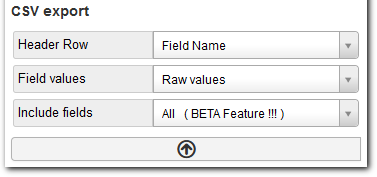
Also some options before exporting to make it easier to re-import (e.g. create header row with field names instead of field labels)


-- Flexicontent is Free but involves a big effort on our part.
Like the our support? (for a bug-free FC, despite having a long list of functions) Like the features? Like the ongoing development and future commitment to FLEXIcontent?
-- Add your voice to the FLEXIcontent JED listing with a 5-star review. Thanks!

Please Log in or Create an account to join the conversation.

Moderators: vistamediajoomlacornerggppdk
Cookies user preferences
We use cookies to ensure you to get the best experience on our website. If you decline the use of cookies, this website may not function as expected.
Accept all
Decline all
Essential
These cookies are needed to make the website work correctly. You can not disable them.
Display
Accept
Analytics
Tools used to analyze the data to measure the effectiveness of a website and to understand how it works.
Google Analytics
Accept
Decline
Save