[SOLVED, enable only FLEXIcontent adv search plugin] FC fields not showing in search view since 3.0.8 update

More
10 years 4 months ago - 10 years 4 months ago #57450 by Natwork
Hi,
On a website i udpate J3.4.3 to 3.4.4 and FC2.2.0 to FC3.0.8.
Since this update, i can't see any FC field in the search view.

Regarding to the generated source code, fields are detected but not rendered, and there is no trace of image field.

In details, i have
A - Image field (FC) renders nothing (not even an empty container)
B - Text fields are detected, but not the content

This code from default_results.php
Code:
<?php foreach ($infoflds as $fieldname) : ?> <div class="fc_field_container <?php echo $fieldname; ?>"> <?php if ( @$fcitems[$i]->fields[$fieldname]->display ) : ?> [....] <?php endif; ?> </div> <?php endforeach; ?>
Renders
Code:
<div class="fc_field_container my_field1_name"></div> <div class="fc_field_container my_field2_name"></div>

I'm accessing this search view by using FC search module; i cleared all caches, purged indexes, menu item link is OK, FC serach view is set on the good item link, indexes are re-generated, fields are indexed in basic and advanced search, and can be used as filters...

Any idea why i got this problem, and how to solve it?

Last edit: 10 years 4 months ago by ggppdk.

Please Log in or Create an account to join the conversation.

More
10 years 4 months ago #57453 by ggppdk
Hello

are you using a joomla template override for file:
default_results.php


-- Flexicontent is Free but involves a big effort on our part.
Like the our support? (for a bug-free FC, despite having a long list of functions) Like the features? Like the ongoing development and future commitment to FLEXIcontent?
-- Add your voice to the FLEXIcontent JED listing with a 5-star review. Thanks!

Please Log in or Create an account to join the conversation.

More
10 years 4 months ago - 10 years 4 months ago #57487 by Natwork
Yes, but when i remove it (by renaming template's folder "search") or replace it with the original default_results.php, the problem remains...

My template overrides default.php, default_form.php and defaut_results.php
Last edit: 10 years 4 months ago by Natwork. Reason: Adding more informations and corrections

Please Log in or Create an account to join the conversation.

More
10 years 4 months ago #57496 by ggppdk
Hello

are you using a different Joomla template for the search menu item,

can you check if you have the template override in another Joomla template that is used for the search menu item ?


-- Flexicontent is Free but involves a big effort on our part.
Like the our support? (for a bug-free FC, despite having a long list of functions) Like the features? Like the ongoing development and future commitment to FLEXIcontent?
-- Add your voice to the FLEXIcontent JED listing with a 5-star review. Thanks!

Please Log in or Create an account to join the conversation.

More
10 years 4 months ago #57497 by Natwork
Hello,

I checked and it's OK : Search menu item got the same template than other items.

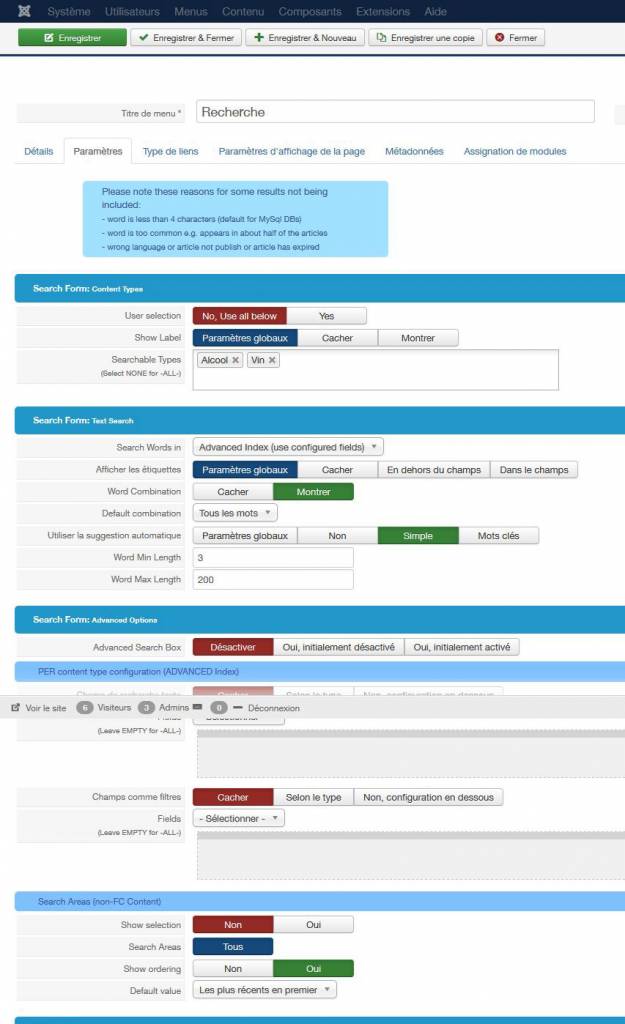
Every params seems OK too :
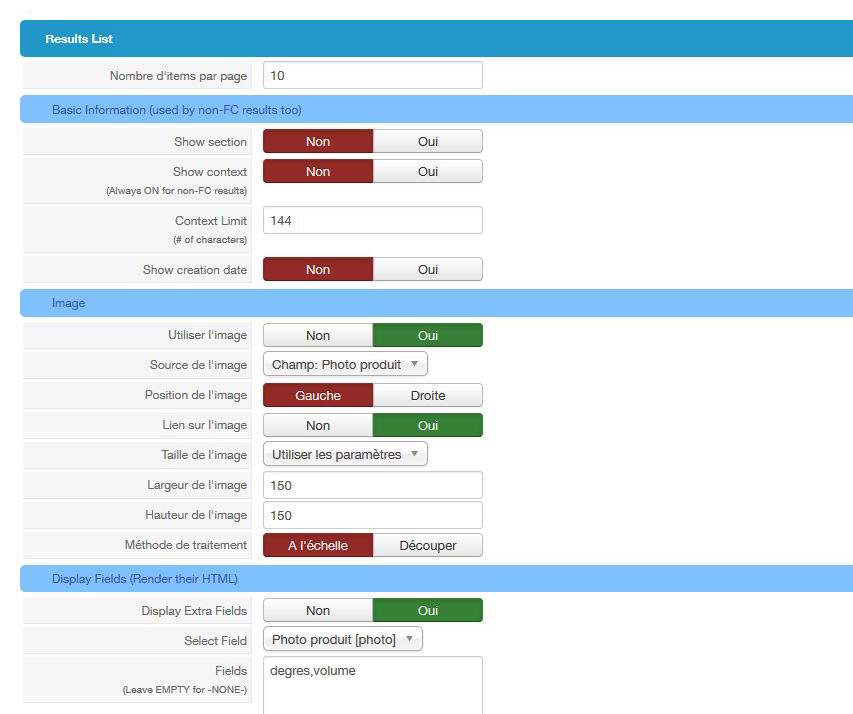
- "use image" is on YES
- "display fields" is on YES
- fields are written in the "Fields" text field.
- I set "Searchable Types" with two types

Please Log in or Create an account to join the conversation.

More
10 years 4 months ago #57498 by ggppdk
Hello

1. make sure that the search results are FC results,
e.g. if you have enable Joomla article(content) search plugin the records that you see are not FC, plus you will get duplicate results

2. make sure that if you see ITEM A, that the fields are assigned to the Contet Type of item A,
in v3, if a field is not assigned to a type then it will not be shown, this was a bahaviour bug of v2.2.x

3. The parameter to add extra fields is (switch to backend english):
Display Fields (Render their HTML)
have you added fields in this parameter or in some other parameter ?


-- Flexicontent is Free but involves a big effort on our part.
Like the our support? (for a bug-free FC, despite having a long list of functions) Like the features? Like the ongoing development and future commitment to FLEXIcontent?
-- Add your voice to the FLEXIcontent JED listing with a 5-star review. Thanks!

Please Log in or Create an account to join the conversation.

More
10 years 4 months ago - 10 years 4 months ago #57499 by Natwork
1 - Joomla article serch content plugin is not active
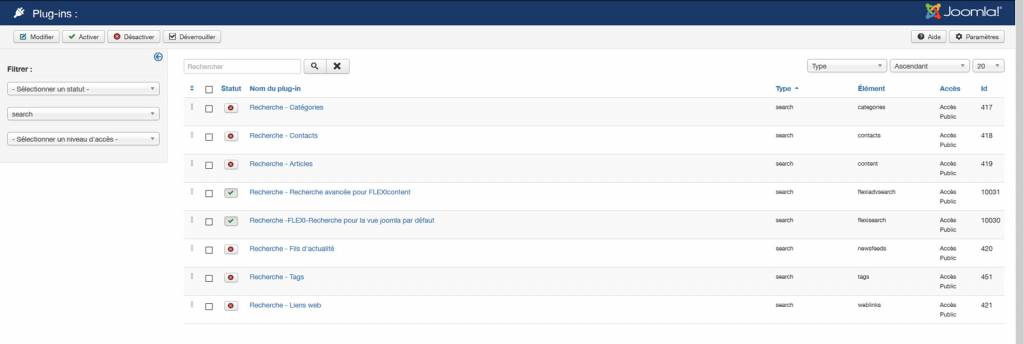
Activated search plugins : flexiadvsearch and flexisearch

2 - Fields are assigned to the two Content Type that are used by the search item view's params. This fields are not empty and need to be completed to save items.

3 - The parameter Display Fields (Render their HTML) contain the two fields that need to be rendered. They are detected because a div with class fc_field_container is rendered for each. My custom HTML display fields' names in extra class, and it works (see my first for the rendered html).
If i stop overriding default_results.php, nothing is rendered in divs with fc_search_result_fields class, not even the container.
Last edit: 10 years 4 months ago by Natwork.

Please Log in or Create an account to join the conversation.

More
10 years 4 months ago - 10 years 4 months ago #57534 by Natwork
[strike]Hi,
i deleted my custom template, nothing is overrided.
Even like this, image is not rendered in results item list.
I tried DB mode, folder mode, with or without watermark, repuploading image, saving items... And nothing... I can't get any image...

Did someone use flexicontent search and get images with v3.0.8?
[/strike]

EDIT / Solution :

IMPORTANT EDIT : THE PROBLEM IS DIFFERENT OF WHAT I THINKED
Previously i didn't notice this because my search results get to much items but :
I've got all items in double : firt joomla version (no image, no custom fields), then i have FC Items, in inverted order, like this :
- item 1
- item 2
- item 3
- fc item 3 with image and custom fields
- fc item 2 with image and custom fields
- fc item 1 with image and custom fields

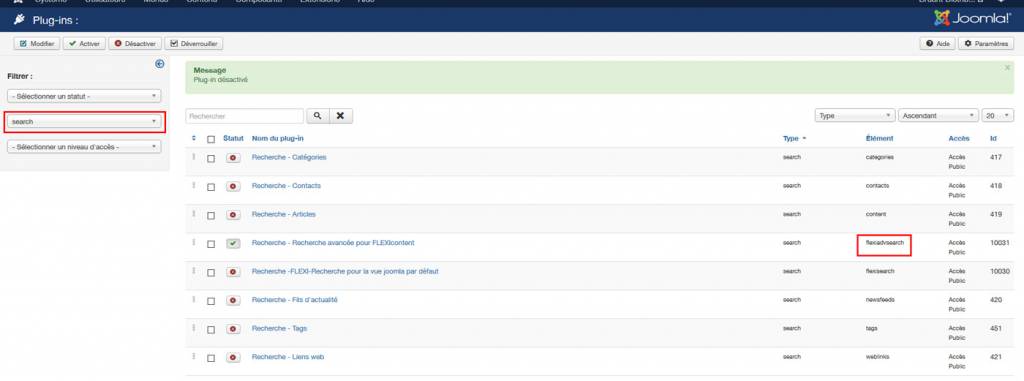
The solution was to disable "flexisearch" plugin to get only "flexiadvsearch" on.
Thanks again to you ggppdk, you said it but i didn't understood correctly what you said (my english isn't fluent enough).

For those who will get this problem, i join a screenshot to see how to set search plugins to get custom fileds working.
Last edit: 10 years 4 months ago by Natwork.

Please Log in or Create an account to join the conversation.

More
10 years 4 months ago - 10 years 4 months ago #57536 by ggppdk
Hello

in Joomla Global settings set error reporting to maximum and refresh the search view, is there any PHP notices/warnings ?

also you may post a link to the plage to view the HTML source
then i may ask you for access to the website


-- Flexicontent is Free but involves a big effort on our part.
Like the our support? (for a bug-free FC, despite having a long list of functions) Like the features? Like the ongoing development and future commitment to FLEXIcontent?
-- Add your voice to the FLEXIcontent JED listing with a 5-star review. Thanks!
Last edit: 10 years 4 months ago by ggppdk.

Please Log in or Create an account to join the conversation.

More
10 years 4 months ago #57540 by Natwork
Already done, and i have no error message.

But everything is OK, as i said on my last post, the problem was that i had flexisearch AND flexiadvsearch activated.
I turned off flexisearch plugin and now everything is good.

Thanks for your help

Regards

Please Log in or Create an account to join the conversation.

Moderators: vistamediajoomlacornerggppdk
Cookies user preferences
We use cookies to ensure you to get the best experience on our website. If you decline the use of cookies, this website may not function as expected.
Accept all
Decline all
Essential
These cookies are needed to make the website work correctly. You can not disable them.
Display
Accept
Analytics
Tools used to analyze the data to measure the effectiveness of a website and to understand how it works.
Google Analytics
Accept
Decline
Save