phpthumb error on uploading image

More
9 years 8 months ago - 9 years 8 months ago #61753 by hervemlam
Hello,

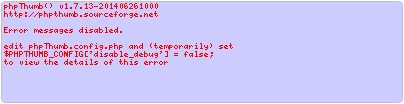
While creating a new item, I am trying to upload an image into an image field of my item, and I got the phpthumb error written red on mauve instead of the thumbnail. It suggests to set $PHPTHUMB_CONFIG['disable_debug'] = false.


Well, I did it, but didn't get more details about the error.

I noticed that my image file is correctly uploaded into /images/stories/flexicontent/item__2016_05_03_07_25_33_15728526d4eca5_field_18/original
I first thought that the path should be as usual .../item_79_field_18/original instead, but realised that my item wasn't inserted yet, therefore didn't already have his ID (79 or so). So it makes sense.
But the fact is the resized files (b_mypic.jpg, l_mypic.jpg, m_mypic.jpg and s_mypic.jpg) weren't created at all.
What should I do?

P.S.: I forgot to mention that I don't have this problem on my local site, just on my (new) distant site.

Good night.
HervE

PHP 8.1.16
Joomla! 4.3.3
FLEXIcontent 4.1.5
Last edit: 9 years 8 months ago by ggppdk.

Please Log in or Create an account to join the conversation.

More
9 years 8 months ago - 9 years 8 months ago #61786 by hervemlam
Hello,

Any idea anyone?

Here is the GD part from phpinfo():
GD Supportenabled
GD Versionbundled (2.1.0 compatible)
FreeType Supportenabled
FreeType Linkagewith freetype
FreeType Version2.4.9
GIF Read Supportenabled
GIF Create Supportenabled
JPEG Supportenabled
libJPEG Version8
PNG Supportenabled
libPNG Version1.2.49
WBMP Supportenabled
XBM Supportenabled

DirectiveLocal ValueMaster Value
gd.jpeg_ignore_warning00

Good night.
HervE

PHP 8.1.16
Joomla! 4.3.3
FLEXIcontent 4.1.5
Last edit: 9 years 8 months ago by hervemlam.

Please Log in or Create an account to join the conversation.

More
9 years 8 months ago #61811 by ggppdk
Hello

is your web server a windows or linux server ?

after you change to debug you need to open the URL at the browser address bar

there you can see a detail LOG (text) of what is happening


-- Flexicontent is Free but involves a big effort on our part.
Like the our support? (for a bug-free FC, despite having a long list of functions) Like the features? Like the ongoing development and future commitment to FLEXIcontent?
-- Add your voice to the FLEXIcontent JED listing with a 5-star review. Thanks!

Please Log in or Create an account to join the conversation.

More
9 years 8 months ago - 9 years 8 months ago #61813 by hervemlam
Hello,

Thanks for your answer.
This is Linux.

I did it and got the whole trace.
Then I added these in the phpThumb config:
Code:
$PHPTHUMB_CONFIG['additional_allowed_dirs'] = array('/srv/disk5/myId/www/mySite.co.nf/images/'); $PHPTHUMB_CONFIG['document_root'] = '/srv/disk5/myId/www/mySite.co.nf';
This leads me to something strange: I can see the thumbnail, and the preview of the item is fine, but only until I save the article.
Then I've got an announcement. It's in French, I try to translate:
The field Image/Gallerie : 'Jaquette', some field values were ignored: [ myPic.jpg ], because the original file seems to have been erased (the creation of the thumbnail failed).
This message will be erased when the item is saved.

Below I've got this:
Code:
Failed2: phpThumb() v1.7.13-201406261000 http://phpthumb.sourceforge.net Error messages disabled. edit phpThumb.config.php and (temporarily) set $PHPTHUMB_CONFIG['disable_debug'] = false; to view the details of this error phpThumb() v1.7.13-201406261000 in file "phpthumb.class.php" on line 225 setSourceFilename(/srv/disk5/myId/www/mySite.co.nf/images/stories/flexicontent/item_79_field_18/original/myPic.jpg) set $this->sourceFilename to "/srv/disk5/myId/www/mySite.co.nf/images/stories/flexicontent/item_79_field_18/original/myPic.jpg" in file "phpthumb.class.php" on line 276 file_exists() = 0 in file "phpthumb.class.php" on line 1340 file_exists_ignoreopenbasedir() = 0 in file "phpthumb.class.php" on line 1341 is_file() = 0 in file "phpthumb.class.php" on line 1342 is_executable() = 0 in file "phpthumb.class.php" on line 1343 using ImageMagick path from `which convert` (/usr/bin/convert) in file "phpthumb.class.php" on line 1364 ImageMagick version checked with "convert --version" in file "phpthumb.class.php" on line 1405 ImageMagick convert --version says "Version: ImageMagick 6.7.7-10 2014-03-08 Q16 " in file "phpthumb.class.php" on line 1413 Addding ImageMagick formats to $AvailableImageOutputFormats (text;ico;bmp;wbmp;gif;png;jpeg) in file "phpthumb.class.php" on line 924 $AvailableImageOutputFormats = array(text;ico;bmp;wbmp;gif;png;jpeg) in file "phpthumb.class.php" on line 930 $this->thumbnailFormat set to $this->config_output_format "jpeg" in file "phpthumb.class.php" on line 941 $this->thumbnailQuality set to "90" in file "phpthumb.class.php" on line 958 resolvePath: /srv/disk5/myId/www/mySite.co.nf/images/stories/flexicontent/item_79_field_18/original/myPic.jpg (allowed_dirs: Array ( ) ) in file "phpthumb.class.php" on line 1101 resolvePath: iteration, path=/srv/disk5/myId/www/mySite.co.nf/images/stories/flexicontent/item_79_field_18/original/myPic.jpg, base path = in file "phpthumb.class.php" on line 1120 open_basedir: "" in file "phpthumb.class.php" on line 1087 resolvePath: stop at component 12 in file "phpthumb.class.php" on line 1136 resolvePath: stop at path=/srv/disk5/myId/www/mySite.co.nf/images/stories/flexicontent/item_79_field_18/original/myPic.jpg in file "phpthumb.class.php" on line 1139 resolvePath: no match, returning null in file "phpthumb.class.php" on line 1141 $this->sourceFilename set to "" in file "phpthumb.class.php" on line 854 phpThumb() v1.7.13-201406261000 http://phpthumb.sourceforge.net Error messages disabled. edit phpThumb.config.php and (temporarily) set $PHPTHUMB_CONFIG['disable_debug'] = false; to view the details of this error in file "phpthumb.class.php" on line 4055 setCacheDirectory() starting with config_cache_directory = "" in file "phpthumb.class.php" on line 966 $this->config_cache_directory () is not a directory in file "phpthumb.class.php" on line 1002 SetCacheFilename() failed because $this->config_cache_directory is empty in file "phpthumb.class.php" on line 3409 starting ExtractEXIFgetImageSize() in file "phpthumb.class.php" on line 3241 skipping GetImageSize() because $this->sourceFilename is empty in file "phpthumb.class.php" on line 3253 GetImageSize("") failed in file "phpthumb.class.php" on line 3284 $this->useRawIMoutput=true after checking $UnAllowedParameters in file "phpthumb.class.php" on line 1513 ImageMagickThumbnailToGD() aborting because $this->sourceFilename is empty in file "phpthumb.class.php" on line 1557 ImageMagickThumbnailToGD() failed in file "phpthumb.class.php" on line 3291 SetOrientationDependantWidthHeight() starting with ""x"" in file "phpthumb.class.php" on line 3220 SetOrientationDependantWidthHeight() setting w="800", h="600" in file "phpthumb.class.php" on line 3236 EXIF thumbnail extraction: (size=0; type=""; 0x0) in file "phpthumb.class.php" on line 3348 starting SourceImageToGD() in file "phpthumb.class.php" on line 3608 Not using EXIF thumbnail data because $this->exif_thumbnail_data is empty in file "phpthumb.class.php" on line 3679 $this->gdimg_source is still empty in file "phpthumb.class.php" on line 3731 ImageMagickThumbnailToGD() failed in file "phpthumb.class.php" on line 3733 phpThumb() v1.7.13-201406261000 http://phpthumb.sourceforge.net Error messages disabled. edit phpThumb.config.php and (temporarily) set $PHPTHUMB_CONFIG['disable_debug'] = false; to view the details of this error in file "phpthumb.class.php" on line 4055 SourceImageToGD() failed in file "phpthumb.class.php" on line 356

Like I said, it is OK on local site (Windows) but wrong on distant site.
What do you think?

Good night.
HervE

PHP 8.1.16
Joomla! 4.3.3
FLEXIcontent 4.1.5
Last edit: 9 years 8 months ago by hervemlam.

Please Log in or Create an account to join the conversation.

More
9 years 8 months ago #61815 by ggppdk
Hello

first please use:
v3.0.14-rc2a


-- Flexicontent is Free but involves a big effort on our part.
Like the our support? (for a bug-free FC, despite having a long list of functions) Like the features? Like the ongoing development and future commitment to FLEXIcontent?
-- Add your voice to the FLEXIcontent JED listing with a 5-star review. Thanks!

Please Log in or Create an account to join the conversation.

More
9 years 8 months ago #61816 by hervemlam
Oh no!

Warning: POST Content-Length of 6603610 bytes exceeds the limit of 5242880 bytes in Unknown on line 0
Warning: session_start(): Cannot send session cache limiter - headers already sent in /srv/disk5/myId/www/mySite.co.nf/libraries/joomla/session/session.php on line 665

Just cannot upgrade FLEXIcontent because the zipfile is too big :ohmy:
How can I do?

HervE

PHP 8.1.16
Joomla! 4.3.3
FLEXIcontent 4.1.5

Please Log in or Create an account to join the conversation.

More
9 years 8 months ago #61818 by ggppdk
Hello

it is good to update Joomla

about upgrading FLEXIcontent see here, (about increasing upload limit):
www.flexicontent.org/documentation/faq/7...ver-limitations.html


-- Flexicontent is Free but involves a big effort on our part.
Like the our support? (for a bug-free FC, despite having a long list of functions) Like the features? Like the ongoing development and future commitment to FLEXIcontent?
-- Add your voice to the FLEXIcontent JED listing with a 5-star review. Thanks!

Please Log in or Create an account to join the conversation.

More
9 years 8 months ago #61821 by hervemlam
I added a .htaccess file with this line only (just to try):
php_value upload_max_filesize 15M

...and got a 500 Internal Server Error.
Is there a specific syntax to add a php_value to .htaccess?
I can't find it anywhere.

HervE

PHP 8.1.16
Joomla! 4.3.3
FLEXIcontent 4.1.5

Please Log in or Create an account to join the conversation.

More
9 years 8 months ago - 9 years 8 months ago #61833 by ggppdk
Hello

some server do not allow to change this via .htaccess

in such a case you need to use file:
php.ini
Code:
upload_max_filesize=15M post_max_size=15M max_input_time=300 max_execution_time=120 default_socket_timeout=120 max_input_vars=5000

in some servers, you may have to create 1 more php.ini file :
joomlaFolder/administrator/php.ini

but usually editting this should be enough to apply to all subfolders:
joomlaFolder/php.ini


-- Flexicontent is Free but involves a big effort on our part.
Like the our support? (for a bug-free FC, despite having a long list of functions) Like the features? Like the ongoing development and future commitment to FLEXIcontent?
-- Add your voice to the FLEXIcontent JED listing with a 5-star review. Thanks!
Last edit: 9 years 8 months ago by ggppdk.

Please Log in or Create an account to join the conversation.

More
9 years 8 months ago - 9 years 8 months ago #61852 by hervemlam
Hello,

Thanks for you answer.

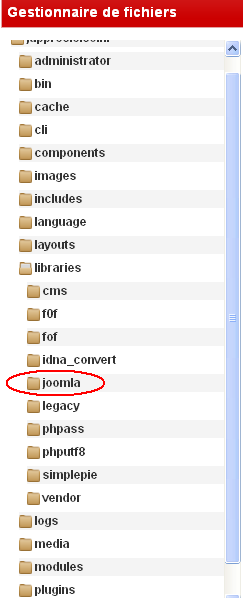
What do you mean with joomlaFolder?
Is it mySite/libraries/joomla? (See screenshot.)


If so, there is no administrator folder inside.

Do I have to add a php.ini in mySite/libraries/joomla?

Good night.
HervE

PHP 8.1.16
Joomla! 4.3.3
FLEXIcontent 4.1.5
Last edit: 9 years 8 months ago by hervemlam.

Please Log in or Create an account to join the conversation.

Moderators: vistamediajoomlacornerggppdk
Cookies user preferences
We use cookies to ensure you to get the best experience on our website. If you decline the use of cookies, this website may not function as expected.
Accept all
Decline all
Essential
These cookies are needed to make the website work correctly. You can not disable them.
Display
Accept
Analytics
Tools used to analyze the data to measure the effectiveness of a website and to understand how it works.
Google Analytics
Accept
Decline
Save