phpthumb failing on Windows

More
5 years 4 months ago #79353 by wiebe
hi there,

phpthumb-ing of images fails on my local windows based project - while it works on linux
it used to work with older flexicontent versions, but when I upgraded to the latest it breaks
It can not find the file

* resolvePath: iteration, path=//components/com_flexicontent/uploads/thefile.jpg, base path = D:\_Web in file "phpthumb.class.php" on line 1204

* open_basedir: "" in file "phpthumb.class.php" on line 1171
* resolvePath: stop at component 1 in file "phpthumb.class.php" on line 1220
* resolvePath: stop at path=//components/com_flexicontent/uploads/thefile.jpg in file "phpthumb.class.php" on line 1223
* resolvePath: no match, returning null in file "phpthumb.class.php" on line 1225

I have no idea what to do now

Any suggestions?

Cheers,

Wiebe

Please Log in or Create an account to join the conversation.

More
5 years 4 months ago #79354 by micker
Replied by micker on topic phpthumb failing on Windows
hello for windows local path you need to change your global config / files tab
and change your config path
Secure files path
Media files path

FLEXIcontent is Free but involves a very big effort on our part.
Like the our support? (for a bug-free FC, despite being huge extension) Like the features? Like the ongoing development and future commitment to FLEXIcontent?
-- Add your voice to the FLEXIcontent JED listing reviews. Thanks![/size]

Please Log in or Create an account to join the conversation.

More
5 years 4 months ago #79355 by wiebe
Replied by wiebe on topic phpthumb failing on Windows
Where should I change this?

And maybe I did not explain myself well enough:
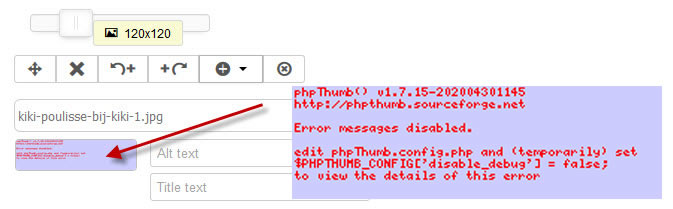
Images are resized properly (to images/stories/flexicontent), but the preview thumbnail in de admin form gives an error and are not created.

Please Log in or Create an account to join the conversation.

More
5 years 4 months ago #79356 by ggppdk
Replied by ggppdk on topic phpthumb failing on Windows
Hello

maybe there is an .htaccess file in images/stories/flexicontent folder ?


-- Flexicontent is Free but involves a big effort on our part.
Like the our support? (for a bug-free FC, despite having a long list of functions) Like the features? Like the ongoing development and future commitment to FLEXIcontent?
-- Add your voice to the FLEXIcontent JED listing with a 5-star review. Thanks!

Please Log in or Create an account to join the conversation.

More
5 years 4 months ago #79357 by wiebe
Replied by wiebe on topic phpthumb failing on Windows
no - it has nothing to do with these folders
the images are created as they should be

it is the preview in the admin form:

see

when I enable debug I get this debug report, but it is very unclear to me what is the exact problem (and what would be the solution)

File Attachment:

File Name: phpThumb_debug.txt
File Size:23.57 KB

Please Log in or Create an account to join the conversation.

More
5 years 4 months ago #79358 by ggppdk
Replied by ggppdk on topic phpthumb failing on Windows
Hello

in windows there must be some issue
if website is directly under Document root

Try placing the joomla inside a subfolder under the Document root
and retry


-- Flexicontent is Free but involves a big effort on our part.
Like the our support? (for a bug-free FC, despite having a long list of functions) Like the features? Like the ongoing development and future commitment to FLEXIcontent?
-- Add your voice to the FLEXIcontent JED listing with a 5-star review. Thanks!

Please Log in or Create an account to join the conversation.

More
5 years 4 months ago #79359 by wiebe
Replied by wiebe on topic phpthumb failing on Windows
sadly that is not the issue:

<VirtualHost *:80>
DocumentRoot D:/_Boxed
ServerName boxed.nl
<Directory "D:/_Boxed/">
AllowOverride All
Options +Indexes +FollowSymLinks +MultiViews
Order allow,deny
Allow from all
</Directory>
</VirtualHost>

Please Log in or Create an account to join the conversation.

More
5 years 4 months ago - 5 years 4 months ago #79360 by ggppdk
Replied by ggppdk on topic phpthumb failing on Windows
Hello

phpThumb_debug.txt
shows that website is under document root

$_SERVER[DOCUMENT_ROOT] = D:/_Bijkiki
$this->cache_filename = string(175) "D:\_Bijkiki\components\com_flexicontent\librairies\phpthumb\cache\\

and it is not under D:/_Boxed but under D:/_Bijkiki


-- Flexicontent is Free but involves a big effort on our part.
Like the our support? (for a bug-free FC, despite having a long list of functions) Like the features? Like the ongoing development and future commitment to FLEXIcontent?
-- Add your voice to the FLEXIcontent JED listing with a 5-star review. Thanks!
Last edit: 5 years 4 months ago by ggppdk.

Please Log in or Create an account to join the conversation.

More
5 years 4 months ago #79361 by wiebe
Replied by wiebe on topic phpthumb failing on Windows
sorry: I pasted the wrong section

<VirtualHost *:80>
DocumentRoot D:/_Bijkiki
ServerName bij.nl
<Directory "D:/_Bijkiki/">
AllowOverride All
Options +Indexes +FollowSymLinks +MultiViews
Order allow,deny
Allow from all
</Directory>
</VirtualHost>

Please Log in or Create an account to join the conversation.

More
5 years 3 months ago - 5 years 3 months ago #79476 by iamrobert
Hi - I also have this issue.

I believe it's because we are getting double slash in the initial URL:

components/com_flexicontent/librairies/phpthumb/phpThumb.php?src=%2F%2Fcomponents%2Fcom_flexicontent%2Fmedias%2Fabout-page.png&w=600&h=600&zc=1&q=95&ar=x&f=png&hash=

Changing it from

src=%2F%2Fcomponents

to:

src=%2Fcomponents or src=/components

the image generates fine, and works for me.

Just not sure how to implement it sitewide. How can we change this?

The image generates correctly in the frontend, and on the server.
Last edit: 5 years 3 months ago by iamrobert.

Please Log in or Create an account to join the conversation.

Moderators: vistamediajoomlacornerggppdk
Cookies user preferences
We use cookies to ensure you to get the best experience on our website. If you decline the use of cookies, this website may not function as expected.
Accept all
Decline all
Essential
These cookies are needed to make the website work correctly. You can not disable them.
Display
Accept
Analytics
Tools used to analyze the data to measure the effectiveness of a website and to understand how it works.
Google Analytics
Accept
Decline
Save