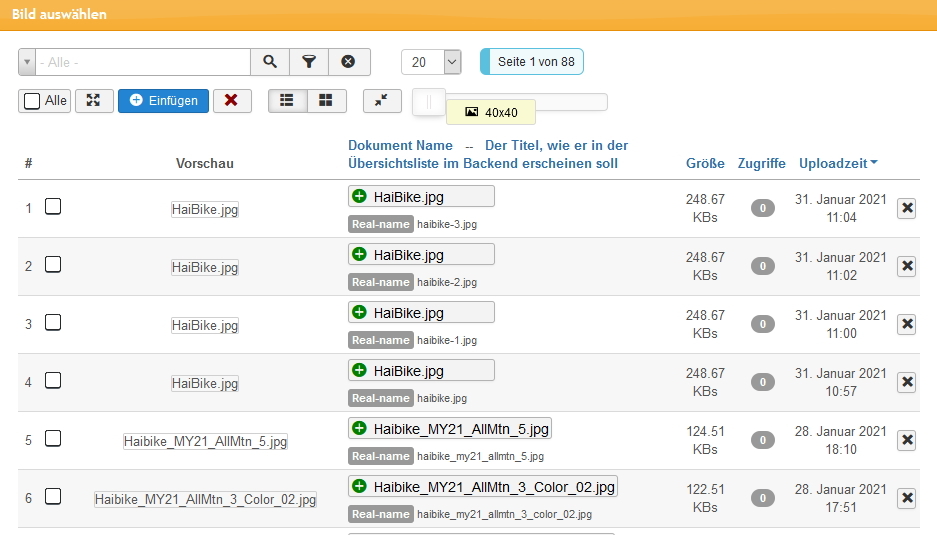
image field in the backend only shows preview text

More
5 years 1 week ago #79705 by bytekulturmaya
Hello...
Suddenly we have the problem that the image field in the backend only says "Preview", but the field is no longer displayed. The same in the file manager.

What could be the reason for this? Very grateful for every tip

Kind regards
Maya


Please Log in or Create an account to join the conversation.

More
5 years 1 week ago #79706 by micker
you need to check console error, seems that image arn't here => you have same problem in front end ?

FLEXIcontent is Free but involves a very big effort on our part.
Like the our support? (for a bug-free FC, despite being huge extension) Like the features? Like the ongoing development and future commitment to FLEXIcontent?
-- Add your voice to the FLEXIcontent JED listing reviews. Thanks![/size]

Please Log in or Create an account to join the conversation.

More
5 years 1 week ago #79707 by bytekulturmaya
Hello
No all Files are in the components/com_flexicontent/uploads folder. also the generated pictures in the /images folder are available...

in the frontend view everything is fine?!
 

Please Log in or Create an account to join the conversation.

More
5 years 1 week ago #79711 by micker
my question is for image are display in item view ?

FLEXIcontent is Free but involves a very big effort on our part.
Like the our support? (for a bug-free FC, despite being huge extension) Like the features? Like the ongoing development and future commitment to FLEXIcontent?
-- Add your voice to the FLEXIcontent JED listing reviews. Thanks![/size]

Please Log in or Create an account to join the conversation.

More
5 years 5 days ago #79735 by bytekulturmaya
I did a little research.
The images are displayed cleanly in the frontend. we only edit through the /administrator site.

phpthumb doesn't seem to work properly. not even if you deactivate the HTACCESS.

interestingly, the image is both found and cached (/components/com_flexicontent/librairies/phpthumb/cache//6/6a/6a5/phpThumb_cache_dib.ch__src6a5a4f9b7afef8aae286a910c4c07 not loaded from there. Means: he finds the original file, can even create a cache file from it, but then doesn't read it in ...

In the appendix the phpthum.debug file I did a little research.
The images are displayed cleanly in the frontend. we only edit through the /administrator site.

phpthumb doesn't seem to work properly. not even if you deactivate the HTACCESS.

interestingly, the image is both found and cached (/components/com_flexicontent/librairies/phpthumb/cache//6/6a/6a5/phpThumb_cache_dib.ch__src6a5a4f9b7afef8aae286a910c4c07 not loaded from there. Means: he finds the original file, can even create a cache file from it, but then doesn't read it in ...

In the appendix the phpthum.debug file

File Attachment:

File Name: phpthumb.debug.txt
File Size:26.46 KB

Please Log in or Create an account to join the conversation.

More
5 years 4 days ago #79736 by micker
can you provide a link for testing ?

FLEXIcontent is Free but involves a very big effort on our part.
Like the our support? (for a bug-free FC, despite being huge extension) Like the features? Like the ongoing development and future commitment to FLEXIcontent?
-- Add your voice to the FLEXIcontent JED listing reviews. Thanks![/size]

Please Log in or Create an account to join the conversation.

More
5 years 4 days ago #79737 by bytekulturmaya
I wrote you an message with the details
thanks

Please Log in or Create an account to join the conversation.

More
5 years 4 days ago #79738 by micker
it seems that
/home/dibch/public_html/components/com_flexicontent/uploads/xtr -1-.jpg doesn't exist, backend is this url
front end use /images/bikes/l_canyon_fs_30_001-1.jpg
did you rmove this image ?
can you try to re upload it ?

FLEXIcontent is Free but involves a very big effort on our part.
Like the our support? (for a bug-free FC, despite being huge extension) Like the features? Like the ongoing development and future commitment to FLEXIcontent?
-- Add your voice to the FLEXIcontent JED listing reviews. Thanks![/size]

Please Log in or Create an account to join the conversation.

More
5 years 4 days ago #79739 by bytekulturmaya
The file /home/dibch/public_html/components/com_flexicontent/uploads/xtr -1-.jpg does exist in the folder.
 

that's why I don't understand why the images are no longer displayed?!
Even if we upload a new picture, this is shown in the frontend, but not in the backend.

Please Log in or Create an account to join the conversation.

More
5 years 4 days ago #79740 by micker
check if you didn't have an htacess with rules

FLEXIcontent is Free but involves a very big effort on our part.
Like the our support? (for a bug-free FC, despite being huge extension) Like the features? Like the ongoing development and future commitment to FLEXIcontent?
-- Add your voice to the FLEXIcontent JED listing reviews. Thanks![/size]

Please Log in or Create an account to join the conversation.

Moderators: vistamediajoomlacornerggppdk
Cookies user preferences
We use cookies to ensure you to get the best experience on our website. If you decline the use of cookies, this website may not function as expected.
Accept all
Decline all
Essential
These cookies are needed to make the website work correctly. You can not disable them.
Display
Accept
Analytics
Tools used to analyze the data to measure the effectiveness of a website and to understand how it works.
Google Analytics
Accept
Decline
Save