File field not working with Joomla 5.2.1

More
1 year 3 months ago #85806 by krae
I am able to create / view the types that have a file field now.

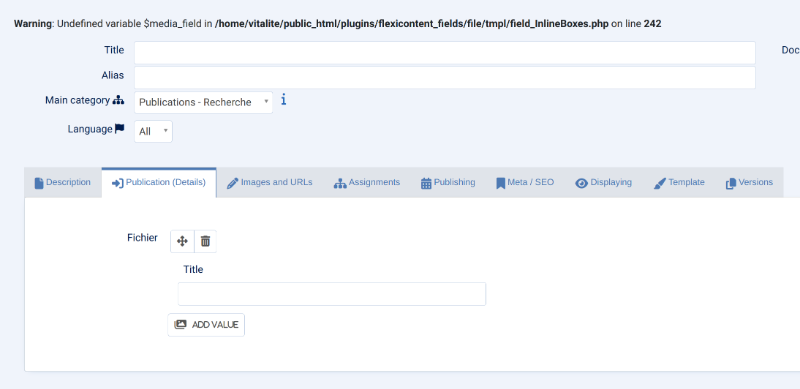
Within the item I have: Warning: Undefined variable $media_field in /public_html/plugins/flexicontent_fields/file/tmpl/field_InlineBoxes.php on line 242

Please Log in or Create an account to join the conversation.

More
1 year 3 months ago #85807 by micker
You cant save item ?

FLEXIcontent is Free but involves a very big effort on our part.
Like the our support? (for a bug-free FC, despite being huge extension) Like the features? Like the ongoing development and future commitment to FLEXIcontent?
-- Add your voice to the FLEXIcontent JED listing reviews. Thanks![/size]

Please Log in or Create an account to join the conversation.

More
1 year 3 months ago #85808 by krae
No, I don't have the option to upload or select - image attached

Please Log in or Create an account to join the conversation.

More
1 year 3 months ago #85809 by micker
ok my workarround doesn't works ....
the problem is the mode of field, joomla media field seems have a problem

FLEXIcontent is Free but involves a very big effort on our part.
Like the our support? (for a bug-free FC, despite being huge extension) Like the features? Like the ongoing development and future commitment to FLEXIcontent?
-- Add your voice to the FLEXIcontent JED listing reviews. Thanks![/size]

Please Log in or Create an account to join the conversation.

More
1 year 3 months ago #85860 by krae
wondering if there is any update on this?

thanks again

Please Log in or Create an account to join the conversation.

More
1 year 3 months ago #85861 by micker
hello
this bug is corrected in beta, waiting some issue for publish it

FLEXIcontent is Free but involves a very big effort on our part.
Like the our support? (for a bug-free FC, despite being huge extension) Like the features? Like the ongoing development and future commitment to FLEXIcontent?
-- Add your voice to the FLEXIcontent JED listing reviews. Thanks![/size]

Please Log in or Create an account to join the conversation.

More
1 year 1 month ago #85940 by krae
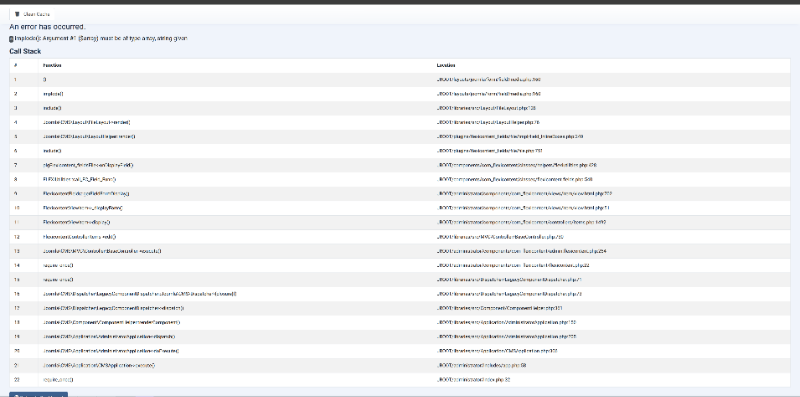
We just updated Joomla and the latest Flexi from Github. Now when I go to create a new article that has a file field I immediately receive the following error: implode(): Argument #1 ($array) must be of type array, string given.

I'm not sure if this might be related to the following? github.com/FLEXIcontent/flexicontent-cck/issues/1222

Please Log in or Create an account to join the conversation.

More
1 year 1 month ago #85942 by micker
hello please active debug mode to see more information

FLEXIcontent is Free but involves a very big effort on our part.
Like the our support? (for a bug-free FC, despite being huge extension) Like the features? Like the ongoing development and future commitment to FLEXIcontent?
-- Add your voice to the FLEXIcontent JED listing reviews. Thanks![/size]

Please Log in or Create an account to join the conversation.

More
11 months 3 weeks ago #85998 by krae
This is what I'm getting with debug turned on

Please Log in or Create an account to join the conversation.

More
11 months 3 weeks ago #85999 by krae
I was able to get the field to work by changing to 'Inline uploads + My Files reuse modal (with: Secure Uploads + URL links)'.

But now I have another issue. The field was previously set to download on the frontend and we now need to view the file in the browser. The view button appears on new items that I add, but does not appear on existing ones.

Is this how the field is supposed to function?

Thank you

Please Log in or Create an account to join the conversation.

Moderators: vistamediajoomlacornerggppdk
Cookies user preferences
We use cookies to ensure you to get the best experience on our website. If you decline the use of cookies, this website may not function as expected.
Accept all
Decline all
Essential
These cookies are needed to make the website work correctly. You can not disable them.
Display
Accept
Analytics
Tools used to analyze the data to measure the effectiveness of a website and to understand how it works.
Google Analytics
Accept
Decline
Save