directory templates

More
16 years 2 weeks ago #2772 by KingoftheRoad
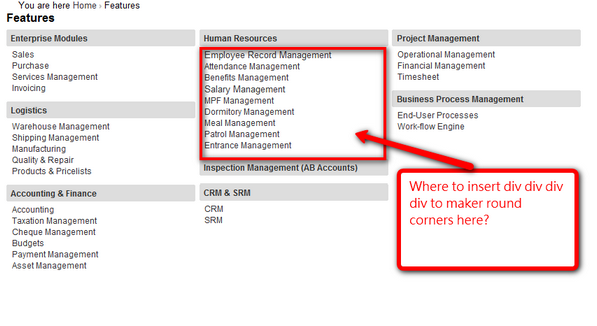
I found the directory view is very useful. Now I want to make round corners inside the directory view.

Anybody know where to edit to insert the four divs so as to make round corners inside the directory view as illustrated in the screen captured?

Many thanks.

Seth

Please Log in or Create an account to join the conversation.

More
16 years 2 weeks ago #2785 by pepperstreet
Replied by pepperstreet on topic directory templates
Hello,
this is only a quick search and suggestion ;-) Take a look here:

flexicontent/components/com_flexicontent/views/flexicontent/tmpl/default_categories.php

see after line #61

There is the column, Category and SubCategory output.
Right after the H2 headline output, you will find the UL list at line #75:
Code:
... <ul class="catdets cat<?php echo $sub->id; ?>"> <?php foreach ($sub->subcats as $subcat) :?> <li> [url=<?php echo JRoute::_( FlexicontentHelperRoute::getCategoryRoute($subcat->slug) ); ?>]<?php echo $this->escape($subcat->title); ?>[/url] <?php if ($this->params->get('showassignated')) : ?> <span class="small"><?php echo $subcat->assignedsubitems != null ? '('.$subcat->assignedsubitems.'/'.$subcat->assignedcats.')' : '(0/'.$subcat->assignedcats.')'; ?></span> <?php endif; ?> </li> <?php endforeach; ?> </ul> ...

I guess you will have to surround this part with the additional DIV containers.
Good luck.

Please Log in or Create an account to join the conversation.

More
16 years 2 weeks ago #2801 by KingoftheRoad
Replied by KingoftheRoad on topic directory templates
Thank you so much. I will try and post back the result here.

Anybody knows whether Flexicontent supports MVC override, so that I can copy the folder flexicontent/components/com_flexicontent/views to Joomla/templates/Mytemplate/html/com_flexicontent/views and make the changes there?

Thanks.

Seth

Please Log in or Create an account to join the conversation.

More
16 years 2 weeks ago #2804 by KingoftheRoad
Replied by KingoftheRoad on topic directory templates
Successful to add the four Divs.

But failed to do MVC template override.

I tried :
1) Copy flexicontent/components/com_flexicontent/views to Joomla/templates/Mytemplate/html/com_flexicontent/views

or
2) Copy flexicontent/components/com_flexicontent/views to Joomla/templates/Mytemplate/html/com_flexicontent

Both failed.

That means I have to modified the file Joomla/components/com_flexicontent/views/flexicontent/tmpl/default_categories.php directly and modify again everytime I do upgrade.... :|

Any advices?

Thanks.

Seth

Please Log in or Create an account to join the conversation.

More
16 years 2 weeks ago #2808 by bsky92
Replied by bsky92 on topic directory templates
or you use the templating possibilities of Flexicontent, make your own template, and it will not be modified when there is a component upgrade

Using the default template is IMHO not the best idea

Please Log in or Create an account to join the conversation.

More
16 years 2 weeks ago #2822 by pepperstreet
Replied by pepperstreet on topic directory templates

bsky92 wrote: or you use the templating possibilities of Flexicontent, make your own template, and it will not be modified when there is a component upgrade

Using the default template is IMHO not the best idea


You are right, but the directory output is not included in the template structure!? So, the MVC-override method would be the only way with out a core modification... if this method does not work (i can´t confirm this issue at the moment, sorry), it would be a good and simple addition for the next release!!! A bunch of extra DIVs does not hurt, right? ;-)

Please Log in or Create an account to join the conversation.

More
16 years 2 weeks ago #2828 by kenmcd
Replied by kenmcd on topic directory templates
.
MVC is already a part of FLEXIcontent.
Output overrides should work as expected.

Please Log in or Create an account to join the conversation.

More
16 years 2 weeks ago #2842 by Linuus
Replied by Linuus on topic directory templates
I don't really know how the overrides work, but I guess you should copy:

/components/com_flexicontent/views/flexicontent/tmpl/default_categories.php

to

/templates/your_template/html/com_flexicontent/views/flexicontent/tmpl/default_categories.php

Tried that? :)

Please Log in or Create an account to join the conversation.

More
16 years 2 weeks ago #2843 by pepperstreet
Replied by pepperstreet on topic directory templates

Linuus wrote: /components/com_flexicontent/views/flexicontent/tmpl/default_categories.php

to

/templates/your_template/html/com_flexicontent/views/flexicontent/tmpl/default_categories.php


I tried the component override... cleared caches etc. It does work. Please see the difference in the folder structure!!!

/components/com_flexicontent/views/flexicontent/tmpl/default_categories.php

COPY TO

/templates/your_template/html/com_flexicontent/flexicontent/default_categories.php

Please Log in or Create an account to join the conversation.

More
16 years 2 weeks ago #2846 by tmrsk
Replied by tmrsk on topic directory templates
May you give a link to that page so I can see css code?

Please Log in or Create an account to join the conversation.

Moderators: vistamediajoomlacornerggppdk
Cookies user preferences
We use cookies to ensure you to get the best experience on our website. If you decline the use of cookies, this website may not function as expected.
Accept all
Decline all
Essential
These cookies are needed to make the website work correctly. You can not disable them.
Display
Accept
Analytics
Tools used to analyze the data to measure the effectiveness of a website and to understand how it works.
Google Analytics
Accept
Decline
Save