Custom (non-Core) field loading in wrong possition in Blog template

More
7 years 7 months ago #73661 by ajisaju
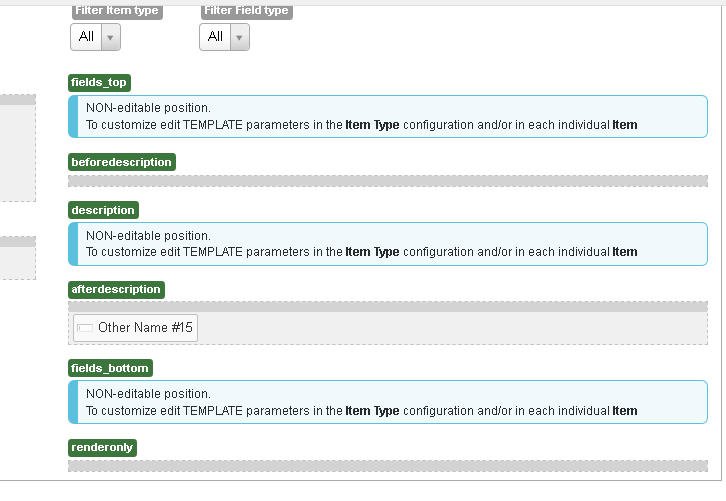
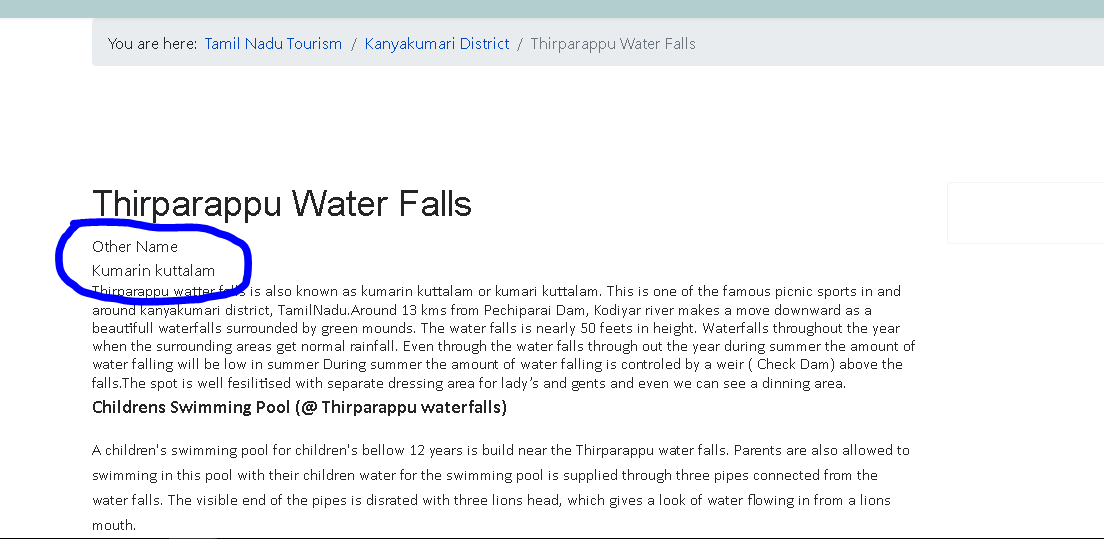
I used a custem field other name in afterdescription feild but as seen in image the feild is displayed above discription
please help

Please Log in or Create an account to join the conversation.

More
7 years 7 months ago #73664 by micker
check template configuration you can disable field via params (in template or in type)

FLEXIcontent is Free but involves a very big effort on our part.
Like the our support? (for a bug-free FC, despite being huge extension) Like the features? Like the ongoing development and future commitment to FLEXIcontent?
-- Add your voice to the FLEXIcontent JED listing reviews. Thanks![/size]

Please Log in or Create an account to join the conversation.

More
7 years 7 months ago #73669 by ggppdk
Micker

the question is about a custom (a non-Core) field,
so this cannot be because of parameters

i am thinking if this can be via custom CSS

Question
if you remove the custom field from the 'template' position of the layout
then does the custom field disappear

askin in order to confirm that the category is using this particular layout configuration


-- Flexicontent is Free but involves a big effort on our part.
Like the our support? (for a bug-free FC, despite having a long list of functions) Like the features? Like the ongoing development and future commitment to FLEXIcontent?
-- Add your voice to the FLEXIcontent JED listing with a 5-star review. Thanks!

Please Log in or Create an account to join the conversation.

More
7 years 7 months ago #73691 by ajisaju

Question
if you remove the custom field from the 'template' position of the layout
then does the custom field disappear

No there is nochange in it

Please Log in or Create an account to join the conversation.

More
7 years 7 months ago #73694 by ggppdk
Hello

i think you have created 2 or more copies of the 'blog' template
e.g.
blog-1
and
blog-2

Go to TYPES manager, at template/layout column which template is it shown to be used by your Item type e.g. ('Hotel' type)
and then you can also ITEMS manager, maybe the particular item is configured to use a different template, at template/layout column
which template is it shown to be used by your specific Item (e.g. "Some title")


-- Flexicontent is Free but involves a big effort on our part.
Like the our support? (for a bug-free FC, despite having a long list of functions) Like the features? Like the ongoing development and future commitment to FLEXIcontent?
-- Add your voice to the FLEXIcontent JED listing with a 5-star review. Thanks!

Please Log in or Create an account to join the conversation.

More
7 years 7 months ago - 7 years 7 months ago #73711 by ajisaju

i think you have created 2 or more copies of the 'blog' template
e.g.
blog-1
and
blog-2.

No i am using defalte Blog template now to test

Go to TYPES manager, at template/layout column which template is it shown to be used by your Item type e.g. ('Hotel' type)
and then you can also ITEMS manager, maybe the particular item is configured to use a different template, at template/layout column
which template is it shown to be used by your specific Item (e.g. "Some title")

both set to blog template

all the Custom (non-Core) fields which i have created is listed one by one even when i have not added this feilds to any possition in templa,
and also when i drages any of this to a possition its not changing.,

plz see : www.viatn.com/kanyakumari-dist/kanyakumari
Last edit: 7 years 7 months ago by ajisaju.

Please Log in or Create an account to join the conversation.

More
7 years 7 months ago - 7 years 7 months ago #73720 by ggppdk
Hello

i checked out the link that you gave

You have an existing content structure that is using
- Joomla category view
- and Joomla article view

when you are using the above the custom fields are prepend (added) before the description view the Joomla onBeforeContent event

The template layout and field positions that you are editing are using
- in Flexicontent item view

You can simply go to types manager and find the type row (probably in your case it is 'Article' Type) and click to "Reroute to item view" at the column

Joomla article view

(Allowed / Rerouted / Redirected)"


-- Flexicontent is Free but involves a big effort on our part.
Like the our support? (for a bug-free FC, despite having a long list of functions) Like the features? Like the ongoing development and future commitment to FLEXIcontent?
-- Add your voice to the FLEXIcontent JED listing with a 5-star review. Thanks!
Last edit: 7 years 7 months ago by ggppdk.

Please Log in or Create an account to join the conversation.

More
7 years 7 months ago #73754 by ajisaju
thank you very much ggppdk , works now

Please Log in or Create an account to join the conversation.

More
7 years 7 months ago - 7 years 7 months ago #73758 by ajisaju
I need to display multiple  feilds right to the image,  so i copied the image and top image fields coding from defalt template
Code:
 <?php if ((isset($item->positions['image'])) || (isset($item->positions['top']))) : ?>         <!-- BOF image/top row -->         <aside class="flexi topblock group">  <!-- NOTE: image block is inside top block ... -->                          <?php if (isset($item->positions['image'])) : ?>                 <!-- BOF image block -->                 <?php foreach ($item->positions['image'] as $field) : ?>                 <figure class="flexi image field_<?php echo $field->name; ?> span4">                     <?php echo $field->display; ?>                     <div class="fcclear"></div>                 </figure>                 <?php endforeach; ?>                 <!-- EOF image block -->             <?php endif; ?>                          <?php if (isset($item->positions['top'])) : ?>                 <!-- BOF top block -->                 <?php                     $top_cols = $this->params->get('top_cols', 'two');                     $span_class = ''; //$top_cols == 'one' ? 'span8' : 'span4'; // commented out: bootstrap spanNN is not responsive to width !                 ?>                 <div class="flexi infoblock <?php echo $top_cols; ?>cols span8">                     <ul class="flexi row">                         <?php foreach ($item->positions['top'] as $field) : ?>                         <li class="flexi lvbox <?php echo 'field_' . $field->name . ' ' . $span_class; ?>">                             <div>                                 <?php if ($field->label) : ?>                                 <span class="flexi label field_<?php echo $field->name; ?>"><?php echo $field->label; ?></span>                                 <?php endif; ?>                                 <div class="flexi value field_<?php echo $field->name; ?>"><?php echo $field->display; ?></div>                             </div>                         </li>                         <?php endforeach; ?>                     </ul>                 </div>                 <!-- EOF top block -->             <?php endif; ?>                      </aside>         <!-- EOF image/top row -->     <?php endif; ?>

but it shows the fields below the template, also I need to display one field per line, but the result is displaying multiple.
please help to solve this
Last edit: 7 years 7 months ago by ajisaju.

Please Log in or Create an account to join the conversation.

More
7 years 7 months ago #73759 by ggppdk
Hello

ok but can you more specific what is the problem ?

if you want every field to be in seperate line
then before the closing </li>
try to add:
Code:
<div class="fcclear"></div>

or also try this
instead of
Code:
<li class="flexi lvbox <?php echo 'field_' . $field->name . ' ' . $span_class; ?>">
use:
Code:
<li style="display: block !important; width: auto !important;" class="flexi lvbox <?php echo 'field_' . $field->name . ' ' . $span_class; ?>">


-- Flexicontent is Free but involves a big effort on our part.
Like the our support? (for a bug-free FC, despite having a long list of functions) Like the features? Like the ongoing development and future commitment to FLEXIcontent?
-- Add your voice to the FLEXIcontent JED listing with a 5-star review. Thanks!

Please Log in or Create an account to join the conversation.

Moderators: vistamediajoomlacornerggppdk
Cookies user preferences
We use cookies to ensure you to get the best experience on our website. If you decline the use of cookies, this website may not function as expected.
Accept all
Decline all
Essential
These cookies are needed to make the website work correctly. You can not disable them.
Display
Accept
Analytics
Tools used to analyze the data to measure the effectiveness of a website and to understand how it works.
Google Analytics
Accept
Decline
Save