Created thumbnail via phpThumb is larger than the original image in some cases

More
8 years 3 months ago - 8 years 3 months ago #69992 by charlynancy
Hi,
phpThumb is supposed to improve file size.
But in fact, it's the contrary with phpThumb in Flexi.
I saw that when i searched to improve the size of my categories pages.
The images with phpThumb have a size 6 or 7 times larger as the original size.
If you have a page with 20 images of 30 ko, that should give 600 ko of images.
With phpThumb that give 3600 ko of images sizes.

You can see that on the flexicontent.org site :
1°) i take an image of the site :
www.flexicontent.org/images/stories/flex...tent/s_capture-4.jpg
i downloaded it : its size is 13 Ko

2°)i take the same image that i display with phpThumb of Flexi (i used the same ratio of original size (width and height))
---components/com_flexicontent/librairies/phpthumb/phpThumb.php?src=/images/stories/flexicontent/s_capture-4.jpg&w=250&h=200&aoe=1&q=95&ar=x
link of the image with phpThumb
i downloaded it : it's size is 88,7 Ko (7 times larger)
Last edit: 8 years 3 months ago by ggppdk.

Please Log in or Create an account to join the conversation.

More
8 years 3 months ago - 8 years 3 months ago #69993 by charlynancy
My post could be confused because of a bad translation.
I spoke of weight of images files in kilobytes. I didn't want to speak of the images sizes in pixel.
Last edit: 8 years 3 months ago by ggppdk.

Please Log in or Create an account to join the conversation.

More
8 years 3 months ago #69994 by ggppdk
Hello

this is the effect of options
especially of option quality
q=95

aka quality 95%

if your image are
- already compessed -plus- you are also using almost same dimentions

then this is expected behaviour

for such cases
- we have an option to use original image as any thumbnail

the option "Copy original"

also you could try decreasing the quality setting, but for same or close dimention the proper is to do the above


-- Flexicontent is Free but involves a big effort on our part.
Like the our support? (for a bug-free FC, despite having a long list of functions) Like the features? Like the ongoing development and future commitment to FLEXIcontent?
-- Add your voice to the FLEXIcontent JED listing with a 5-star review. Thanks!

Please Log in or Create an account to join the conversation.

More
8 years 3 months ago #69998 by charlynancy
Hello Georgios,

this is the effect of options
especially of option quality
q=95

I tried to use q=10 or q=1
That give a weight file of 88 ko (no change)
Code:
for such cases - we have an option to use original image as any thumbnail the option "Copy original"
In my case, this problem concern the categories pages with many subcategories.
For example : Sport category with 30 sub categories (tennis, football, basket, runing...)
So you obtain a page with 30 images of subcategories (weight per image file ~ 150 ko , total is more than 4500 ko (just for images of subcategories)

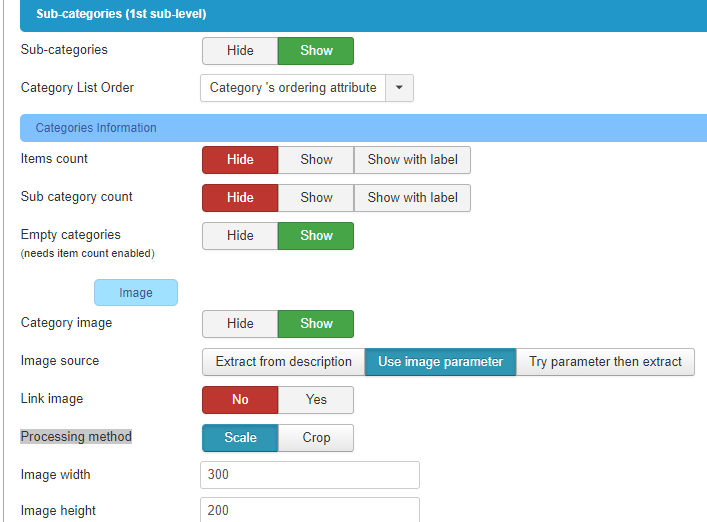
My setting in Category views > List Headers > Sub-categories list > Categories information > Image are :
Category image : show
Image source : Use image parameter
Processing method : scale
image width and height : same size as the original file (300 * 200)


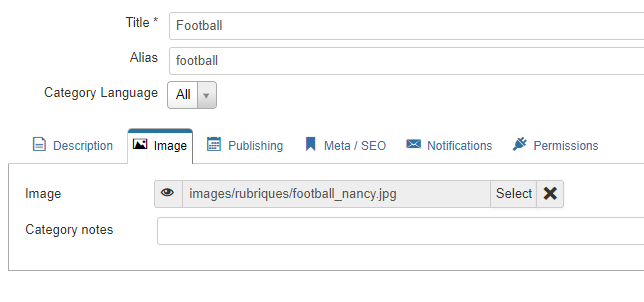
The image of the category is in table image of the category


I use the default template (no setting about image)

In the category_subcategories.php file of the default template i find this part of code (for $subcats_html[$i]):
Code:
.$sub->image.
But i can't understand where is the code that implement $sub->image

In the blog template i searched unsuccesfull where is the code that implement the source image of subcategories.

In other words : i can't find the option "Copy original" in my case

Please Log in or Create an account to join the conversation.

More
8 years 3 months ago #70000 by ggppdk
Hello

i see why this is happening

input image is JPG

but output image (default if not specified) is PNG !


-- Flexicontent is Free but involves a big effort on our part.
Like the our support? (for a bug-free FC, despite having a long list of functions) Like the features? Like the ongoing development and future commitment to FLEXIcontent?
-- Add your voice to the FLEXIcontent JED listing with a 5-star review. Thanks!

Please Log in or Create an account to join the conversation.

More
8 years 3 months ago #70007 by charlynancy
you are right :
in /com_flexicontent/librairies/phpthumb/phpThumb.config.php

if i change line 160

// * Default output configuration :
Before : $PHPTHUMB_CONFIG = 'png'; //....
After : $PHPTHUMB_CONFIG = 'jpeg'; //....

Now the weight of the jpg file is perfect.

Concerning png compression , i suspect phpthumb to use png 32bits (png 8bits would be better for compression)

Please Log in or Create an account to join the conversation.

More
8 years 3 months ago #70009 by charlynancy
Do you now where can i change setting to have :
q=75 instead of q=95 by default ?

Please Log in or Create an account to join the conversation.

More
8 years 3 months ago - 8 years 3 months ago #70013 by ggppdk
Hello

i had read one of your answer fast and missed that you were talking about category images

my answer for "copy" original was meant for image-gallery field,

You do not need to do anything , also no new parameter needed
- i will make a fix for category thumbnailing code,
correct (default) behaviour for this is that the output image thumbnail is same image type as original category image


-- Flexicontent is Free but involves a big effort on our part.
Like the our support? (for a bug-free FC, despite having a long list of functions) Like the features? Like the ongoing development and future commitment to FLEXIcontent?
-- Add your voice to the FLEXIcontent JED listing with a 5-star review. Thanks!
Last edit: 8 years 3 months ago by ggppdk.

Please Log in or Create an account to join the conversation.

More
8 years 3 months ago #70017 by ggppdk

$f = in_array( $ext, array('png', 'ico', 'gif') ) ? '&f='.$ext : '';


it used to be that default output was jpg but now it is png

so the above code did not include case of jpg (jpeg) images

... because the above code assumes that the default is jpg ... !

this issue with using png as output for jpg exists in many places (favourites view, tags view , etc)

will update it everywhre

thanks for report


-- Flexicontent is Free but involves a big effort on our part.
Like the our support? (for a bug-free FC, despite having a long list of functions) Like the features? Like the ongoing development and future commitment to FLEXIcontent?
-- Add your voice to the FLEXIcontent JED listing with a 5-star review. Thanks!

Please Log in or Create an account to join the conversation.

More
8 years 3 months ago #70030 by charlynancy
Thank you very much to you for your quickly intervention.
Now the pages with many subcategories (10 or 15) are 1000 ko less heavy.
It is very important for mobile browsers.
I will test your update in other cases (favourites view, tags view...) when you will have finished it.

Please Log in or Create an account to join the conversation.

Moderators: vistamediajoomlacornerggppdk
Cookies user preferences
We use cookies to ensure you to get the best experience on our website. If you decline the use of cookies, this website may not function as expected.
Accept all
Decline all
Essential
These cookies are needed to make the website work correctly. You can not disable them.
Display
Accept
Analytics
Tools used to analyze the data to measure the effectiveness of a website and to understand how it works.
Google Analytics
Accept
Decline
Save