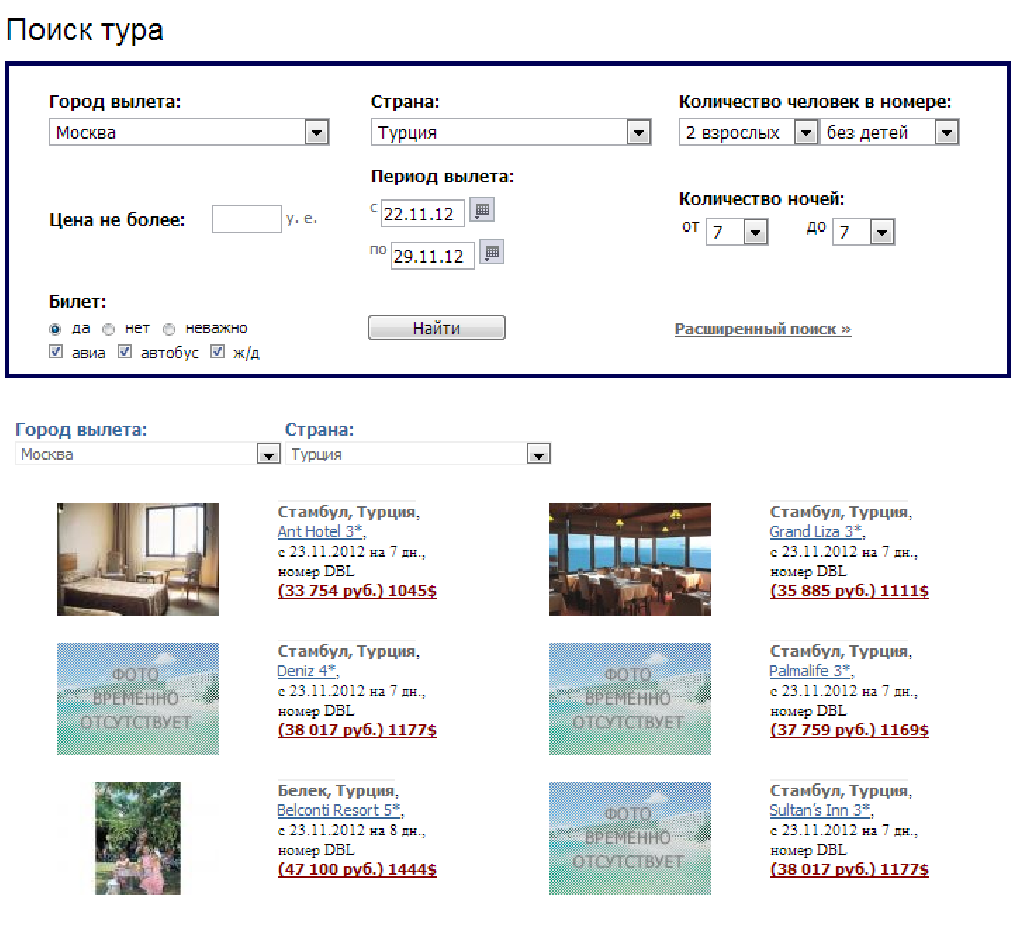
Item listing with images having a layout like

More
10 years 5 months ago - 10 years 5 months ago #57229 by keepachris
Hi, i was wondering if it's possible and if so how do i make my catagory layout the same as this... where each item is displayed in a windows

thanks

chris
Last edit: 10 years 5 months ago by ggppdk.

Please Log in or Create an account to join the conversation.

More
10 years 5 months ago #57232 by ggppdk
Hello

did you try the blog template ?


-- Flexicontent is Free but involves a big effort on our part.
Like the our support? (for a bug-free FC, despite having a long list of functions) Like the features? Like the ongoing development and future commitment to FLEXIcontent?
-- Add your voice to the FLEXIcontent JED listing with a 5-star review. Thanks!

Please Log in or Create an account to join the conversation.

More
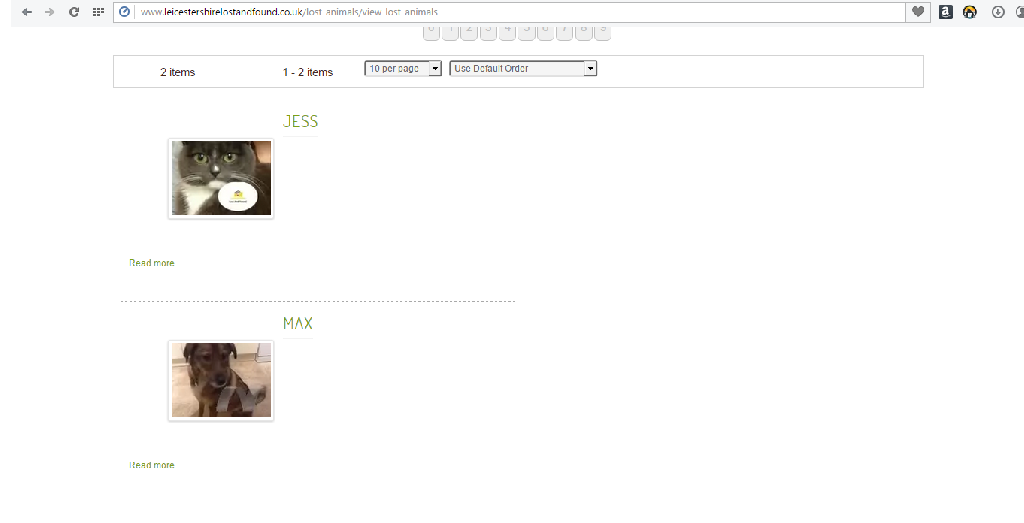
10 years 5 months ago #57262 by keepachris
Hi, Yes i did, this is how it looks with blog template

Please Log in or Create an account to join the conversation.

More
10 years 5 months ago #57265 by ggppdk
Hello

go to templates manager and edit the -category- LAYOUT
of the "blog" template

- you can place your fields in the position "Above description" position
- then set a small length for "Text" (description) or use CSS to hide it


but in the image that you posted !
- it looks like there is Javascript error in the page

neither the "masonry" JS of the blog template for tiling the items
nor the select2 JS looks like the have loaded properly

about JS error, if you don't know how to find it,
you may post a link to the frontend page or send the link via PM


-- Flexicontent is Free but involves a big effort on our part.
Like the our support? (for a bug-free FC, despite having a long list of functions) Like the features? Like the ongoing development and future commitment to FLEXIcontent?
-- Add your voice to the FLEXIcontent JED listing with a 5-star review. Thanks!

Please Log in or Create an account to join the conversation.

More
10 years 5 months ago #57269 by keepachris
Hi, link to the page is...

www.leicestershirelostandfound.co.uk/los...ls/view-lost-animals

please contact me if you need any further information.

Please Log in or Create an account to join the conversation.

More
10 years 5 months ago #57276 by ggppdk
Hello

you have jQuery error in your page, before doing anything else you need to fix it

- you have an extension that is not loading the jQuery via Joomla

it is happening because you have this:
<script src="//ajax.googleapis.com/ajax/libs/jquery/1.8.2/jquery.min.js" type="text/javascript"></script>

it looks like it is added by module:
ARI Image Slider

please edit module, it probably has parameter to load jQuery via Joomla


-- Flexicontent is Free but involves a big effort on our part.
Like the our support? (for a bug-free FC, despite having a long list of functions) Like the features? Like the ongoing development and future commitment to FLEXIcontent?
-- Add your voice to the FLEXIcontent JED listing with a 5-star review. Thanks!

Please Log in or Create an account to join the conversation.

More
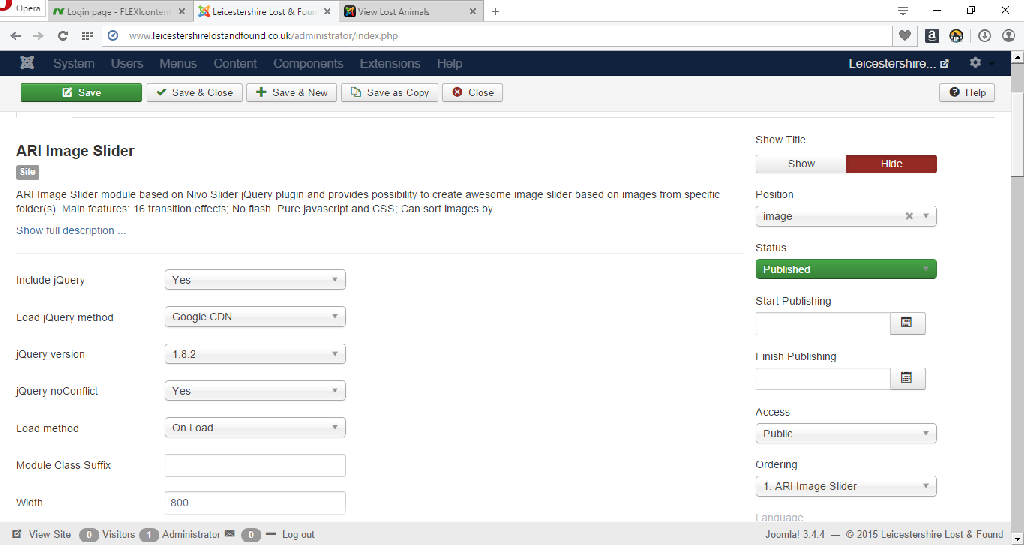
10 years 5 months ago #57277 by keepachris
This is what i see when i open up the module settings

Please Log in or Create an account to join the conversation.

More
10 years 5 months ago #57278 by ggppdk
Hello

set parameter: Load jQuery method
to value: "Local copy"

also make sure that Joomla cache is disabled, in Global parameters, (you can enable it once site is finished)


-- Flexicontent is Free but involves a big effort on our part.
Like the our support? (for a bug-free FC, despite having a long list of functions) Like the features? Like the ongoing development and future commitment to FLEXIcontent?
-- Add your voice to the FLEXIcontent JED listing with a 5-star review. Thanks!

Please Log in or Create an account to join the conversation.

More
10 years 5 months ago - 10 years 5 months ago #57279 by keepachris
Thank you that has solved it. how do i remove the "read more" and is there anyway i can get the title to sit directly above the image?
Last edit: 10 years 5 months ago by keepachris.

Please Log in or Create an account to join the conversation.

More
10 years 5 months ago #57280 by ggppdk
Hello


go to templates manager and edit the -category- LAYOUT
of the "blog" template

and checkout the parameters

Imporant note that there are 2 SETs of same parameters

- items are divided into
- "leading"
- "standard"

each of them can have different number of columns, etc


e.g. now you have 1 leading items (using a full-width aka 1 column)
and the rest of the items are "standard" using 2 columns


-- you would probably want to set number leading items to ZERO
so that all items are standard and displayed via 2 columns


-- Flexicontent is Free but involves a big effort on our part.
Like the our support? (for a bug-free FC, despite having a long list of functions) Like the features? Like the ongoing development and future commitment to FLEXIcontent?
-- Add your voice to the FLEXIcontent JED listing with a 5-star review. Thanks!

Please Log in or Create an account to join the conversation.

Moderators: vistamediajoomlacornerggppdk
Cookies user preferences
We use cookies to ensure you to get the best experience on our website. If you decline the use of cookies, this website may not function as expected.
Accept all
Decline all
Essential
These cookies are needed to make the website work correctly. You can not disable them.
Display
Accept
Analytics
Tools used to analyze the data to measure the effectiveness of a website and to understand how it works.
Google Analytics
Accept
Decline
Save