Display image if field is not empty

More
12 years 3 months ago #41624 by nikotome
Good morning!

I'm new to FlexiContent and I'm finding it's an absolute great component.

I'm developing a template, and I would like to now if there is a way to find out if a field is empty. something like:
Code:
If (($this->fields['web']->display;) == NULL { whatever }

Can anyone help me on this? Thanks in advance

Please Log in or Create an account to join the conversation.

More
12 years 3 months ago #41626 by ggppdk
Hello

In short use:

// Item view (item layout)
$fvals = $item->fieldvalues[$field_id];

// in category view you may need to use $items[$i]->
$fvals = $items[$i]->fieldvalues[$field_id];


if ( !empty($fvals) ) ...


NOTE: our image/ image gallery field has a parameter for default image


In more details
the variable
...->display

exists only if you try to create the display HTML of the field, in your case it would be better to check the war field value which:
- is always available for checking
- is a lot faster that created field's HTML via ... putting in a template position or via ... getFieldDisplay()

Using the raw value of a field inside a template file

Regards


-- Flexicontent is Free but involves a big effort on our part.
Like the our support? (for a bug-free FC, despite having a long list of functions) Like the features? Like the ongoing development and future commitment to FLEXIcontent?
-- Add your voice to the FLEXIcontent JED listing with a 5-star review. Thanks!

Please Log in or Create an account to join the conversation.

More
12 years 3 months ago #41627 by nikotome
Thank you! I will give it a try

Please Log in or Create an account to join the conversation.

More
12 years 3 months ago #41648 by nikotome
Hi,

I have added a new field named facebook, and made sure it was added to the template too. The new id for this field is 32.

Then, I have written the following code in the template file:
Code:
$field_id = 32; $fvals = $item->fieldvalues[$field_id]; if ( !empty($fvals) ) { echo '<a href="' . $this->fields['facebook']->display . '<img src="/images/facebook_icon.png" />';

What's wrong?

Please Log in or Create an account to join the conversation.

More
12 years 3 months ago #41649 by wiebe

nikotome wrote: Hi,

I have added a new field named facebook, and made sure it was added to the template too. The new id for this field is 32.

Then, I have written the following code in the template file:

Code:
$field_id = 32; $fvals = $item->fieldvalues[$field_id]; if ( !empty($fvals) ) { echo '<a href="' . $this->fields['facebook']->display . '<img src="/images/facebook_icon.png" />';

What's wrong?


I should think it should be:
$item->fields->display

cheers
Wiebe

Please Log in or Create an account to join the conversation.

More
12 years 3 months ago #41650 by nikotome
Ops! Yes, thank you. But it's still not working...

Please Log in or Create an account to join the conversation.

More
12 years 3 months ago #41653 by ggppdk
Hello,

NOTE: before you can use a field you should make sure that it's display is created , by editting your template layout and adding the field in "RenderOnly" position,

then you can use it, as mention above,
NOTE the default performance setting in
- Componet params / Options / Create Field display

is to always create fields in Item view

so the above mentioned code will work in item view without adding to "Render Only" position, but not in category view

prefer to set parameter: Create Field display to Only when needed and add your field to Render only position for item layout too

Regards


-- Flexicontent is Free but involves a big effort on our part.
Like the our support? (for a bug-free FC, despite having a long list of functions) Like the features? Like the ongoing development and future commitment to FLEXIcontent?
-- Add your voice to the FLEXIcontent JED listing with a 5-star review. Thanks!

Please Log in or Create an account to join the conversation.

More
12 years 3 months ago #41657 by nikotome
I created my own item.xml and I didn't add a "renderonly" group. How would I activate that in my template? I made my own template and I was not aware of this. :?

Please Log in or Create an account to join the conversation.

More
12 years 3 months ago #41658 by ggppdk
Hello

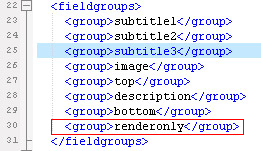
1. just see the image here (edit category.xml and item.xml):

2. clear cache
3. Add you fields in the renderonly position and then use them inside the PHP code item.php

Upgrading custom Templates to work in v1.5.6+


-- Flexicontent is Free but involves a big effort on our part.
Like the our support? (for a bug-free FC, despite having a long list of functions) Like the features? Like the ongoing development and future commitment to FLEXIcontent?
-- Add your voice to the FLEXIcontent JED listing with a 5-star review. Thanks!

Please Log in or Create an account to join the conversation.

More
12 years 3 months ago #41659 by nikotome
All my fields have been placed in render only.

Here is my item xml:
Code:
<?xml version="1.0" encoding="utf-8"?> <form> <metadata> <author>Nicolas Tome</author> <website>www.tictacstudio.es</website> <email>niko@tictacstudio.es</email> <license>GPLv2</license> <version>1.0</version> <release>28 octubre 2013</release> <description>Plantilla para mostrar un negocio de restauracion</description> </metadata> <fieldgroups> <group>subtitle 1</group> <group>subtitle 2</group> <group>subtitle 3</group> <group>subtitle 3</group> <group>image</group> <group>top</group> <group>description</group> <group>bottom</group> <group>renderonly</group> <group>datos</group> </fieldgroups> <cssitem> <file>css/item.css</file> </cssitem> </form>

And here is my item.php
Code:
<?php defined( '_JEXEC' ) or die( 'Restricted access' ); // on définit ici le nom du template $tmpl = $this->tmpl; $field_id = 32; // Use in ITEM view $fvals = $item->fieldvalues[$field_id]; // or use $this->item ?> <?php echo $this->fields['imagen']->display; ?> <br clear="all" /> <h1><?php echo $this->item->title; ?></h1> <div class="linea_roja"></div> <div style="width:100%"> <div class="well fl" style="width:200px;"> <? if ( !empty($fvals) ) { echo '<a href="' . $item->fields['facebook']->display . '<img src="/images/facebook_icon.png" />'; } ?> {mosmap width='200'|height='200'| text='<?php echo $this->item->title; ?>'|address='+<?php echo $this->fields['calle']->display; ?>+<?php echo $this->fields['numero']->display; ?>+<?php echo $this->fields['pobox']->display; ?>+<?php echo $this->fields['localidad']->display; ?>+<?php echo $this->fields['provincia']->display; ?>' |zoom='15'|tooltip='DWO'|marker='1' } <br /> <?php echo $this->fields['web']->display; ?> <br /><br /> <span class="ficha_detalles">Dirección:</span><br /> <?php echo $this->fields['calle']->display; ?>, <?php echo $this->fields['numero']->display; ?> <br /> (<?php echo $this->fields['pobox']->display; ?>), <?php echo $this->fields['localidad']->display; ?> <br /> <?php echo $this->fields['provincia']->display; ?> <br /><br /> <span class="ficha_detalles">Tel: </span> <?php echo $this->fields['telefono']->display; ?> <br /> <span class="ficha_detalles">Mov: </span> <?php echo $this->fields['movil']->display; ?> </div> <div class="fr" style="width:450px;"> <div style="padding-bottom:20px;"> <? echo FlexicontentFields::getFieldDisplay($this->item, 'galeria', null, 'display_small'); ?> </div> <br /> <?php echo $this->item->text; ?> </div> </div>

www.qsecuece.es/2013-10-22-14-44 ... -tapas-bar

Still doesn't work. :shock:

Please Log in or Create an account to join the conversation.

Moderators: vistamediajoomlacornerggppdk
Cookies user preferences
We use cookies to ensure you to get the best experience on our website. If you decline the use of cookies, this website may not function as expected.
Accept all
Decline all
Essential
These cookies are needed to make the website work correctly. You can not disable them.
Display
Accept
Analytics
Tools used to analyze the data to measure the effectiveness of a website and to understand how it works.
Google Analytics
Accept
Decline
Save