personnalisation de la recherche avancée

More
13 years 2 months ago #31577 by walkyripa
Bonjour,

Ma question du jour : comment faire pour personnaliser les champs disponibles dans la recherche avancée. Je n'ai pas trouvé de zone unique de configuration de cette recherche...

L'objectif serait pour moi de simplement proposer dans la recherche avancée de choisir les catégories dans lesquelles recherchées, et les options de tri (du plus récent au plus ancien, alpha...).

Je voudrai ne pas avoir de champs / cases à cocher pour "Title" "Intro and main text", TExt Fields", "Metadata", "Tags"... Mais je ne vois pas comment les masquer... (y compris dans default_form.php du dossier views/search de flexicontent. peut être dans view.html.php?).

Merci!

Merci à la communauté!

Please Log in or Create an account to join the conversation.

More
13 years 2 months ago #31595 by ggppdk
Which revision do you have?

In RC9b r1576,
advanced search view has been update to include these, visit the Joomla menu Item for flexicontent search view

For FLEXIcontent search module, currently there are no such options, it simply links to the FLEXIcontent advanced search view


-- Flexicontent is Free but involves a big effort on our part.
Like the our support? (for a bug-free FC, despite having a long list of functions) Like the features? Like the ongoing development and future commitment to FLEXIcontent?
-- Add your voice to the FLEXIcontent JED listing with a 5-star review. Thanks!

Please Log in or Create an account to join the conversation.

More
13 years 2 months ago #31608 by walkyripa
Yes, i saw parameters in the module menu item. That's just perfect.

ggppdk wrote: For FLEXIcontent search module, currently there are no such options, it simply links to the FLEXIcontent advanced search view

Yes perfect!

And i don't know why, but there is written "FLEXI_SEARCH_KEYWORD " at the end of the component (see below). I look in the en-GB language file.. this string is nowhere.

Thanks for your help, one more time!

Merci à la communauté!

Please Log in or Create an account to join the conversation.

More
13 years 2 months ago - 13 years 2 months ago #31609 by walkyripa

walkyripa wrote: Yes, i saw parameters in the module menu item. That's just perfect.

ggppdk wrote: For FLEXIcontent search module, currently there are no such options, it simply links to the FLEXIcontent advanced search view

Yes perfect!

And i don't know why, but there is written "FLEXI_SEARCH_KEYWORD " at the end of the component (see below). I look in the en-GB language file.. this string is nowhere.

Thanks for your help, one more time!


[attachment=0:1nvqnhk4]<!-- ia0 -->Recherche avancée 2 - 2012-12-07 09-56-11.jpeg<!-- ia0 -->[/attachment:1nvqnhk4]

edit : Ok, in the french language file, i put : FLEXI_SEARCH_KEYWORD="Recherche pour les mots : "

Merci à la communauté!
Last edit: 13 years 2 months ago by walkyripa.

Please Log in or Create an account to join the conversation.

More
13 years 2 months ago #31610 by walkyripa
I have other questions concerning the search function :

In the results, if i display the section, here is an extract of what i get:

1. Exemple revue 2012
(Content / Archive des revues / Exemple revue 2012)
Text Search (all 2 words required):
Exemple revue 2012 | 86 | 97 | Lorem, ipsum, dolor sit amet, ...

A. Further than two subcategories, it seems that "Content/" is displayed at the beginning of the category breadcrumbs... is there a way to have full path?

B. Where is the "Text Search (all X words required):" translation? i can't find it..?

C. What means " | 86 | 97 |" after the title? why is the title displayed a second time in the text area (it is already in the title area)?

D. Bonus question : Does the search is searching in the private (logged in) datas? And can i find a workaround to display something like a padlock (best : login link if needed)?

Sorry for all this questions... But i'm sure it will help to be the best ckk ever ;)

Merci à la communauté!

Please Log in or Create an account to join the conversation.

More
13 years 2 months ago #31614 by walkyripa
one more (sorry) question, but it's annoying :

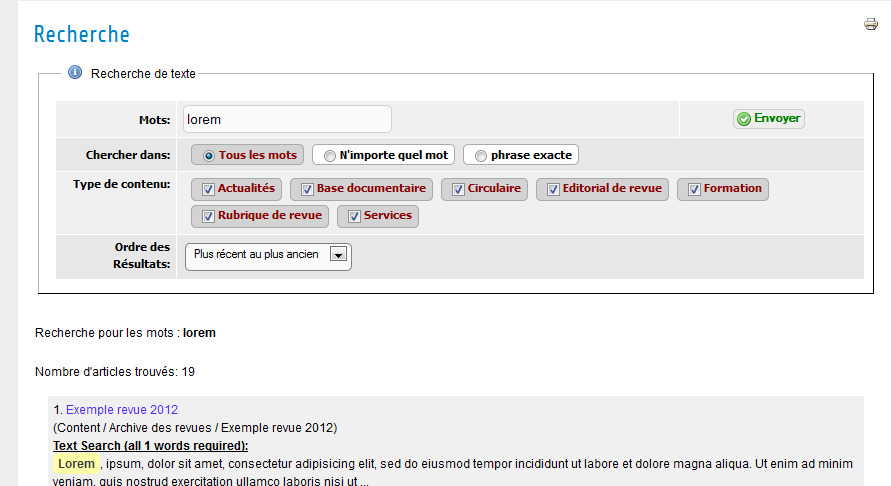
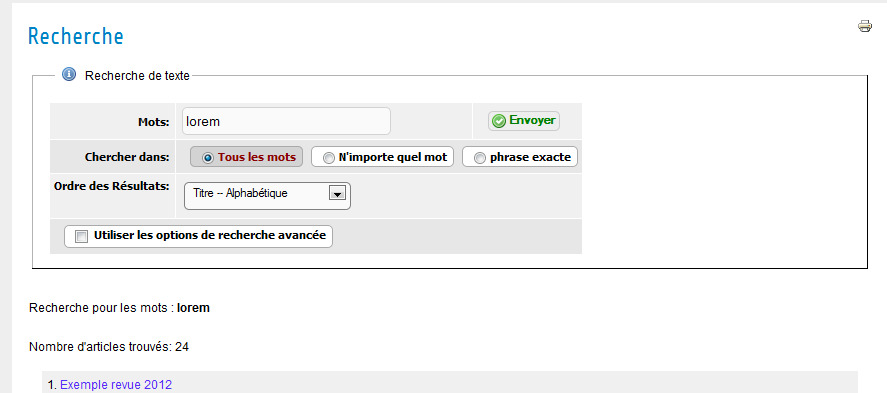
If i use the fc search module, then the form above the result is not like the parameters used in the menu item (url is the good one).

two captures : the one with a link in the menu (all is ok), the second after a search in the fc module search.

first url: index.php?searchword=lorem&option=com_flexicontent&task=search&Itemid=894

second url: component/search/index.php?searchword=lorem&option=com_flexicontent&task=search&Itemid=894

Thanks a lot...
[attachment=1:zdcw1j7i]<!-- ia1 -->a.jpeg<!-- ia1 -->[/attachment:zdcw1j7i]
[attachment=0:zdcw1j7i]<!-- ia0 -->b.jpeg<!-- ia0 -->[/attachment:zdcw1j7i]

Merci à la communauté!

Please Log in or Create an account to join the conversation.

More
13 years 2 months ago #31617 by ggppdk

walkyripa wrote: I have other questions concerning the search function :

In the results, if i display the section, here is an extract of what i get:

1. Exemple revue 2012
(Content / Archive des revues / Exemple revue 2012)
Text Search (all 2 words required):
Exemple revue 2012 | 86 | 97 | Lorem, ipsum, dolor sit amet, ...

A. Further than two subcategories, it seems that "Content/" is displayed at the beginning of the category breadcrumbs... is there a way to have full path?

B. Where is the "Text Search (all X words required):" translation? i can't find it..?

C. What means " | 86 | 97 |" after the title? why is the title displayed a second time in the text area (it is already in the title area)?

D. Bonus question : Does the search is searching in the private (logged in) datas? And can i find a workaround to display something like a padlock (best : login link if needed)?

Sorry for all this questions... But i'm sure it will help to be the best ckk ever ;)


A. There is currently no option for this

B. Not all string are translated yet, sorry will do in next update,

C. these are category ids, or tag ids i will see if there are "raw" values displayed

D. There is option to include unauthorized items OR (NOT include), if an unauthorized item is clicked then you will be asked to login


-- Flexicontent is Free but involves a big effort on our part.
Like the our support? (for a bug-free FC, despite having a long list of functions) Like the features? Like the ongoing development and future commitment to FLEXIcontent?
-- Add your voice to the FLEXIcontent JED listing with a 5-star review. Thanks!

Please Log in or Create an account to join the conversation.

More
13 years 2 months ago #31619 by walkyripa

ggppdk wrote: A. There is currently no option for this

Ok, is there a way to hide / rename "Content"?

ggppdk wrote: B. Not all string are translated yet, sorry will do in next update,

Can you just tell me in which file(s) this is hard codded?

ggppdk wrote: C. these are category ids, or tag ids i will see if there are "raw" values displayed

What is strange is that the title|id|id doesn't appear in all results...

ggppdk wrote: D. There is option to include unauthorized items OR (NOT include), if an unauthorized item is clicked then you will be asked to login

Thank you for this information... i can't find this option in menu item, nor in plugin... where can i find it?

Did you see on capture the problem i encounter if i use the standard search module? (display search form withour good parameters)

Thank you!

Merci à la communauté!

Please Log in or Create an account to join the conversation.

More
13 years 2 months ago #31624 by micker
tu peu poster la traduction ?
Merci

FLEXIcontent is Free but involves a very big effort on our part.
Like the our support? (for a bug-free FC, despite being huge extension) Like the features? Like the ongoing development and future commitment to FLEXIcontent?
-- Add your voice to the FLEXIcontent JED listing reviews. Thanks![/size]

Please Log in or Create an account to join the conversation.

More
13 years 2 months ago #31628 by walkyripa
oui, sauf que la traduction n'est pas dans un fichier langue à part, mais au milieu de flexicontent.ini. Et je suis toujours pas inscrit sur l'outil de traduction.

Voici donc ce que je peux te donner (ça comprend les filtres aussi)!

FLEXI_SEARCH_TEXT_SEARCH="Recherche de texte"
FLEXI_SEARCH_TEXT_SEARCH_INFO="Entrez le mot ou la phrase recherchée"
FLEXI_SEARCH_FIELD_FILTERS="Attributs des filtres"
FLEXI_SEARCH_FIELD_FILTERS_INFO="Vous pouvez limitez votre recherche à ces champs"
FLEXI_SEARCH_SEARCHWORDS="Mots"
FLEXI_SEARCH_SEARCHWORDS_TIP="Mots / phrasesà chercher <br/><b>NOTE:</b> Pour entrer plus d'une phrase, choisir tous/n'importe quel mot, et entrer les phrases entre guillemets"
FLEXI_SEARCH_KEYWORD_REQUIREMENT="Chercher dans"
FLEXI_SEARCH_CONTENT_TYPE="Type de contenu"
FLEXI_SEARCH_CONTENT_TYPE_TIP="Choisir le type de contenu à inclure dans votre recherche"

FLEXI_SEARCH_USE_ADVANCED_OPTIONS="Utiliser les options de recherche avancée"
FLEXI_SEARCH_USE_ADVANCED_OPTIONS_TIP="Clicquer pour affcher / masquer la recherche avancée"
FLEXI_SEARCH_ADVANCED_SEARCH_OPTIONS="Options de recherche avancée"
FLEXI_SEARCH_MISSING_FIELD_DESCR="La description est absente."

FLEXI_SEARCH_BEHAVIOR="Comportement de recherche"
FLEXI_SEARCH_FILTERS_REQUIRED="Filtres souhaités"
FLEXI_SEARCH_FILTERS_REQUIRED_TIP="choisir si les filtres sont obligatoires ou requis."
FLEXI_SEARCH_ALL="Tous"
FLEXI_SEARCH_ANY="N'importe lequel"
FLEXI_SEARCH_ORDERING="Ordre des Résultats"
FLEXI_SEARCH_ORDERING_TIP="Choisir comment trier les résultats"
FLEXI_SEARCH_ALSO_SEARCH_IN_AREAS="Cherchez aussi dans les zones de texte"
FLEXI_SEARCH_ALSO_SEARCH_IN_AREAS_TIP="Permet de rechercher dans TOUTES les zones de texte"

FLEXI_SEARCH_INCLUDE_AREAS="Inclus (*)"
FLEXI_SEARCH_INCLUDE_AREAS_TIP="Choisir les autres zones à inclure à votre recherche, <br/><br/><b>NOTE:</b><br/> Le contenu général du site est inclu par défaut, mais vous pouvez choisir de l'exclure ici..."

FLEXI_TEXT_SEARCH="Recherche de texte"
FLEXI_FIELD_FILTERS="Filtres"
FLEXI_TEXT_SEARCH_INFO="entrez un texte à rechercher"
FLEXI_FIELD_FILTERS_INFO="Vous pouvez limiter votre recherche à ces champs"
FLEXI_PAGINATION="nombre par page"
FLEXI_PAGINATION_INFO="Choisir le nombre d'articles à afficher par page"
FLEXI_ORDERBY="Ordre d'affichage"
FLEXI_ORDERBY_INFO="Choisir dans quel ordre afficher les articles"

FLEXI_ORDER_DEFAULT_INITIAL="Utiliser l'ordre par défaut"
FLEXI_ORDER_TITLE_ALPHABETICAL="Titre -- Alphabétique"
FLEXI_ORDER_TITLE_ALPHABETICAL_REVERSE="Titre -- Alphabétique inversé"
FLEXI_ORDER_DEFAULT_INITIAL="Ordre par défaut"
FLEXI_ORDER_OLDEST_FIRST="Plus ancien au plus récent"
FLEXI_ORDER_MOST_RECENT_FIRST="Plus récent au plus ancien"
FLEXI_ORDER_LAST_MODIFIED_FIRST="Derniers modifiés en premier"
FLEXI_ORDER_AUTHOR_ALPHABETICAL="Par auteur"
FLEXI_ORDER_AUTHOR_ALPHABETICAL_REVERSE="Par auteur, inversé"
FLEXI_ORDER_MOST_HITS="Les plus populaires en premier"
FLEXI_ORDER_LEAST_HITS="Les plus populaires en dernier"
FLEXI_ORDER_CONFIGURED_ORDER="Ordre prédéfini"

FLEXI_SEARCH="Recherche"
FLEXI_SEARCH_TEXT_SEARCH="Recherche de texte"
FLEXI_USE_GLOBAL="par Défaut"

FLEXI_ALL_WORDS="Tous les mots"
FLEXI_ANY_WORDS="N'importe quel mot"
FLEXI_EXACT_PHRASE="phrase exacte"
FLEXI_EXACT_SENTENCE="Phrase exacte"
FLEXI_ADV_NEWEST_FIRST="plus récents en premier"
FLEXI_ADV_OLDEST_FIRST="plus anciens en premier"
FLEXI_ADV_MOST_POP="plus populaires en premier"
FLEXI_ADV_ALPHA="Alphabetique"
FLEXI_ADV_SEARCH_SEC_CAT="Section/Categorie"
FLEXI_TO_FILTER_TEXT_SEARCH_RESULTS="<small>... Pour filtrer les zones de recherche</small>"
FLEXI_TOTALRESULTSFOUND="Nombre d'articles trouvés: %s"
FLEXI_SEARCH_KEYWORD="Recherche pour les mots : "

Merci à la communauté!

Please Log in or Create an account to join the conversation.

Moderators: vistamediajoomlacornerggppdk
Cookies user preferences
We use cookies to ensure you to get the best experience on our website. If you decline the use of cookies, this website may not function as expected.
Accept all
Decline all
Essential
These cookies are needed to make the website work correctly. You can not disable them.
Display
Accept
Analytics
Tools used to analyze the data to measure the effectiveness of a website and to understand how it works.
Google Analytics
Accept
Decline
Save