[SOLVED] Resultats mots clés

More
10 years 2 months ago - 10 years 1 month ago #58511 by Lelouch
Bonsoir,

Je me permets d'ouvrir un sujet car je ne trouve pas ma réponse.
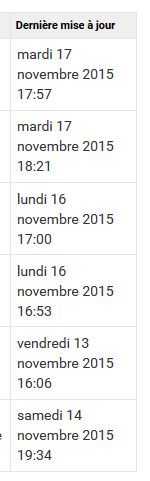
C'est tout simple, dans la pratique. Quand je clique sur un tag quelconque, j'ai une colonne qui apparait : dernière mise à jour.
(cf fichier joint.)

Je souhaiterai simplement qu'elle n'apparaît pas. Mais en cherchant je n'ai pas trouvé. Je ne sais donc pas où chercher et je coince.

En vous remerciant.
Last edit: 10 years 1 month ago by Lelouch.

Please Log in or Create an account to join the conversation.

More
10 years 2 months ago #58512 by micker
Replied by micker on topic Resultats mots clés
il te faut créer un lien vers tes tags (dans un menu cacher) puis activer la surcharge puis lui mettre le template que tu souhaites
puis tu vas dans ce template et tu glisse deposes les champs que tu souhaite affichés

FLEXIcontent is Free but involves a very big effort on our part.
Like the our support? (for a bug-free FC, despite being huge extension) Like the features? Like the ongoing development and future commitment to FLEXIcontent?
-- Add your voice to the FLEXIcontent JED listing reviews. Thanks![/size]

Please Log in or Create an account to join the conversation.

More
10 years 2 months ago - 10 years 2 months ago #58516 by Lelouch
Replied by Lelouch on topic Resultats mots clés
Le soucis, c'est que en créant mon menu (si j'ai bien compris c'est comme un menu pour naviguer sur le site web), que ce soit dans :
- Flexicontent -> Items taggés
ou
- Flexicontent -> Tag

Je ne peux en sélectionner qu'un seul tag. Je suis donc obligé de créer un nombre de menu en fonction du nombre de tags que je possède ?

Puis, je m'excuse, mais je ne vois pas où se trouve "activer la surcharge".
Merci.
Last edit: 10 years 2 months ago by Lelouch.

Please Log in or Create an account to join the conversation.

More
10 years 2 months ago - 10 years 2 months ago #58526 by ggppdk
Replied by ggppdk on topic Resultats mots clés
Hello

- Flexicontent -> Tag
our legacy tag view that, is a table based view

- and you only need to create 1 menu item
1. create a new Menu item of type "Flexicontent -> Tag"
(create it inside a hidden menu that is not displayed in the frontend, e.g. inside FLEXIcontent hidden menu)

2. select any tag in it, preferably a tag you do not use in any item, but set a generic title to itm because the alias of it will appear in the URL, e.g. name it "tagged"

3. configure the display parameters of it

4. then go to component parameters (click configuration button)

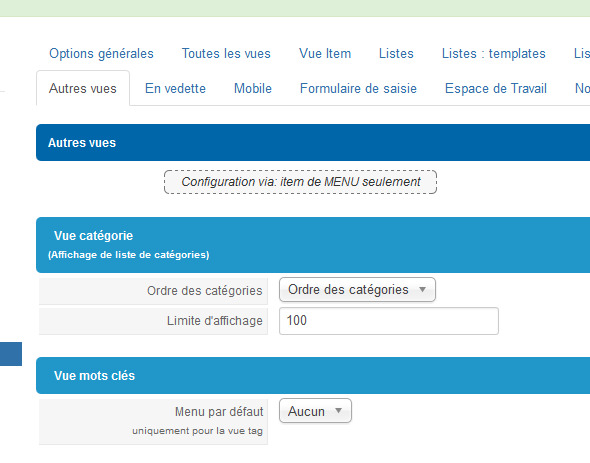
5. then inside TAB "other" views set the ID of the menu item as default menu item for tags view

- when you display the tags field,
all tag views links will use configuration parameters of it

- i will add a small description for this in the menu item for next FLEXIcontent version


-- Flexicontent is Free but involves a big effort on our part.
Like the our support? (for a bug-free FC, despite having a long list of functions) Like the features? Like the ongoing development and future commitment to FLEXIcontent?
-- Add your voice to the FLEXIcontent JED listing with a 5-star review. Thanks!
Last edit: 10 years 2 months ago by ggppdk.

Please Log in or Create an account to join the conversation.

More
10 years 2 months ago - 10 years 2 months ago #58588 by Lelouch
Replied by Lelouch on topic Resultats mots clés
Thank you very much for your help. It works !!

ggppdk wrote: - i will add a small description for this in the menu item for next FLEXIcontent version

Excellent idea.

Solved.
Last edit: 10 years 2 months ago by Lelouch.

Please Log in or Create an account to join the conversation.

More
10 years 2 months ago #58851 by walkyripa
Replied by walkyripa on topic Resultats mots clés
Bonjour,

Je me permets de venir vers vous car je veux faire exactement la même chose, et je pense avoir compris le principe mais...
Lorsque j'affiche le lien de menu en question, c'est ok ( lien )
Si j'utilise un autre tag (au bas d'un article, ou dans le module tag) je reviens à l'affichage en tableau : ( lien ).
J'ai pourtant bien paramétré ma configuration globale vers le lien de menu en question!

Merci pour votre aide!

///////////////////////////

Hi, and sorry for my english!

I've done all you said, but if it works work the tag choosen in the menu item, if i click on another tag, the display is still in table. (see links above)... I have change the link to the good menu item in the configuration of flexicontent...

Thank you for your help!

Merci à la communauté!

Please Log in or Create an account to join the conversation.

More
10 years 2 months ago - 10 years 2 months ago #58852 by Lelouch
Alors je vais t'expliquer du mieux que je le peux.

1. Dans flexicontent, tu créais un tag dont tu ne te serviras jamais. Pour ma part, j'ai créé : tags.
2. Dans le menu : FLEXIcontent Hidden Menu, tu créais un menu. Étant caché, il ne sera visible que dans l'administration.
Ce menu sera : FLEXIcontent » Tag
Tu fais tes paramétrages. (tu indiques donc ici-même comme tag : tags. Celui que tu as créé et que tu ne te serviras uniquement que pour le menu.)
3. Tu vas dans les paramétrages de Flexicontent.
Autres vues => Vue mots clés => nomdetonmenu

De là, tous les tags devraient avoir la même configuration.
J'ai tout réexpliqué car cela pour servir pour d'autres, mais dans ton cas, je pense que cela provient du fait que tu as assigné ton menu a un tag que tu utilises déjà. Du moins c'est ce que je pense au vu de ce que tu expliques. Je peux, bien sûr, me tromper.
Last edit: 10 years 2 months ago by Lelouch.

Please Log in or Create an account to join the conversation.

More
10 years 2 months ago - 10 years 2 months ago #58855 by ggppdk
Replied by ggppdk on topic Resultats mots clés
Hello

the above description was for our old tags view,
- which uses a table view


If you have selected a menu item called "Tagged Items"
- which uses category templating / model / etc
Then selecting it as ddefault tags view menu item, will have no effect , it will be ignored


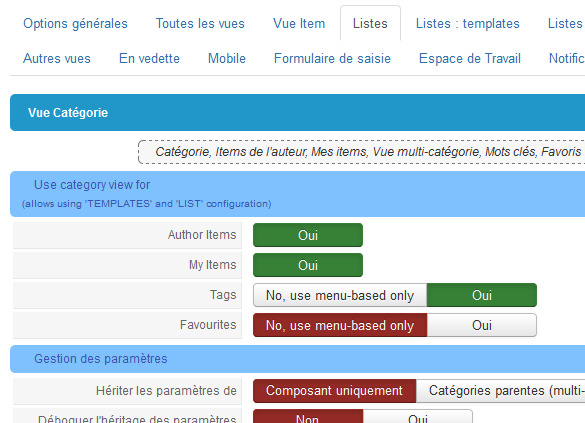
But you can make all your tags link use category templating via a parameter in component configuration
inside the "Lists" TAB
- but this does not let you select a template for displaying the tagged items list, instead it will use the component's default template
(if the above is OK then do it)

TODO: add a parameter for selecting a default template for tags and favourites view if they are set to display items via category view / templating


-- Flexicontent is Free but involves a big effort on our part.
Like the our support? (for a bug-free FC, despite having a long list of functions) Like the features? Like the ongoing development and future commitment to FLEXIcontent?
-- Add your voice to the FLEXIcontent JED listing with a 5-star review. Thanks!
Last edit: 10 years 2 months ago by ggppdk.

Please Log in or Create an account to join the conversation.

More
10 years 2 months ago #58864 by walkyripa
Merci pour cette réponse. J'ai effectivement fait ces étapes... pour le tag choisi dans le menu, il n'est actuellement utilisé dans aucun des items...
Comme je vois que ggppdk a fourni une autre réponse, je lui réponds aussi... merci en tout cas de prendre du temps pour moi!

bonne journée!

Merci à la communauté!

Please Log in or Create an account to join the conversation.

More
10 years 2 months ago - 10 years 2 months ago #58865 by walkyripa
Replied by walkyripa on topic Resultats mots clés

ggppdk wrote: the above description was for our old tags view,
- which uses a table view


ok, that's the view i have for now. i use the last version of flexicontent.

ggppdk wrote: If you have selected a menu item called "Tagged Items"
- which uses category templating / model / etc
Then selecting it as ddefault tags view menu item, will have no effect , it will be ignored


--> ok, so i don't have to use a menu item, if i well understand.

ggppdk wrote: But you can make all your tags link use category templating via a parameter in component configuration
inside the "Lists" TAB
- but this does not let you select a template for displaying the tagged items list, instead it will use the component's default template
(if the above is OK then do it)


So, in the "other views" tab, i set menu tag to "none" :


and i switch on the list tab to tags--> yes

ggppdk wrote: TODO: add a parameter for selecting a default template for tags and favourites view if they are set to display items via category view / templating

[/quote]

Not sure to understand : i made all you said, the url has changed, but tge display is still in table, as you can see .

How can i choose the template? (it can be the default template (blog), if it must be. but i don't want a table view).

Thank you and have a nice day!

Merci à la communauté!
Last edit: 10 years 2 months ago by walkyripa.

Please Log in or Create an account to join the conversation.

Moderators: vistamediajoomlacornerggppdk
Cookies user preferences
We use cookies to ensure you to get the best experience on our website. If you decline the use of cookies, this website may not function as expected.
Accept all
Decline all
Essential
These cookies are needed to make the website work correctly. You can not disable them.
Display
Accept
Analytics
Tools used to analyze the data to measure the effectiveness of a website and to understand how it works.
Google Analytics
Accept
Decline
Save