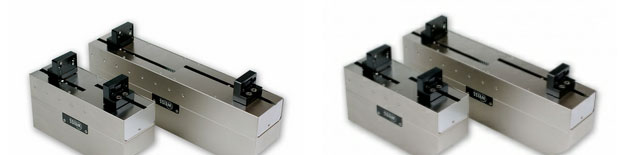
Why is the quality of images resized by FC so bad?

More
13 years 8 months ago #26012 by hede
In the attachment you can see the difference: image (800x600 to 240x180), left resized by the browser and right resized by FC. Thumb quality is set to 100.

FF on Win10, FLEXIcontent version 3.0.10 on Joomla 3.4

Please Log in or Create an account to join the conversation.

More
13 years 8 months ago #26017 by ggppdk
we updated php thumb to v1.7.11 from v1.7.9, but i don't think that is relevant.

At some place the images may use fixed quality,
you have not mentioned where are these images

is it item or category or favs or tags view?
is it category view with blog template?
is it universal module?


-- Flexicontent is Free but involves a big effort on our part.
Like the our support? (for a bug-free FC, despite having a long list of functions) Like the features? Like the ongoing development and future commitment to FLEXIcontent?
-- Add your voice to the FLEXIcontent JED listing with a 5-star review. Thanks!

Please Log in or Create an account to join the conversation.

More
13 years 8 months ago #26026 by hede
As far as I remember that "bad quality" thing happens allways no matter what. It definitely happens in FC content module, Field[image] and category blog view.

Is that of any help?

FF on Win10, FLEXIcontent version 3.0.10 on Joomla 3.4

Please Log in or Create an account to join the conversation.

More
13 years 8 months ago #26030 by ggppdk
For category layout of blog template and for FLEXIcontent module the quality is fixed to 95, but you can check by opening category_items.php (blog template) and helper.php (flexicontent module) and finding lines like:

$q = '&q=95';

you can change these lines to

$q = '&q=100';

to see if it makes difference for you

-- Also try changing the use as resizing method "crop" instead of "scaling"


-- Flexicontent is Free but involves a big effort on our part.
Like the our support? (for a bug-free FC, despite having a long list of functions) Like the features? Like the ongoing development and future commitment to FLEXIcontent?
-- Add your voice to the FLEXIcontent JED listing with a 5-star review. Thanks!

Please Log in or Create an account to join the conversation.

More
13 years 8 months ago #26037 by hede
Thanks for the tips. Now I use in FLEXIcontent Module [mod_flexicontent] the Field HTML as Image which uses the thumb produced by the FIELD[image] where one can specify quality and place of the thumbs. That turned out ok. I couldn't see any difference in qality beween scale and crop.

BTW what I found strange is that every FC function stores the thumbs in a different place. A global place configured in global setup would be very beneficial I think.

FF on Win10, FLEXIcontent version 3.0.10 on Joomla 3.4

Please Log in or Create an account to join the conversation.

More
13 years 8 months ago #26039 by ggppdk
We have 2 kind of thumbnails:

a. the image field thumbnails which are created once via phpthumb, these are stored in specific thumbnail folder defined in each image field (these are not recreated until you change the thumbnail dimensions)

b. URLS using phpthumb to create thumbnails on the fly, these are --cached-- by phpthumb itself


-- Flexicontent is Free but involves a big effort on our part.
Like the our support? (for a bug-free FC, despite having a long list of functions) Like the features? Like the ongoing development and future commitment to FLEXIcontent?
-- Add your voice to the FLEXIcontent JED listing with a 5-star review. Thanks!

Please Log in or Create an account to join the conversation.

More
13 years 8 months ago #26047 by kenmcd
@hede,

The example images do not appear to have the same aspect ratio.
Could you please provide the original 800x600 image for testing?

Actually re-sampling and saving an image at a different size is going to cause some image degradation.
Especially when each 10 pixels of width is reduced into 3 pixels of width.
Any resizing application has to average some of those values.
Bigger originals will re-size to better quality than an 800x600 reduced to 30% of the original.

Displaying at a different size in a browser is not the same thing.
The uncompressed image is in memory and your graphics card is making some decisions on how to best display that image at different zoom levels.

Some server questions:
- What version of GD is installed on your server?
- Is ImageMagick installed on your server?
- How much memory is available to PHP?
This info is available on the PHP Information page in the Joomla back-end.

Please provide the original image as I would like to do some resizing tests.
Generally manually resizing images yourself gives you better control than any automated system.
I would like to see how resizing this particular image in high-end tools will compare to what phpThumb does with it.

Also, please provide a link to the page(s) where you have this image displayed.
I would like to compare the results on your server to the results on my server.

KM

Please Log in or Create an account to join the conversation.

More
13 years 8 months ago #26054 by hede
@kenmcd: Thank you! here we go, image attached

version of GD is 2.0
ImageMagick 6.6.0-4
memory_limit 72M

You're right, resampling comes allways with quality loss which is why I asked for a new option in fc content module and FIELDimage: crop + scale + use original. Images resized to the exact necessary size via e.g. Gimp and then uploaded and not touched by php are a lot better qualitywise.
The risizing of images in web pages is actually done by the browser engine, not by the hardware (graphic card). That is why people who remember lte IE6 still have in mind browser resized images look bad, fortunatelly those times are over.

Link to the site which is under construction: weiss.jordymedia.de/

... Im really embarrassed, I cant reproduce the situation with the blurred thumbnail. As far as I remember that was produced eather by FIELD[image] or more likely by the flexicontent module.
Rigth now I use Field HTML as Image whitin the flexicontent module which allows to set the quality of thumbs to 100 in the FIELD[image]. That works ok.

Cheers

FF on Win10, FLEXIcontent version 3.0.10 on Joomla 3.4

Please Log in or Create an account to join the conversation.

Moderators: vistamediajoomlacornerggppdk
Cookies user preferences
We use cookies to ensure you to get the best experience on our website. If you decline the use of cookies, this website may not function as expected.
Accept all
Decline all
Essential
These cookies are needed to make the website work correctly. You can not disable them.
Display
Accept
Analytics
Tools used to analyze the data to measure the effectiveness of a website and to understand how it works.
Google Analytics
Accept
Decline
Save