Native Joomla's fields

More
13 years 3 months ago #31261 by Neow85
Hello,

Just one question !

When creating an article without FlexiContent, there are a lot of fields like intro text, intro image, full article image, link A, link B, etc... Do you know what I mean ? I am not sure how these fields are called in English.
All these fields disappear with FlexiContent, I understand that because we can create custome fields.
However, I would like to use these fields from the original article creation form, because I'd like to use them in another 3rd party extension for a very specific case.
Is it possible to get them back ?

Please Log in or Create an account to join the conversation.

More
13 years 3 months ago #31262 by ggppdk
Replied by ggppdk on topic Native Joomla's fields
FLEXIcontent -unlike other CCK-, uses joomla's native DB tables to store data,

so you can use any third party module to display articles

See here:
Features list

just note that FLEXIcontent extended (extra data, extra fields, etc) can only be extended by FLEXIcontent views and modules


-- Flexicontent is Free but involves a big effort on our part.
Like the our support? (for a bug-free FC, despite having a long list of functions) Like the features? Like the ongoing development and future commitment to FLEXIcontent?
-- Add your voice to the FLEXIcontent JED listing with a 5-star review. Thanks!

Please Log in or Create an account to join the conversation.

More
13 years 3 months ago #31266 by Neow85
Replied by Neow85 on topic Native Joomla's fields
Yes, that's why I work with FlexiContent ;)

But the problem is not to display article in a 3rd party extension, it works well.

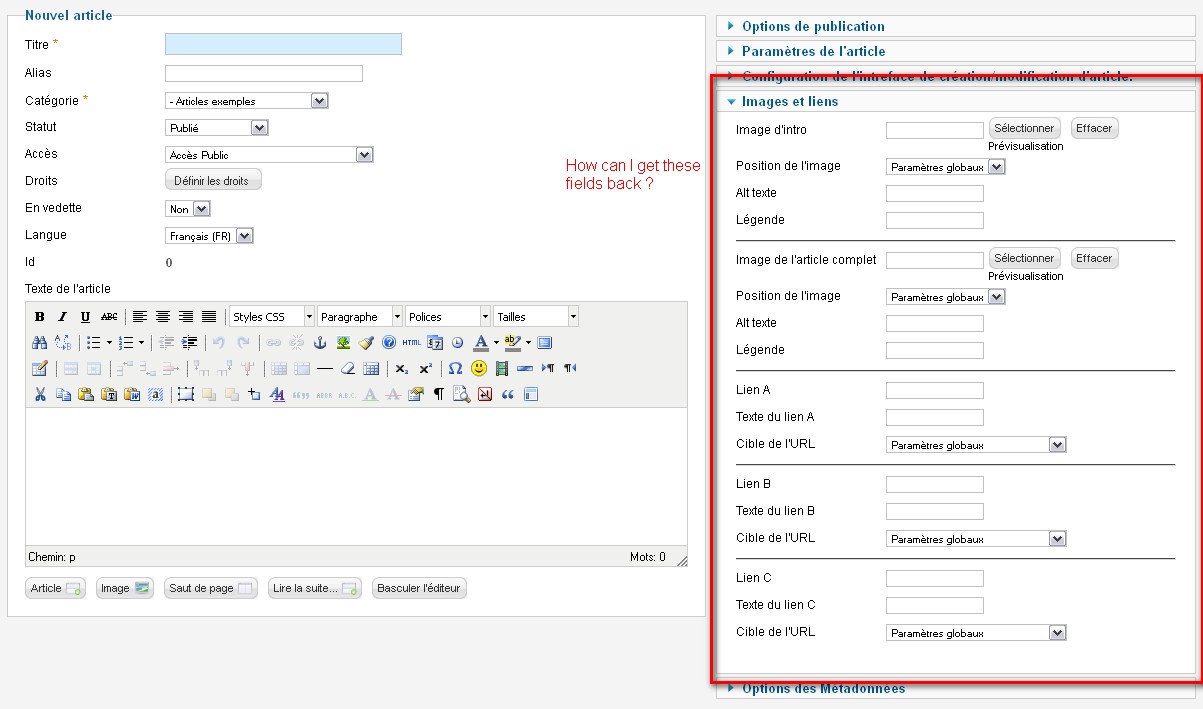
What I want is, when creating an article in FlexiContent, to have Joomla native field that are currently not displayed in FlexiContent.

See attachment, I think it would be clearer :)

Please Log in or Create an account to join the conversation.

More
13 years 3 months ago #31269 by ggppdk
Replied by ggppdk on topic Native Joomla's fields
Which field is missing all are available inside item form or in items manager list


-- Flexicontent is Free but involves a big effort on our part.
Like the our support? (for a bug-free FC, despite having a long list of functions) Like the features? Like the ongoing development and future commitment to FLEXIcontent?
-- Add your voice to the FLEXIcontent JED listing with a 5-star review. Thanks!

Please Log in or Create an account to join the conversation.

More
13 years 3 months ago #31275 by Neow85
Replied by Neow85 on topic Native Joomla's fields
The fields that I want are the ones in the very right of the capture I attached in my previous post, I circled them in red. The capture is from the basic Joomla form, without FlexiContent.
I really can't find them in FC.

Please Log in or Create an account to join the conversation.

More
13 years 3 months ago #31297 by ggppdk
Replied by ggppdk on topic Native Joomla's fields
A , i see you meant these parameters :D

-- These must be inserted by some joomla Content plugin that modifies the article form, right?

-- The author joomla Content plugin should modify his plugin to support FLEXIcontent item(=article with types) edit form


-- Flexicontent is Free but involves a big effort on our part.
Like the our support? (for a bug-free FC, despite having a long list of functions) Like the features? Like the ongoing development and future commitment to FLEXIcontent?
-- Add your voice to the FLEXIcontent JED listing with a 5-star review. Thanks!

Please Log in or Create an account to join the conversation.

More
13 years 3 months ago #31311 by kenmcd
Replied by kenmcd on topic Native Joomla's fields
.
Those fields are the mini-CCK feature in Joomla 2.5.

You can replicate this feature in FLEXIcontent using your own image fields and links fields.
So supporting those fields does not seem to make sense.

You can see more about the Joomla feature here:
community.joomla.org/blogs/community/153...es-in-joomla-25.html

Use the Images and URL Fields to Create Simple Standardized Layouts


In 2.5 you can choose to use the existing image and URL fields in the articles to set up a simple standardized layout for blogs, news reports, etc. These are fields that existed in the database but were never used. After you activate the feature in the Article Options Editing Layouts, you will be able to specify an image for the introduction and an image for the full article, as well as 3 links. This means that your content creators won't have to fuss with an image in the text (you can even disable the image button in the editor) and your article format will be cleaner and more consistent. You can use css, layout over rides and alternative layouts to customize your pages even further. This feature also allows easy customization of the back end article editor to limit content creator and content editor options, for example removing the ability to change the images or publishing options.

Of interest to: Site administrators, site creators, content creators for sites that need a simple, consistent content layouts but not a full featured CCK.


The display of those fields is controlled by a setting in the Article Manager options.

.

Please Log in or Create an account to join the conversation.

More
12 years 8 months ago #38154 by gpmaestro
Replied by gpmaestro on topic Native Joomla's fields
Hello, I have the same problem maybe. I need to set full article image for content because of showcase module "roksprocket". There is no image in category view without full article image or intro image set.

Thank you very much for your help :)

Best regards from Prague.

Please Log in or Create an account to join the conversation.

More
12 years 8 months ago #38157 by ggppdk
Replied by ggppdk on topic Native Joomla's fields
Hello,

Hello, since these are parameters you can edit the files:
components/com_flexicontent/models/forms/item.xml
administrator/components/com_flexicontent/models/forms/item.xml

and add them, just before
<fieldset name="themes" ...

These despite not used/supported by FC (yet) will give you compatibility with joomla category view and with the module that you mentioned
Code:
<fieldset name="images_and_links" label="Images and Links" description=""> <field name="" type="separator" default="Images (Compatibility, used by Joomla Built-in Views and modules)" description="..." level="level2" /> <field name="" type="separator" default="Intro Images (Joomla category/featured/etc views)" description="..." level="level3" /> <field name="image_intro" type="media" label="COM_CONTENT_FIELD_INTRO_LABEL" description="COM_CONTENT_FIELD_INTRO_DESC" /> <field name="float_intro" type="list" label="COM_CONTENT_FLOAT_LABEL" description="COM_CONTENT_FLOAT_DESC"> <option value="">JGLOBAL_USE_GLOBAL</option> <option value="right">COM_CONTENT_RIGHT</option> <option value="left">COM_CONTENT_LEFT</option> <option value="none">COM_CONTENT_NONE</option> </field> <field name="image_intro_alt" type="text" label="COM_CONTENT_FIELD_IMAGE_ALT_LABEL" description="COM_CONTENT_FIELD_IMAGE_ALT_DESC" class="inputbox" size="20" /> <field name="image_intro_caption" type="text" label="COM_CONTENT_FIELD_IMAGE_CAPTION_LABEL" description="COM_CONTENT_FIELD_IMAGE_CAPTION_DESC" class="inputbox" size="20" /> <field name="" type="separator" default="Full Images (Joomla article view)" description="..." level="level3" /> <field name="image_fulltext" type="media" label="COM_CONTENT_FIELD_FULL_LABEL" description="COM_CONTENT_FIELD_FULL_DESC" /> <field name="float_fulltext" type="list" label="COM_CONTENT_FLOAT_LABEL" description="COM_CONTENT_FLOAT_DESC"> <option value="">JGLOBAL_USE_GLOBAL</option> <option value="right">COM_CONTENT_RIGHT</option> <option value="left">COM_CONTENT_LEFT</option> <option value="none">COM_CONTENT_NONE</option> </field> <field name="image_fulltext_alt" type="text" label="COM_CONTENT_FIELD_IMAGE_ALT_LABEL" description="COM_CONTENT_FIELD_IMAGE_ALT_DESC" class="inputbox" size="20" /> <field name="image_fulltext_caption" type="text" label="COM_CONTENT_FIELD_IMAGE_CAPTION_LABEL" description="COM_CONTENT_FIELD_IMAGE_CAPTION_DESC" class="inputbox" size="20" /> <field name="" type="separator" default="Links (Compatibility, used by Joomla built-in views and modules)" description="..." level="level2" /> <field name="" type="separator" default="Link A" description="..." level="level3" /> <field name="urla" type="url" validate="url" filter="url" label="COM_CONTENT_FIELD_URLA_LABEL" description="COM_CONTENT_FIELD_URL_DESC" /> <field name="urlatext" type="text" label="COM_CONTENT_FIELD_URLA_LINK_TEXT_LABEL" description="COM_CONTENT_FIELD_URL_LINK_TEXT_DESC" class="inputbox" size="20" /> <field name="targeta" type="list" label="COM_CONTENT_URL_FIELD_BROWSERNAV_LABEL" description="COM_CONTENT_URL_FIELD_BROWSERNAV_DESC" default="" filter="options" class="inputbox"> <option value="">JGLOBAL_USE_GLOBAL</option> <option value="0">JBROWSERTARGET_PARENT</option> <option value="1">JBROWSERTARGET_NEW</option> <option value="2">JBROWSERTARGET_POPUP</option> <option value="3">JBROWSERTARGET_MODAL</option> </field> <field name="" type="separator" default="Link B" description="..." level="level3" /> <field name="urlb" type="url" validate="url" filter="url" label="COM_CONTENT_FIELD_URLB_LABEL" description="COM_CONTENT_FIELD_URL_DESC" /> <field name="urlbtext" type="text" label="COM_CONTENT_FIELD_URLB_LINK_TEXT_LABEL" description="COM_CONTENT_FIELD_URL_LINK_TEXT_DESC" class="inputbox" size="20" /> <field name="targetb" type="list" label="COM_CONTENT_URL_FIELD_BROWSERNAV_LABEL" description="COM_CONTENT_URL_FIELD_BROWSERNAV_DESC" default="" filter="options" class="inputbox"> <option value="">JGLOBAL_USE_GLOBAL</option> <option value="0">JBROWSERTARGET_PARENT</option> <option value="1">JBROWSERTARGET_NEW</option> <option value="2">JBROWSERTARGET_POPUP</option> <option value="3">JBROWSERTARGET_MODAL</option> </field> <field name="" type="separator" default="Link C" description="..." level="level3" /> <field name="urlc" type="url" validate="url" filter="url" label="COM_CONTENT_FIELD_URLC_LABEL" description="COM_CONTENT_FIELD_URL_DESC" /> <field name="urlctext" type="text" label="COM_CONTENT_FIELD_URLC_LINK_TEXT_LABEL" description="COM_CONTENT_FIELD_URL_LINK_TEXT_DESC" class="inputbox" size="20" /> <field name="targetc" type="list" label="COM_CONTENT_URL_FIELD_BROWSERNAV_LABEL" description="COM_CONTENT_URL_FIELD_BROWSERNAV_DESC" default="" filter="options" class="inputbox"> <option value="">JGLOBAL_USE_GLOBAL</option> <option value="0">JBROWSERTARGET_PARENT</option> <option value="1">JBROWSERTARGET_NEW</option> <option value="2">JBROWSERTARGET_POPUP</option> <option value="3">JBROWSERTARGET_MODAL</option> </field> </fieldset>


-- Flexicontent is Free but involves a big effort on our part.
Like the our support? (for a bug-free FC, despite having a long list of functions) Like the features? Like the ongoing development and future commitment to FLEXIcontent?
-- Add your voice to the FLEXIcontent JED listing with a 5-star review. Thanks!

Please Log in or Create an account to join the conversation.

More
12 years 8 months ago #38158 by gpmaestro
Replied by gpmaestro on topic Native Joomla's fields
Thank you for your help, but it's not functional unfortunately :(

Field "Parameters: Images and Links" is in setting of item/content. That's right, but finaly images are not shown in showcase module.

I'm sorry for bother you. But it's very important for me. Thank you so much for any advice. :roll:

Please Log in or Create an account to join the conversation.

Moderators: vistamediajoomlacornerggppdk
Cookies user preferences
We use cookies to ensure you to get the best experience on our website. If you decline the use of cookies, this website may not function as expected.
Accept all
Decline all
Essential
These cookies are needed to make the website work correctly. You can not disable them.
Display
Accept
Analytics
Tools used to analyze the data to measure the effectiveness of a website and to understand how it works.
Google Analytics
Accept
Decline
Save