Fields alignment adjustment

More
12 years 1 week ago #45193 by Rooney
Replied by Rooney on topic Fields alignment adjustment
Hi,
again, just having a quick look I found this
Code:
span.flexi.value, .flexi.value { display: block; float: left; max-width: 100% !important; padding: 0 !important; }
deleting float left put everything in the same line. After that you just have to put some margin-left for the content on the right.
Rooney

Joomla! 3.9.24 and FC 3.3.9

Please Log in or Create an account to join the conversation.

More
12 years 1 week ago #45203 by agnesch
Replied by agnesch on topic Fields alignment adjustment
Hi Rooney,
thanks for your help!
I've tried to apply your solution, by setting
Code:
float: none
(as well as deleting it all the way)

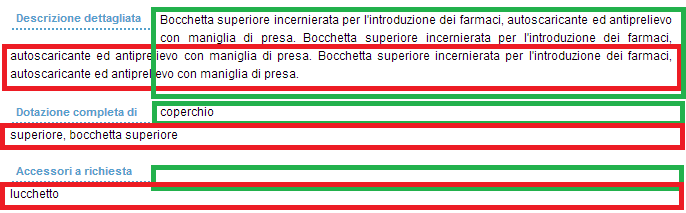
but what I get is in the attachment.
As you can see, the first line of the text field value are now aligned, but it messed all the rest...
Plus, adjusting the margins only caused the whole the thing to shift, and did not affect only the text field value...
Do you have any idea why this happens?
Thank you so much! :)

Please Log in or Create an account to join the conversation.

More
12 years 1 week ago #45209 by ggppdk
Replied by ggppdk on topic Fields alignment adjustment
Hello,

set the overlapping containers to have
display: inline-block;

please test altering the CSS,and reading some docs, you do instant CSS changes via e.g. firebug, to test the effect

Regards


-- Flexicontent is Free but involves a big effort on our part.
Like the our support? (for a bug-free FC, despite having a long list of functions) Like the features? Like the ongoing development and future commitment to FLEXIcontent?
-- Add your voice to the FLEXIcontent JED listing with a 5-star review. Thanks!

Please Log in or Create an account to join the conversation.

More
12 years 1 week ago #45210 by Rooney
Replied by Rooney on topic Fields alignment adjustment
Yes, that is what I meant with setting a left margin. The contents is inside a div with class "flexi value". This div has to have a left margin. Just play around a little bit.

As I mentioned in my first post. firebug is an excellent tool to find out which css classes are involved and have to be changed.

Rooney

Joomla! 3.9.24 and FC 3.3.9

Please Log in or Create an account to join the conversation.

More
12 years 1 week ago #45215 by agnesch
Replied by agnesch on topic Fields alignment adjustment
Thank you both for your help!!
I'm just a beginner with css so I've been reading a lot these last days, and I've been playing around with firebug all morning, including trying display: inline-block, but I'm nowhere near to the expected outcome...
I've tried modifying display, float, width, padding, margin, clear... :?:

Please Log in or Create an account to join the conversation.

Moderators: vistamediajoomlacornerggppdk
Cookies user preferences
We use cookies to ensure you to get the best experience on our website. If you decline the use of cookies, this website may not function as expected.
Accept all
Decline all
Essential
These cookies are needed to make the website work correctly. You can not disable them.
Display
Accept
Analytics
Tools used to analyze the data to measure the effectiveness of a website and to understand how it works.
Google Analytics
Accept
Decline
Save