I uninstalled FlexiContent Now trash manager can't delete

More
15 years 11 months ago #5119 by lmiksch
I had to uninstall FlexiContent. The uninstall did not delete the extra articles, sections and categories that were created by FlexiContent. I manually deleted the articles - went to Trash Manager and found nothing. I tried to delete anyway and received a message stating that I needed to select an article to delete before I could really delete it. Sadly, as there is nothing there that I can see- I cannot select anything.

Now I need to delete the unattached categories and sections so that my menus can work properly again - but I cannot.

If I try to delete at the section level I receive a message stating that I cannot delete the section because it contains categories. If I try to delete at the category level I get an error message that states the categories contain articles, which I explained in paragraph 1 - I cannot see.

Can someone please tell me how to really delete the FlexiContent articles that Joomla seems to be unable to delete and which I can no longer see. And then tell me how to delete the extra sections and categories.

I am using Joomla 1.5.15, upgraded form the Joomla Enterprise version that started as 1.5.14.

Thanks,

Linda

Please Log in or Create an account to join the conversation.

More
15 years 11 months ago #5120 by vistamedia
Hi Linda,
As FLEXIcontent extends the core com_content it binds the standard article with extended data.
In order to remove every flexicontent data, you must reinstall flexicontent to delete all articles/categories created in it.
Then you can uninstall it again.
Normally you don't have to do that, but I guess you created article in flexi and trash them with the standard article manager.
Cheers,
Emmanuel.

FLEXIcontent lead developer.
www.vistamedia.fr web agency and custom development.
www.joomla.fr co-administrator.
Please no PM for support request, use the forum for that!!!

Please Log in or Create an account to join the conversation.

More
15 years 11 months ago #5121 by lmiksch
OK - I have reinstalled FlexiContent and I see no items, articles or categories.

Do I import and bind them all again which I know will create a new copies?

If I do that - will not I be in the same predicament since it seams that I caused the mess when I tried to delete the articles through an un-extened by FlexiContent Joomla and apparently created phantoms?

Please Log in or Create an account to join the conversation.

More
15 years 11 months ago #5123 by vistamedia
No, you just have to choose the old section you use (and couldn't delete with flexi) in the global comfiguration of the component.

FLEXIcontent lead developer.
www.vistamedia.fr web agency and custom development.
www.joomla.fr co-administrator.
Please no PM for support request, use the forum for that!!!

Please Log in or Create an account to join the conversation.

More
15 years 11 months ago #5124 by lmiksch
Sorry, I seem to be getting more confused. It appears you are telling me to go to Global Configuration from the FlexiContent screens. I have done this and I do in fact see the Sections that FlexiContent created - however, I cannot identify anyway to delete these sections from within the Global Configuration.

In case I was wrong in my thinking - I also tried to again delete the previously created categories and sections through the Joomla managers and this again failed.

Please Log in or Create an account to join the conversation.

More
15 years 11 months ago #5133 by lmiksch
Solved - I didn't realize that there were two trash managers. Finding the Article trash manager resolved the issue.

Please Log in or Create an account to join the conversation.

More
15 years 10 months ago #6300 by zoomlanski
I have to agree, I'm having the worst time trying to uninstall Flexicontent - it keeps staying on my backend menu... What gives? It is even gone from my install/uninstall menu.

I deleted all the articles, then the flexi cats, and sections, and trashed it all. I cleared my joomla cache, and purged deleted items... and yet it hangs around on the menu like a bad cold. I have installed and uninstalled. Where is this second trash bin?

Can you provide some clear instructions on removing it?

Thanks
Tim

Please Log in or Create an account to join the conversation.

More
15 years 10 months ago #6302 by lmiksch
Try Content>Article Trash - it is the second item in the drop down menu.

And I had quite a time getting everything to totally clear out.

I do remember someone telling me I had to reinstall it to fully uninstall it. - Which I now believe may not be necessary.

If you find and successfully delete the articles in the trash you may be good to go - So by all means try that before reinstalling.

Please Log in or Create an account to join the conversation.

More
15 years 10 months ago #6415 by zoomlanski
I had to reinstall to get to the menus.

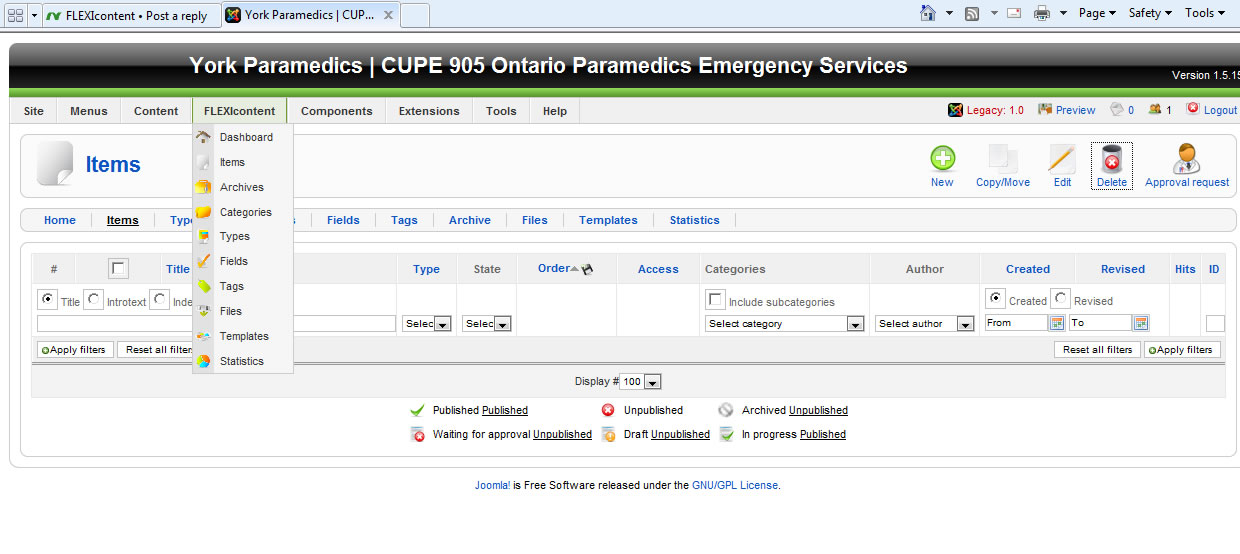
The second thing on my list is ITEMS, and there are no articles or items to delete... It's empty.

My menu list is:
Dashboard, Items, Archive, Categories, Types, Fields, Tags, Files, Templates, Statistics.

I don't want to delete it because it's bad, but I installed the wrong thing. I wanted to intall flexiaccess, but installed content instead. My bad, now I can't remove it.

Attached screen shot of menu

Any help is appreciated,
Tim

Please Log in or Create an account to join the conversation.

Moderators: vistamediajoomlacornerggppdk
Cookies user preferences
We use cookies to ensure you to get the best experience on our website. If you decline the use of cookies, this website may not function as expected.
Accept all
Decline all
Essential
These cookies are needed to make the website work correctly. You can not disable them.
Display
Accept
Analytics
Tools used to analyze the data to measure the effectiveness of a website and to understand how it works.
Google Analytics
Accept
Decline
Save