images not showing

More
10 years 9 months ago #55853 by lowket
images not showing was created by lowket
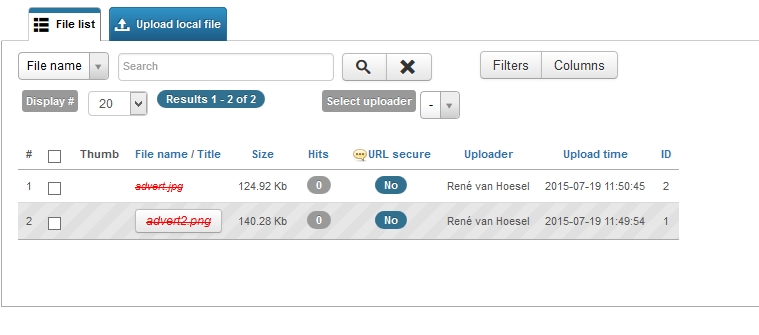
in the latest version of FC (3.0.0) i can't add images (i.e. invisible) in items.

Please Log in or Create an account to join the conversation.

More
10 years 9 months ago #55855 by micker
Replied by micker on topic images not showing
did you put your image in template position ?
i think you need to read tutorial you are lost because you forgot basic flexicontent concept
www.flexicontent.org/documentation/tutorials.html

FLEXIcontent is Free but involves a very big effort on our part.
Like the our support? (for a bug-free FC, despite being huge extension) Like the features? Like the ongoing development and future commitment to FLEXIcontent?
-- Add your voice to the FLEXIcontent JED listing reviews. Thanks![/size]

Please Log in or Create an account to join the conversation.

More
10 years 9 months ago #55856 by lowket
Replied by lowket on topic images not showing
image shows not in core fields of template. How do i add?

Please Log in or Create an account to join the conversation.

More
10 years 9 months ago #55857 by lowket
Replied by lowket on topic images not showing
i have created the field 'Images' and added to the template.
In the tab 'Article (details) i get an 'Add Image' text.
When i want to select the image, it gets crosslined and red and will not display.

Please Log in or Create an account to join the conversation.

More
10 years 9 months ago #55858 by ggppdk
Replied by ggppdk on topic images not showing
Hello

if images are not found then you will get a message about file missing

since you do not get, the next reasons is because the image is not readable via URL (e.g. due to your htaccess configuration),

if you don't know how to check this,

then you can do this to confirm that the above is happening

despite the thumbnail not showing, select an image into the image field
and save the item form

then post here, the frontend link of the item


-- Flexicontent is Free but involves a big effort on our part.
Like the our support? (for a bug-free FC, despite having a long list of functions) Like the features? Like the ongoing development and future commitment to FLEXIcontent?
-- Add your voice to the FLEXIcontent JED listing with a 5-star review. Thanks!

Please Log in or Create an account to join the conversation.

More
10 years 9 months ago - 10 years 9 months ago #55861 by lowket
Replied by lowket on topic images not showing
Hello, and thank you for your advice.
My website is at: www.collect.one . Maybe you can log in and see what is wrong?

In the sourcecode, image is correct with submaps etc. It gets a class first, which i don't recognize:

<img class="xgckhtpfgacydmevaqbj" src="images/advert.jpg" alt="" />

EDIT: if i select an image which does have a thumbnail, the image shows. It therefor must be something what's creating the error generating a thumbnail and not recognizing the image.
Last edit: 10 years 9 months ago by lowket.

Please Log in or Create an account to join the conversation.

More
10 years 9 months ago #55862 by lowket
Replied by lowket on topic images not showing
What i did was rename the image with a different name, same extension (.jpg and .png).
The program works now. Solved. Thank you.

Please Log in or Create an account to join the conversation.

More
10 years 9 months ago #55868 by ggppdk
Replied by ggppdk on topic images not showing
Hello

i see, this sounds like a naming issue of the "folder-mode" of image field

can you give some information?
would like to see if there is something to fix


can you post the -exact- name that did work, more specifically :
-- what was the name of the file on your local disk ?
-- also what is your web server windows or linux ?


-- Flexicontent is Free but involves a big effort on our part.
Like the our support? (for a bug-free FC, despite having a long list of functions) Like the features? Like the ongoing development and future commitment to FLEXIcontent?
-- Add your voice to the FLEXIcontent JED listing with a 5-star review. Thanks!

Please Log in or Create an account to join the conversation.

More
10 years 9 months ago #55873 by lowket
Replied by lowket on topic images not showing
Hi,

the file i created on my computer was called advert.png and advert.jpg
my server works in linux
i even renamed the file with advert2, but i did not generate a thumbnail and was not visible.
then i gave a random name to it, called blata.png and blata.jpg, which worked. Also, other files i uploaded worked, but the name advert and advert2 was for some reason the fault.

Please Log in or Create an account to join the conversation.

More
10 years 9 months ago #55883 by ggppdk
Replied by ggppdk on topic images not showing
Hello

do you have installed v3.0.0 RCn or v3.0.0 ?


-- Flexicontent is Free but involves a big effort on our part.
Like the our support? (for a bug-free FC, despite having a long list of functions) Like the features? Like the ongoing development and future commitment to FLEXIcontent?
-- Add your voice to the FLEXIcontent JED listing with a 5-star review. Thanks!

Please Log in or Create an account to join the conversation.

Moderators: vistamediajoomlacornerggppdk
Cookies user preferences
We use cookies to ensure you to get the best experience on our website. If you decline the use of cookies, this website may not function as expected.
Accept all
Decline all
Essential
These cookies are needed to make the website work correctly. You can not disable them.
Display
Accept
Analytics
Tools used to analyze the data to measure the effectiveness of a website and to understand how it works.
Google Analytics
Accept
Decline
Save