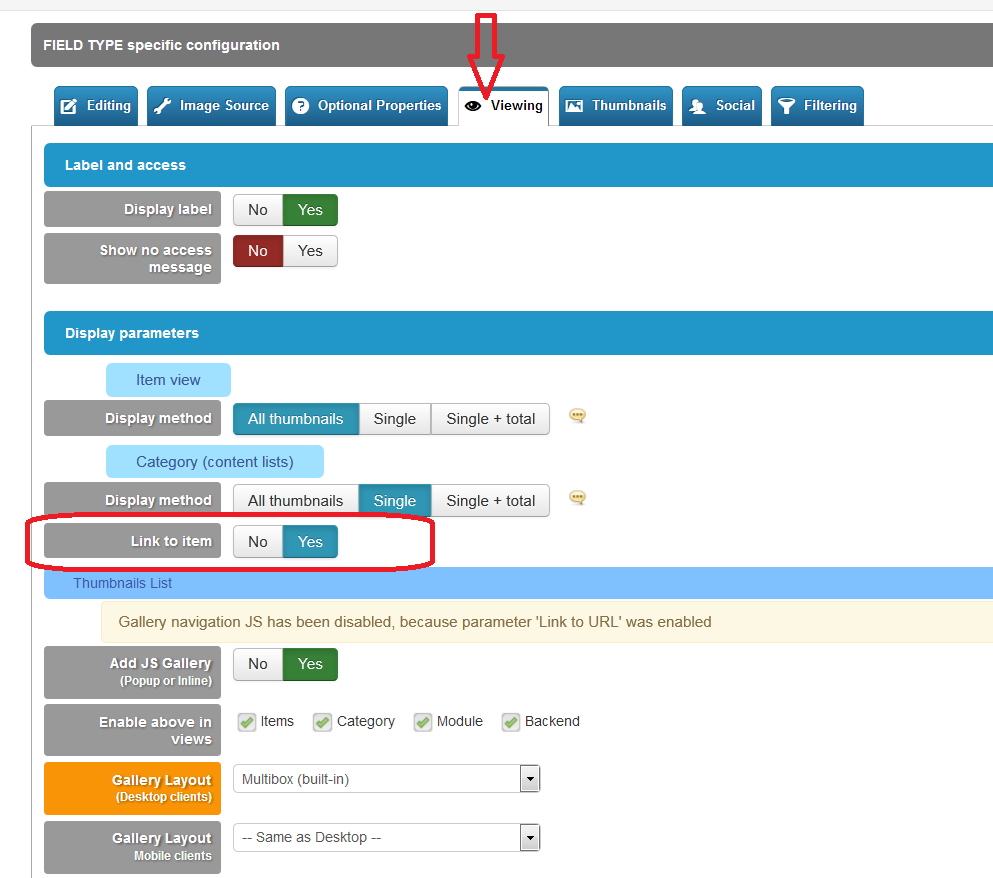
How to create a link to the item within a field ?

More
10 years 5 months ago - 10 years 5 months ago #56688 by geejay
Hello,

I want to create a field which shows an image which links to the item. The purpose is to show nicely styled links to the items in category tables and blogs. The problem is that I cannot figure out how to get the link to the item in the field. I want to set this as the default link of the image.

It seems that the link does not exist as replacement value
www.flexicontent.org/documentation/faq/7...of-other-fields.html

Any help would be greatly appreciated.

Thanks

Geejay
Last edit: 10 years 5 months ago by geejay.

Please Log in or Create an account to join the conversation.

More
10 years 5 months ago - 10 years 5 months ago #56690 by ggppdk
Hello

you can use a FLEXIcontent image field


- if you want to reuse your image inside different items,
then set field to "DB-mode", if images are unique to every item, or if they are rarely re-used, set image field to folder mode

- to manually create an item link , you can find the link inside item.php,
search for "getItemRoute" inside category_items(_htmp) it is like this:
Code:
$item_link = JRoute::_(FlexicontentHelperRoute::getItemRoute($item->slug, $item->categoryslug, 0, $item));

to get the the thumbnail path of an image field:
Code:
$item->fields['imgfieldname']->{"display_backend_src"} $item->fields['imgfieldname']->{"display_small_src"} $item->fields['imgfieldname']->{"display_medium_src"} $item->fields['imgfieldname']->{"display_large_src"} $item->fields['imgfieldname']->{"display_original_src"}

see more here:
www.flexicontent.org/documentation/faq/7...e-gallery-field.html


-- Flexicontent is Free but involves a big effort on our part.
Like the our support? (for a bug-free FC, despite having a long list of functions) Like the features? Like the ongoing development and future commitment to FLEXIcontent?
-- Add your voice to the FLEXIcontent JED listing with a 5-star review. Thanks!
Last edit: 10 years 5 months ago by ggppdk.

Please Log in or Create an account to join the conversation.

More
10 years 5 months ago #56691 by geejay
Hi,

Thank your for you fast response. I had missed this because I had not switched in single image mode.

BR

Geejay

Please Log in or Create an account to join the conversation.

More
10 years 5 months ago #56692 by ggppdk
Hello

you don't need to use single image mode
image field can be multi-value,
- the first image (re-order to place first) will be used to link to the item

just enable the parameter, and add your image field to a template position


-- Flexicontent is Free but involves a big effort on our part.
Like the our support? (for a bug-free FC, despite having a long list of functions) Like the features? Like the ongoing development and future commitment to FLEXIcontent?
-- Add your voice to the FLEXIcontent JED listing with a 5-star review. Thanks!

Please Log in or Create an account to join the conversation.

More
10 years 5 months ago - 10 years 5 months ago #56693 by geejay
Just discovered another bug related to this and fieldgroup:
When putting an image with "link to item" activated into a fieldgroup of images then the image disappears - it is replaced by a triangle bracket "<"

The same happens when using custom html in the fieldgroup.

BTW: Sometimes I think that myriad of parameters makes FC sometimes overly complex and prone to errors. I have been working some years in FC and still get lost. For example a fieldgroup could probably much easier be realized by some macro language - like you already have it in the custom html. However one should extend the macro language by more complex functions. That would allow to eliminate parameters. Also such thing like "link to item" could be done with a simple predefined constant. Just my 0.25 cents of cause.
Last edit: 10 years 5 months ago by geejay.

Please Log in or Create an account to join the conversation.

More
10 years 5 months ago #56694 by ggppdk
Hello

are you using v3.0.6 ?

link to item is not meant to be used with fieldgroup,

-- when you see a "<" in fieldgroup display it means that the field was treat like it was not inside a fieldgroup
when a field is inside an item it creates an array of HTML content instead of a single string with HTML

i ll check if it is an unhandle case, and fix this

about parameters, the alternative to having parameters is to ask user to do some coding


-- Flexicontent is Free but involves a big effort on our part.
Like the our support? (for a bug-free FC, despite having a long list of functions) Like the features? Like the ongoing development and future commitment to FLEXIcontent?
-- Add your voice to the FLEXIcontent JED listing with a 5-star review. Thanks!

Please Log in or Create an account to join the conversation.

More
10 years 5 months ago #56695 by ggppdk
Code:
link to item is not meant to be used with fieldgroup
- but i think it makes sense to support this, otherwise the parameter should be hidden, when use field in group is enabled

will check and fix


-- Flexicontent is Free but involves a big effort on our part.
Like the our support? (for a bug-free FC, despite having a long list of functions) Like the features? Like the ongoing development and future commitment to FLEXIcontent?
-- Add your voice to the FLEXIcontent JED listing with a 5-star review. Thanks!

Please Log in or Create an account to join the conversation.

More
10 years 5 months ago #56696 by geejay
I am using 3.0.4, waiting for 3.0.7

Linking an image to the item is highly desirable, also in fieldgroups. I have been struggling with this for ages. Now I use manual links which is a huge pain.

about parameters, the alternative to having parameters is to ask user to do some coding

I would probably prefer that over spending a morning finding some workarounds with parameters. Most of FC admins are tech savvy I suppose.

Please Log in or Create an account to join the conversation.

More
10 years 5 months ago - 10 years 5 months ago #56698 by geejay
I suppose another possibility would be to make the canonical url to the item a core property which one can put into link parameters
like
{{item->url}}

That way one could use that in many ways.
www.flexicontent.org/documentation/faq/7...of-other-fields.html
Last edit: 10 years 5 months ago by geejay.

Please Log in or Create an account to join the conversation.

More
10 years 5 months ago #56699 by ggppdk
Hello

FLEXIcontent is about building custom websites,

- FLEXIcontent is not meant for any specific website thus it has more parameters than anyone would use for a single website
(people usually complain for 1 specific thing that they miss and they need, and is very important for them to have, and they only care of this, they don't care that only 2-5% of other websites would use it)

imagine someone spending time to create a CMS like joomla , etc just for a specific , single website, how much would that cost ?

- about parameters, you don't need to enable parameters that you do not need

about reporting bugs, please use v3.0.6, in a different thread you have reported bug that did not exist in v3.0.6, (and i have spent good time to test and it was not there)
how many software gives free bug support ?

also if you have something big, it can have bugs,
but compared to the size of FLEXIcontent bugs are very small percentage, the important is not to have any critical bugs, that break the website

if you have something that does just 2 things it has only 1 bug, then it would be a large percentage of the software


-- Flexicontent is Free but involves a big effort on our part.
Like the our support? (for a bug-free FC, despite having a long list of functions) Like the features? Like the ongoing development and future commitment to FLEXIcontent?
-- Add your voice to the FLEXIcontent JED listing with a 5-star review. Thanks!

Please Log in or Create an account to join the conversation.

Moderators: vistamediajoomlacornerggppdk
Cookies user preferences
We use cookies to ensure you to get the best experience on our website. If you decline the use of cookies, this website may not function as expected.
Accept all
Decline all
Essential
These cookies are needed to make the website work correctly. You can not disable them.
Display
Accept
Analytics
Tools used to analyze the data to measure the effectiveness of a website and to understand how it works.
Google Analytics
Accept
Decline
Save