Articles - Category module of Joomla creates Joomla articles links and not FC item links

More
10 years 4 months ago - 10 years 4 months ago #59131 by flodariege
Hello,

On one category blog page, I need to display a module with a list of items from a subcategory.
(it's a kind of news articles)

I cannot just (or I did not find the way to) display subcategory articles, since it seems to be a parameter that is applying to ALL categories, and I don't want ALL categories to display subcategory articles.
So I'm trying to use the Joomla module 'articles - category' (not so sure of the name in english, sorry I'm french, and so is my Joomla admin).
It works but... the URL for the articles contained in this module are not "clean".

They look like :
mysite.fr/component/content/article/139-category-level-1/category-level-2/category-level-3/category-level-4/256-item.html?Itemid=435
When they should look like :
mysite.fr/category-level-3/category-level-4/item.html

The problem is : 1st the URL are way too long, 2nd it generates kind of duplicate content...

Any idea of what I should do to get clean URLS, normal URLS on these items inside this module?
Or, is there any module compatible with FC to do the same thing ?
Or is there any way to get subcategory items displaying only in the categories where there are needed?

Thak you for your help.

Flo
France

Dare to dream, believe the unbelievable, never take no for an answer
Last edit: 10 years 4 months ago by ggppdk.

Please Log in or Create an account to join the conversation.

More
10 years 4 months ago #59132 by ggppdk
Hello

The Joomla module "Article - categories", will create Joomla article links
- that is the expected behaviour

please create a module of type:
- "FLEXIcontent - Categories" Module
or
- "FLEXIcontent Universal content" Module

which particular feature are you missing ?


-- Flexicontent is Free but involves a big effort on our part.
Like the our support? (for a bug-free FC, despite having a long list of functions) Like the features? Like the ongoing development and future commitment to FLEXIcontent?
-- Add your voice to the FLEXIcontent JED listing with a 5-star review. Thanks!

Please Log in or Create an account to join the conversation.

More
10 years 4 months ago - 10 years 4 months ago #59134 by flodariege
Hello,
The "FLEXICONTENT Universal content" module is doing perfectly what I was looking for, thank you!
Just one thing please: how could I ask the module to keep the html for the category description?
Currently, it is not (title and desccription are displayed the same way, on the same line)
This module is quite complicated, and a tutorial would be welcome ;-)
Thank you again.

Dare to dream, believe the unbelievable, never take no for an answer
Last edit: 10 years 4 months ago by flodariege.

Please Log in or Create an account to join the conversation.

More
10 years 3 months ago #59162 by ggppdk
Hello

category title and category description (and category image)

are inside containers that you can style with CSS,

e.g. for category description
Code:
<span class='catdescr'>...</span>


-- Flexicontent is Free but involves a big effort on our part.
Like the our support? (for a bug-free FC, despite having a long list of functions) Like the features? Like the ongoing development and future commitment to FLEXIcontent?
-- Add your voice to the FLEXIcontent JED listing with a 5-star review. Thanks!

Please Log in or Create an account to join the conversation.

More
10 years 1 month ago #60429 by flodariege
Hello,

Thank you, but this is not a solution. All I want is the html styling of the category description being respected. ie h2, h3 etc.
As for now, the h2 or h3 tags inside the description are not respected / rendered. And I could not find any way to keep the html for the category description (it is possible for the items, but not for the category)

For info :
I use the html in order to have a H2 title for categories, and I don't display the real title of the categories (the title dispalyed is a line of text inside the description, within H2 tags). I tried hard to get this using css, but I could not get the proper result, si i found this solution.

Dare to dream, believe the unbelievable, never take no for an answer

Please Log in or Create an account to join the conversation.

More
10 years 1 month ago #60433 by ggppdk
Hello

we can fix a bug or implement some important feature,
or fix default styling that is broken,

Combining styling with specific template is not our intention, this can be done by web-site creator
- are you reporting a bug / issue ? i don't understand why this is something to be done by FLEXIcontent

we do not have general H2, H3 styling
Code:
h2 {...} h3 {...}

so what should we "fix" ?


-- Flexicontent is Free but involves a big effort on our part.
Like the our support? (for a bug-free FC, despite having a long list of functions) Like the features? Like the ongoing development and future commitment to FLEXIcontent?
-- Add your voice to the FLEXIcontent JED listing with a 5-star review. Thanks!

Please Log in or Create an account to join the conversation.

More
10 years 1 month ago #60437 by flodariege
I don't think it's a bug, I'd rather think it's a missing feature, a request.
For the text of the article (the description of the article), with FC, you can always chose between keep the html or not.
But you cannot do the same with the CATEGORY description.
(I'm still talking about the Universal content module, I don't know if it's the same with the other kind of modules)

I wanted to show you this on a screen print, but...
... yesterday under FC 3.0.8, I still had a lot of different tabs to change the parameter of this super module.
Today, after udpating FC to 3.0.13... I only have ONE tab, that's weird !! I cannot even chose the places where the module is supposed to show up !! I open a new post in bug report.

Dare to dream, believe the unbelievable, never take no for an answer

Please Log in or Create an account to join the conversation.

More
10 years 1 month ago #60452 by flodariege
OK. Now that my tabs are back, I can show you what I mean :

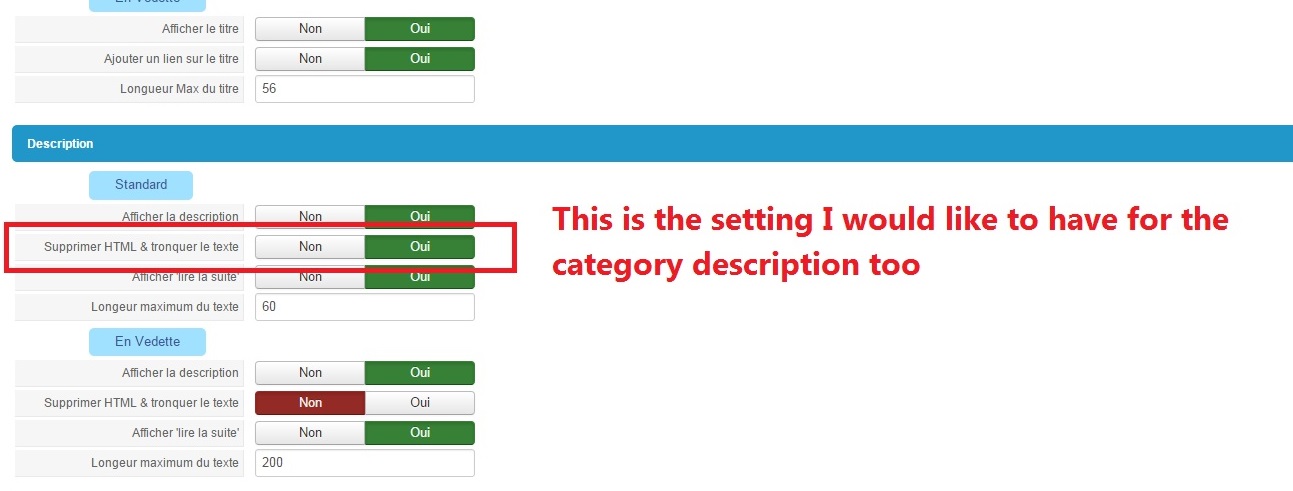
For the items description, the Universal content module offer the choice to keep the html formatting or not :


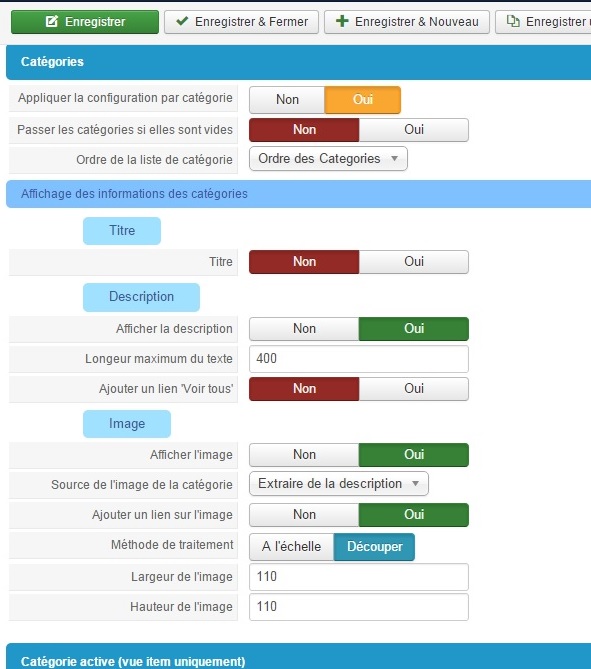
But for the category description, this choice do not exist :


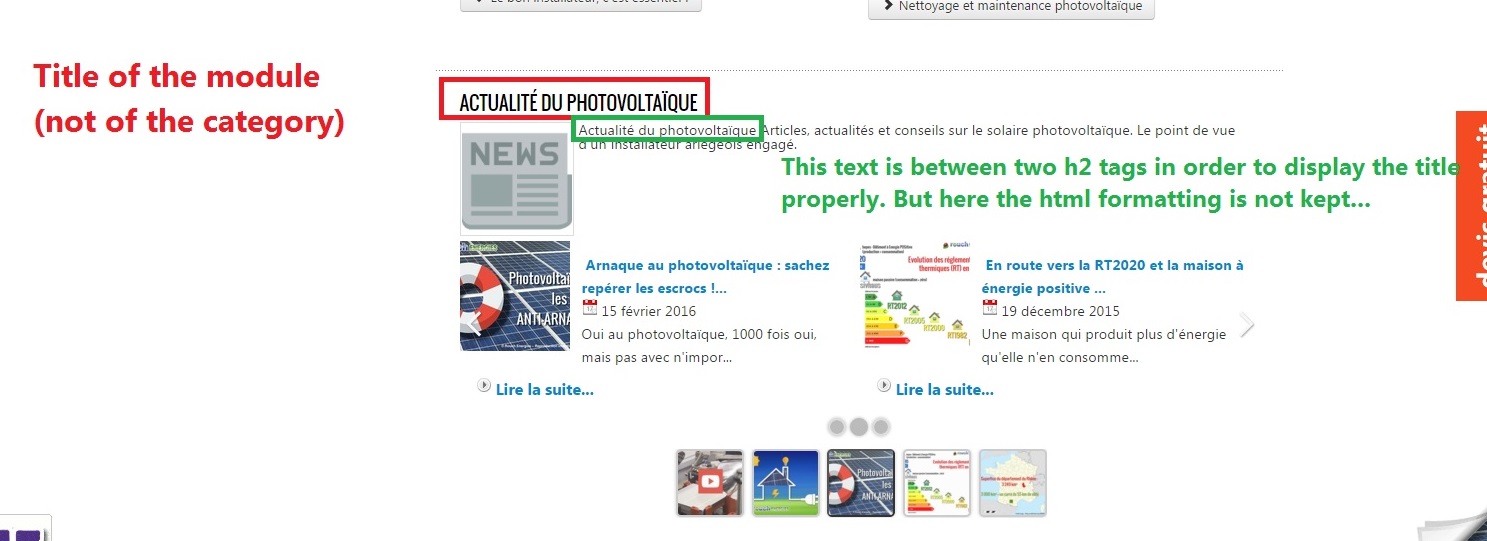
So in my case for example (I don't show the category title, and use a h2 tag in the description to display the title with the right Hn, all this html formatting is gone when I display the category under the universal content module.
Here is how the category description looks like under the universal content module :


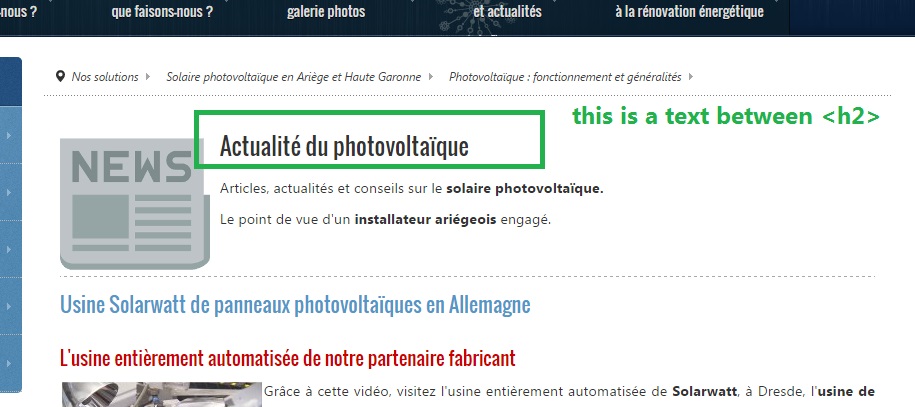
And this is how it should display (normal display of the category description) :


Is it more clear this way?

I hope you could add this feature in the next update ;)

Dare to dream, believe the unbelievable, never take no for an answer

Please Log in or Create an account to join the conversation.

More
10 years 1 month ago #60535 by ggppdk
Hello

hhmm, i see the usefulness of this, although you could / should do it by showing Title (and removing title from description) and using custom template file and / or use CSS to place category title

Do "save as" in the browser for these files:
raw.githubusercontent.com/FLEXIcontent/f...xicontent/helper.php
raw.githubusercontent.com/FLEXIcontent/f...mod_flexicontent.xml

then backup and replace files in:
modules/mod_flexicontent

set parameter and test


-- Flexicontent is Free but involves a big effort on our part.
Like the our support? (for a bug-free FC, despite having a long list of functions) Like the features? Like the ongoing development and future commitment to FLEXIcontent?
-- Add your voice to the FLEXIcontent JED listing with a 5-star review. Thanks!

Please Log in or Create an account to join the conversation.

More
10 years 1 month ago - 10 years 1 month ago #60546 by flodariege

ggppdk wrote: Hello

hhmm, i see the usefulness of this, although you could / should do it by showing Title (and removing title from description) and using custom template file and / or use CSS to place category title


I'm sure I should. And in fact, I've tried hard to do so, as you can see here :
www.flexicontent.org/forum/28-templates-...n-category-blog.html
But, even with your good advices (which worked perfectly for item titles), I could not get the way to make it work for categories's title. That's why I'm doing it this way.

ggppdk wrote: Do "save as" in the browser for these files:
raw.githubusercontent.com/FLEXIcontent/f...xicontent/helper.php
raw.githubusercontent.com/FLEXIcontent/f...mod_flexicontent.xml

then backup and replace files in:
modules/mod_flexicontent

set parameter and test

I'm not sure to understand what those files are supposed to do, but I'm gonna spend some time to get it. Thank you.

Flo

EDIT : I'm sure I'm never going to understand what those files are supposed to do :silly:
If you would just tell me a few words about it, it would help a lot :)

Dare to dream, believe the unbelievable, never take no for an answer
Last edit: 10 years 1 month ago by flodariege.

Please Log in or Create an account to join the conversation.

Moderators: vistamediajoomlacornerggppdk
Cookies user preferences
We use cookies to ensure you to get the best experience on our website. If you decline the use of cookies, this website may not function as expected.
Accept all
Decline all
Essential
These cookies are needed to make the website work correctly. You can not disable them.
Display
Accept
Analytics
Tools used to analyze the data to measure the effectiveness of a website and to understand how it works.
Google Analytics
Accept
Decline
Save