Ordering items in Joomla's Category Blog

More
9 years 1 month ago #66339 by sakis
Hi

I am using the "Category Blog" menu item to display FC items from a specific category.
Though i cannot sort them based on the ordering field of these items, although i used the category ordering as ordering option.

I read some older posts that i can use Joomla! ordering in my FC items, but i cannot find such a setting.
Any help is really appreciated

Joomla 3.6.5
FlexiContent 3.1.1

Please Log in or Create an account to join the conversation.

More
9 years 1 month ago #66348 by ggppdk
Hello

you can only set the "Joomla" ordering in items manager
you can not use in flexicontent view and in flexicontent universal content module

you will need to set and use the "FLEXIcontent" ordering in items manager

explanation because FLEXIcontent items (can) belong to multiple categories
items have an (different) ordering in every category that they participate


-- Flexicontent is Free but involves a big effort on our part.
Like the our support? (for a bug-free FC, despite having a long list of functions) Like the features? Like the ongoing development and future commitment to FLEXIcontent?
-- Add your voice to the FLEXIcontent JED listing with a 5-star review. Thanks!

Please Log in or Create an account to join the conversation.

More
9 years 1 month ago #66349 by ggppdk
Hello

i seem to have not answered your question
you want to use the ordering "Joomla category blog"

yes your can, to set it,
1. go to FLEXIcontent items manager,
2. (optionaly) filter by a category
3. click to order by ordering number
4. There is a selector inside the filters to select to use "Joomla ordering", change it from "FLEXIcontent" ordering to "Joomla" ordering


-- Flexicontent is Free but involves a big effort on our part.
Like the our support? (for a bug-free FC, despite having a long list of functions) Like the features? Like the ongoing development and future commitment to FLEXIcontent?
-- Add your voice to the FLEXIcontent JED listing with a 5-star review. Thanks!

Please Log in or Create an account to join the conversation.

More
9 years 1 month ago - 9 years 1 month ago #66373 by sakis
Thanks for the feedback.

I can find that field only when no category is selected.
Screenshot

If i select a specific category it's not there any longer.
Screenshot

All the items belong to 1 category.

Any idea?
Last edit: 9 years 1 month ago by sakis.

Please Log in or Create an account to join the conversation.

More
9 years 1 month ago #66415 by sakis
Is there something i am missing or can be considered a bug?

Please Log in or Create an account to join the conversation.

More
9 years 1 month ago #66418 by Rooney
I do not fully understand what you want to do. Here is what I do when I want to order items:

1. In category setting "Ordering in current category"
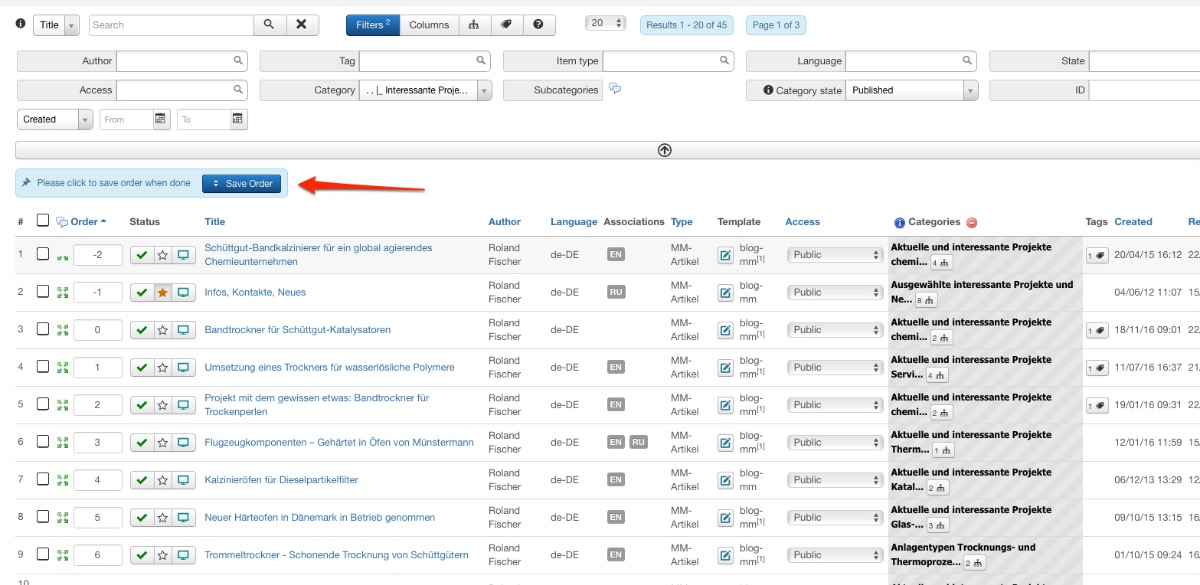
2. Make sure to order your items selecting the category (items of course have to be assigned to the category). Don't forget to save oder (image attached).
3. Make sure that you do not have overrides in the menu setting for the category blog view.

Rooney

Joomla! 3.9.24 and FC 3.3.9

Please Log in or Create an account to join the conversation.

More
9 years 1 month ago - 9 years 1 month ago #66419 by sakis
All this is done.

1. Items belong to a category
2. Items have ordering
3. I am using the Joomla/Articles > Category Blog menu item, to display items from a FC category
4. The ordering setting in that menu item (Article Order) is " Article Order"
5. In the front-end the items are sorted based on their ids and NOT based on the ordering they have
Last edit: 9 years 1 month ago by sakis.

Please Log in or Create an account to join the conversation.

More
9 years 1 month ago #66420 by ggppdk
Hello

About how to set Joomla article order it was explained above

Now about:

4. The ordering setting in that menu item (Article Order) is " Article Order"
5. In the front-end the items are sorted based on their ids and NOT based on the ordering they have


Maybe there is some bug
will review this


-- Flexicontent is Free but involves a big effort on our part.
Like the our support? (for a bug-free FC, despite having a long list of functions) Like the features? Like the ongoing development and future commitment to FLEXIcontent?
-- Add your voice to the FLEXIcontent JED listing with a 5-star review. Thanks!

Please Log in or Create an account to join the conversation.

More
9 years 1 month ago #66421 by ggppdk
Hello

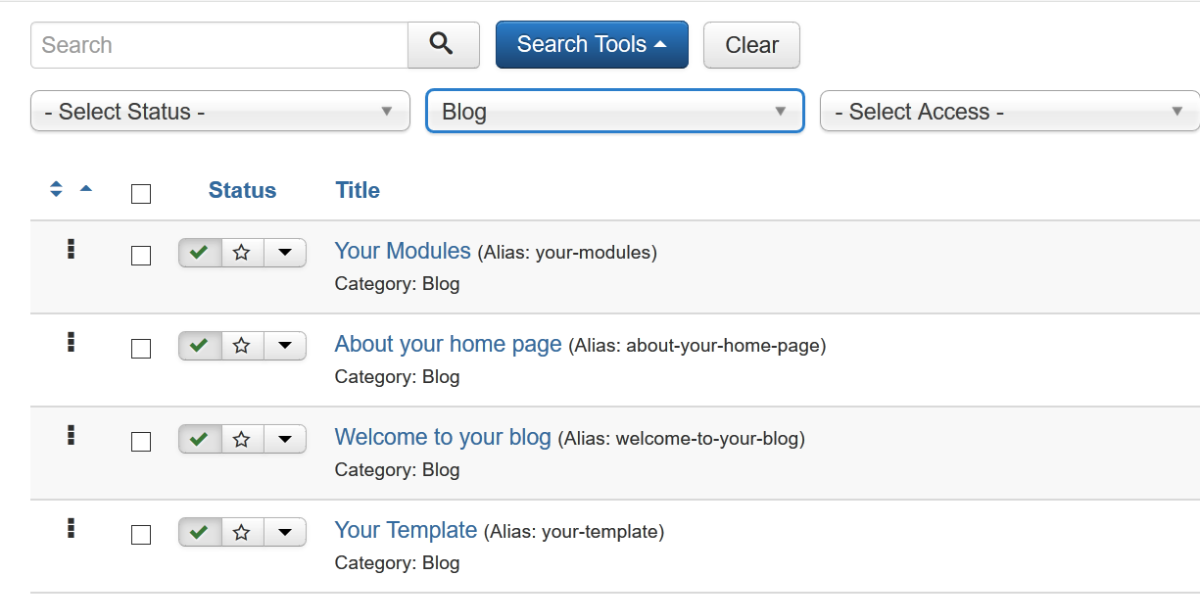
i tested by enabling (in flexicontent system plugin 'flexisystem', access to the Joomla articles manager

-- The Joomla order set by FLEXIcontent items manager is also shown to Joomla article manager

so far all is good
but when i created the Joomla Menu item 'Category blog', selected the specific category and then also set 'Article order'
i see that the order is not respected by the Joomla view

This seems like a Joomla bug and not something we can fix inside FLEXIcontent


-- Flexicontent is Free but involves a big effort on our part.
Like the our support? (for a bug-free FC, despite having a long list of functions) Like the features? Like the ongoing development and future commitment to FLEXIcontent?
-- Add your voice to the FLEXIcontent JED listing with a 5-star review. Thanks!

Please Log in or Create an account to join the conversation.

More
9 years 1 month ago #66422 by ggppdk
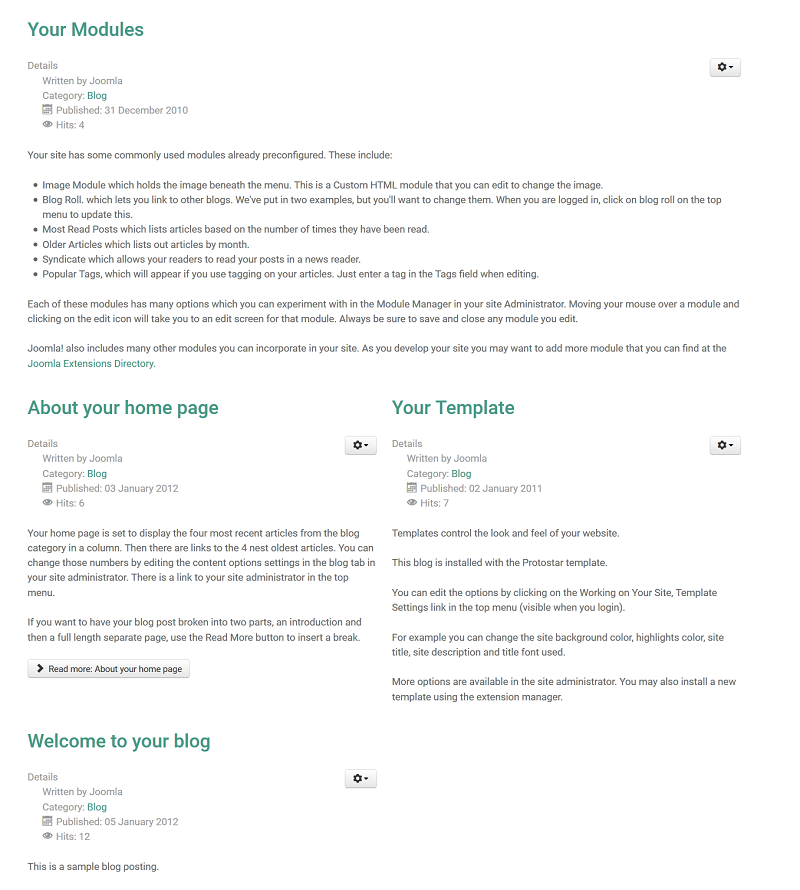
See this example (J3.6.5)
also i use Joomla DEBUG console to confirm that ordering is:
ORDER BY c.lft, a.ordering, a.created

so it seems like a Joomla issue


-- Flexicontent is Free but involves a big effort on our part.
Like the our support? (for a bug-free FC, despite having a long list of functions) Like the features? Like the ongoing development and future commitment to FLEXIcontent?
-- Add your voice to the FLEXIcontent JED listing with a 5-star review. Thanks!

Please Log in or Create an account to join the conversation.

Moderators: vistamediajoomlacornerggppdk
Cookies user preferences
We use cookies to ensure you to get the best experience on our website. If you decline the use of cookies, this website may not function as expected.
Accept all
Decline all
Essential
These cookies are needed to make the website work correctly. You can not disable them.
Display
Accept
Analytics
Tools used to analyze the data to measure the effectiveness of a website and to understand how it works.
Google Analytics
Accept
Decline
Save