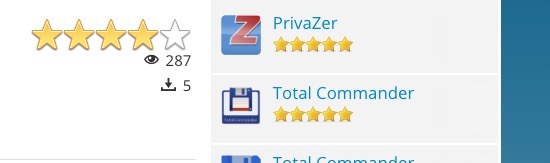
Different rating star size?

More
8 years 11 months ago #66385 by lipatovroman

micker wrote: sorry i realy want to help you but i can help if i can see


I sent you in PM url and access details.

I enabled large stars. I need small stars in module. Module have additional suffix "smallstars".

Thanks.

Please Log in or Create an account to join the conversation.

More
8 years 11 months ago - 8 years 11 months ago #66393 by ggppdk
Replied by ggppdk on topic Different rating star size?
Hello

use any CSS class of the module box to set a different background image
but you will also need CSS to override the width of the container !!

e.g.
Code:
.some_class_of_the_module .voting-row div.fcvote.fcvote-box-main > ul.fcvote_list > li.voting-links a:hover, .some_class_of_the_module .voting-row div.fcvote.fcvote-box-main > ul.fcvote_list > li.current-rating { background-image: url(images/star-medium.png) !important; } .some_class_of_the_module .voting-row div.fcvote.fcvote-box-main > ul.fcvote_list { height: 24px !important; width: 240px !important; } .some_class_of_the_module .voting-row div.fcvote.fcvote-box-main > ul.fcvote_list > li.voting-links a, .some_class_of_the_module .voting-row div.fcvote.fcvote-box-main > ul.fcvote_list > li.current-rating { height: 24px !important; line-height: 24px !important; } .some_class_of_the_module .voting-row div.fcvote > ul.fcvote_list > li.voting-links a, .some_class_of_the_module .voting-row div.fcvote > ul.fcvote_list > li.current-rating { height: 24px !important; line-height: 24px !important; }


This is because the width of the voting box that show the stars as background uses the configuration found in the voting field

NOTE: You may need more rules to override the size, that the ones mentioned above


-- Flexicontent is Free but involves a big effort on our part.
Like the our support? (for a bug-free FC, despite having a long list of functions) Like the features? Like the ongoing development and future commitment to FLEXIcontent?
-- Add your voice to the FLEXIcontent JED listing with a 5-star review. Thanks!
Last edit: 8 years 11 months ago by ggppdk.

Please Log in or Create an account to join the conversation.

More
8 years 11 months ago #66395 by micker
Replied by micker on topic Different rating star size?
reply twice by mp

FLEXIcontent is Free but involves a very big effort on our part.
Like the our support? (for a bug-free FC, despite being huge extension) Like the features? Like the ongoing development and future commitment to FLEXIcontent?
-- Add your voice to the FLEXIcontent JED listing reviews. Thanks![/size]

Please Log in or Create an account to join the conversation.

More
8 years 11 months ago - 8 years 11 months ago #66408 by lipatovroman
Ohhh...

I finally did it :ohmy:


Not so easy...

Here is code for other users:
Code:
.smallstars .voting-row div.fcvote.fcvote-box-main > ul.fcvote_list > li.voting-links a:hover, .smallstars .voting-row div.fcvote.fcvote-box-main > ul.fcvote_list > li.current-rating { background-image: url(../images/star-small.png) !important; } .smallstars .voting-row div.fcvote.fcvote-box-main > ul.fcvote_list { height: 16px!important; width: 80px!important; } .smallstars .voting-row div.fcvote.fcvote-box-main > ul.fcvote_list, .smallstars .voting-row div.fcvote.fcvote-box-main > ul.fcvote_list > li.voting-links a:hover, .smallstars .voting-row div.fcvote.fcvote-box-main > ul.fcvote_list > li.current-rating { background-image: url(../images/star-small.png)!important; } .smallstars .voting-row div.fcvote.fcvote-box-main > ul.fcvote_list { height: 16px !important; width: 80px !important; } .smallstars .voting-row div.fcvote.fcvote-box-main > ul.fcvote_list > li.voting-links a, .smallstars .voting-row div.fcvote.fcvote-box-main > ul.fcvote_list > li.current-rating { height: 16px !important; line-height: 16px !important; } .smallstars .voting-row div.fcvote > ul.fcvote_list > li.voting-links a, .smallstars .voting-row div.fcvote > ul.fcvote_list > li.current-rating { height: 16px !important; line-height: 16px !important; }


But I think, that this option should be in module and category settings.
So we can right in module choose stars size.

Thanks for help!
Last edit: 8 years 11 months ago by lipatovroman.

Please Log in or Create an account to join the conversation.

Moderators: vistamediajoomlacornerggppdk
Cookies user preferences
We use cookies to ensure you to get the best experience on our website. If you decline the use of cookies, this website may not function as expected.
Accept all
Decline all
Essential
These cookies are needed to make the website work correctly. You can not disable them.
Display
Accept
Analytics
Tools used to analyze the data to measure the effectiveness of a website and to understand how it works.
Google Analytics
Accept
Decline
Save