Navigation field - hide if empty

More
8 years 8 months ago #67732 by ggppdk
Hello

the pagination that you see in category view is controlled by
component / category parameters
it is not the FLEXIcontent field "Navigation (next / previous item)"

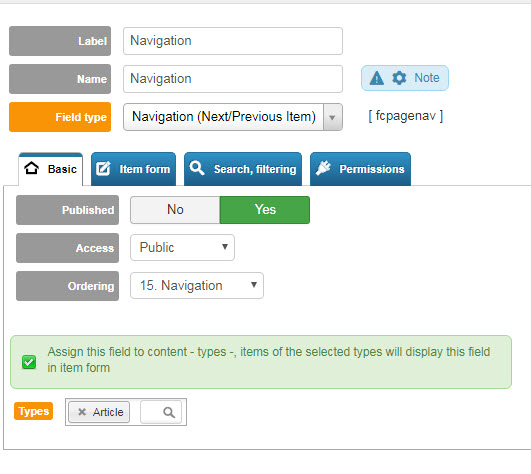
1. Create a new field of Field-Type: "Navigation (next / previous item)"
2. Inside its configuration select which Item Types (aka Content Types) will be using the field
3. In Item-Types manager , click to edit the layout of every type and add the navigation field in some position

when you view items of this type (item (details) view),
you will see a next / previous item link / image


-- Flexicontent is Free but involves a big effort on our part.
Like the our support? (for a bug-free FC, despite having a long list of functions) Like the features? Like the ongoing development and future commitment to FLEXIcontent?
-- Add your voice to the FLEXIcontent JED listing with a 5-star review. Thanks!

Please Log in or Create an account to join the conversation.

More
8 years 8 months ago - 8 years 8 months ago #67733 by Woodzy42
Thank you for the directions. I attached an image showing what I set.
The navigation works in some categories but, not all.
Can you tell me what I should investigate to get the others to work as well?

I also have an issue where using the "inherit parameters from" doesn't seem to work on one or more categories. I have been trying to build out everything in the same fashion, categories, articles, etc but, there are so many options that I may have overlooked one or more settings/ did something different but, I don't know what or where.

Thank you.
Last edit: 8 years 8 months ago by Woodzy42.

Please Log in or Create an account to join the conversation.

More
8 years 7 months ago #67850 by Woodzy42
repost of previously unanswered question.

Woodzy42 wrote: Thank you for the directions. I attached an image showing what I set.
The next/previous navigation works in some categories but, not all.
Can you tell me what I should investigate to get the others to work as well?

Thank you.

Please Log in or Create an account to join the conversation.

More
8 years 7 months ago #67888 by ggppdk
Hello

1. In component configuration enable "inherit categories from parent categories" (if not already like this)

2. Set all category parameters of some category AAA to "Use global"

3. Then use "copy parameters" button in Category Manager to copy parameters of category AAA to many other categories (i do not mean the "copy parameter" inside category form, i mean the button in category manager)

4. Edit component parameters or The PARENT category of some category subtree (as deep as you have ot) and set its parameters as desired

the children categories will inherit parameters from their parents and component


-- Flexicontent is Free but involves a big effort on our part.
Like the our support? (for a bug-free FC, despite having a long list of functions) Like the features? Like the ongoing development and future commitment to FLEXIcontent?
-- Add your voice to the FLEXIcontent JED listing with a 5-star review. Thanks!

Please Log in or Create an account to join the conversation.

Moderators: vistamediajoomlacornerggppdk
Cookies user preferences
We use cookies to ensure you to get the best experience on our website. If you decline the use of cookies, this website may not function as expected.
Accept all
Decline all
Essential
These cookies are needed to make the website work correctly. You can not disable them.
Display
Accept
Analytics
Tools used to analyze the data to measure the effectiveness of a website and to understand how it works.
Google Analytics
Accept
Decline
Save