how to configure autopublishing for a frontend form?

More
7 years 9 months ago #72917 by chrisgraf
I have a form where registered users should be able to automatically add items to a category. Currently the form shows the state field with the information "Please note, that any changes that you make to this content will need to be reviewed and approved" and a notice at the top of the form says "Please note that your new content will be reviewed and accepted by a site administrator". I want to get rid of both notifications and also the the state should be set to published by default. How can this be done?

PS: the permission to edit own's state is set to allowed.

Please Log in or Create an account to join the conversation.

More
7 years 9 months ago #72930 by micker
you can hide notice in globl config item form tab
or create a simple override language via joomla admin

FLEXIcontent is Free but involves a very big effort on our part.
Like the our support? (for a bug-free FC, despite being huge extension) Like the features? Like the ongoing development and future commitment to FLEXIcontent?
-- Add your voice to the FLEXIcontent JED listing reviews. Thanks![/size]

Please Log in or Create an account to join the conversation.

More
7 years 9 months ago #73072 by chrisgraf
Maybe I was unclear in my initial post .. I want that the state is automatically set to "published" and that the state field is not displayed in the form. How can I do this?

Please Log in or Create an account to join the conversation.

More
7 years 9 months ago #73075 by micker
that is in global config you can set initial state in workflow tab

FLEXIcontent is Free but involves a very big effort on our part.
Like the our support? (for a bug-free FC, despite being huge extension) Like the features? Like the ongoing development and future commitment to FLEXIcontent?
-- Add your voice to the FLEXIcontent JED listing reviews. Thanks![/size]

Please Log in or Create an account to join the conversation.

More
7 years 9 months ago #73079 by chrisgraf
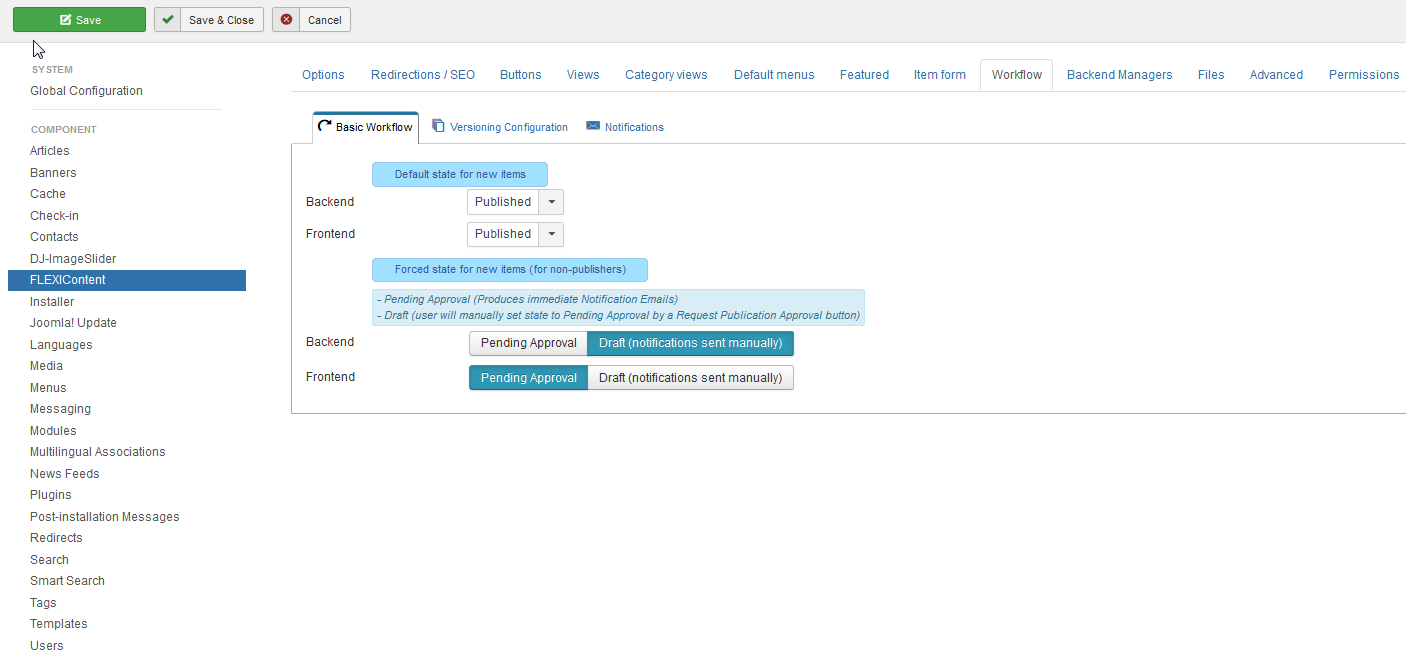
Ok, this parameter seems to be set correctly:


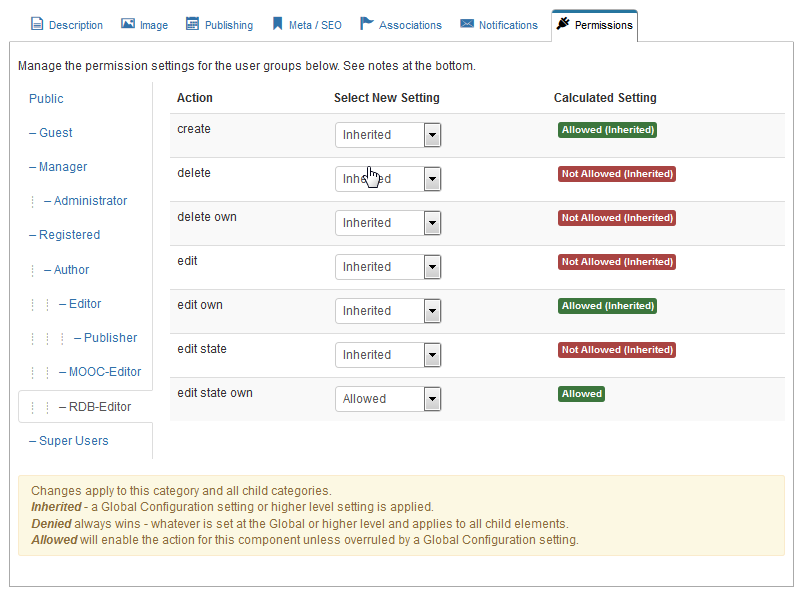
Also the user group which adds items in this form has the permission to change it's state:


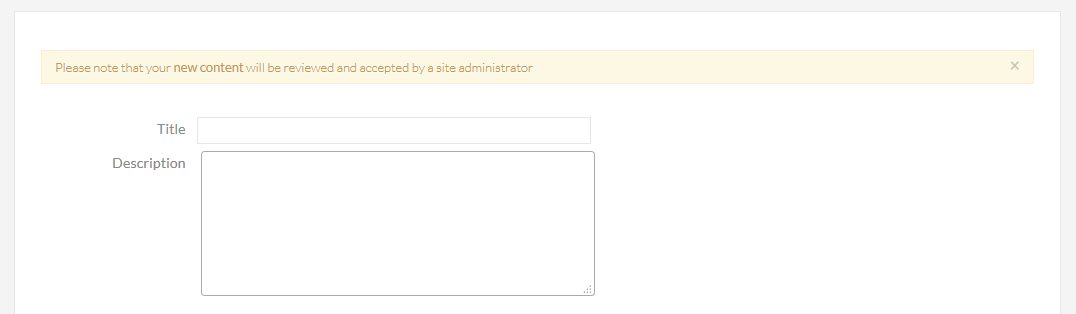
Still the form looks like this:


And the item is stored in the state Draft :: Unpublished...

Do you have any idea where I could have misconfigured something?

Please Log in or Create an account to join the conversation.

More
7 years 9 months ago #73080 by micker
did you check state in menu link for submit ?

FLEXIcontent is Free but involves a very big effort on our part.
Like the our support? (for a bug-free FC, despite being huge extension) Like the features? Like the ongoing development and future commitment to FLEXIcontent?
-- Add your voice to the FLEXIcontent JED listing reviews. Thanks![/size]

Please Log in or Create an account to join the conversation.

More
7 years 9 months ago #73081 by chrisgraf
Sorry, which menu link? I am not using any menu. I use a category filter page where there is an "Add" Button which then shows the form .. at the end of the form there is the submit button..

Please Log in or Create an account to join the conversation.

More
7 years 9 months ago - 7 years 9 months ago #73083 by ggppdk
Hello

For using auto-publishing and a few other things,

- it is a requirement that you create a submit menu item

[hr]

Then you can the select it as default submit menu item in component parameters

"Category views" TAB
"Lists: Header" TAB
"Buttons" TAB

parameter: Submit menu item

[hr]

Then inside configuration of a category (and thus for its child categories which inherit parameters from parent categories),
you can the select to use a different submit menu item, configure again

"Header" TAB
"Page Buttons" Section

parameter: Submit menu item


-- Flexicontent is Free but involves a big effort on our part.
Like the our support? (for a bug-free FC, despite having a long list of functions) Like the features? Like the ongoing development and future commitment to FLEXIcontent?
-- Add your voice to the FLEXIcontent JED listing with a 5-star review. Thanks!
Last edit: 7 years 9 months ago by ggppdk.

Please Log in or Create an account to join the conversation.

More
7 years 9 months ago #73084 by chrisgraf
thanks a lot for the detailed description! Sorry, that I somehow completely missed this part! It now works!

Please Log in or Create an account to join the conversation.

More
7 years 9 months ago - 7 years 9 months ago #73189 by micker
cool think to edit your first post and use checked image for post (= solved)
regards

FLEXIcontent is Free but involves a very big effort on our part.
Like the our support? (for a bug-free FC, despite being huge extension) Like the features? Like the ongoing development and future commitment to FLEXIcontent?
-- Add your voice to the FLEXIcontent JED listing reviews. Thanks![/size]
Last edit: 7 years 9 months ago by ggppdk.

Please Log in or Create an account to join the conversation.

Moderators: vistamediajoomlacornerggppdk
Cookies user preferences
We use cookies to ensure you to get the best experience on our website. If you decline the use of cookies, this website may not function as expected.
Accept all
Decline all
Essential
These cookies are needed to make the website work correctly. You can not disable them.
Display
Accept
Analytics
Tools used to analyze the data to measure the effectiveness of a website and to understand how it works.
Google Analytics
Accept
Decline
Save