Code:
<?php
/* + STRUCTURED DATA GOOGLE
======================================================================*/
$structured_data = '';
?>
<?php if ($show_schema == 1) : ?>
<?php if (($microdata_itemtype == 'Article')||($microdata_itemtype == 'NewsArticle')||($microdata_itemtype == 'BlogPosting')): ?>
<?php
if ( $json_description != '' || $imageURL != '' )
{
$structured_data .= '<script type="application/ld+json">
{
"@context": "http://schema.org",
"@type": "' . $microdata_itemtype . '",
"mainEntityOfPage": {
"@type": "WebPage",
"@id": "' . JURI::current() . '"
},
"headline": ' . json_encode( $item->title, JSON_UNESCAPED_UNICODE ) . ',
' . $JSONimageURL . '
' . $datePublished . '
' . $dateModified . '
"author": {
"@type": "Person",
"name": ' . json_encode( $author, JSON_UNESCAPED_UNICODE ) . '
},
"publisher": {
"@type": "Organization",
"name": ' . json_encode( $company_brand_name, JSON_UNESCAPED_UNICODE ) . ',
"logo": {
"@type": "ImageObject",
"url": "' . $company_logo_image_name . '"
}
},
"description": ' . json_encode( $json_description, JSON_UNESCAPED_UNICODE ) . '
}
</script>';
}
?>
<?php endif; ?>
<?php endif; ?>
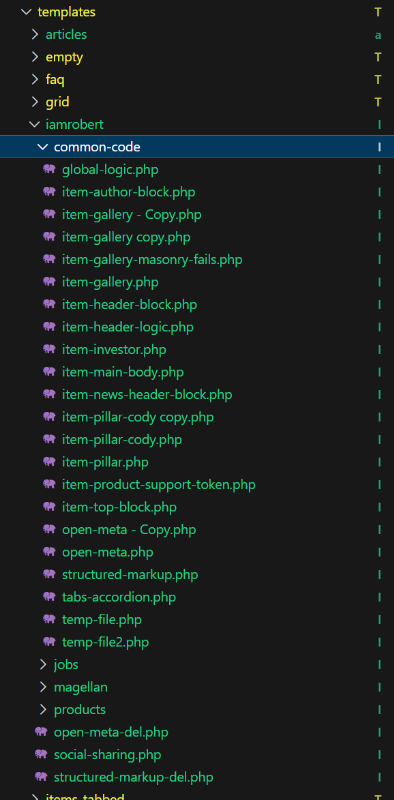
require_once( JPATH_SITE . DS . 'components' . DS . 'com_flexicontent' . DS . 'templates' . DS . 'iamrobert' . DS . 'common-code' . DS . 'global-logic.php' );
Code:
<?php
defined( '_JEXEC' )or die( 'Restricted access' );
/* + OPEN GRAPH META TAGSSOCIAL SHARES
https://blog.kissmetrics.com/open-graph-meta-tags/
https://moz.com/blog/meta-data-templates-123
-----------------------------------------------------------------------
REMEMBER TO SET IMAGE FIELD NUMBER line 81
======================================================================
*/
$document = JFactory::getDocument();
$app = JFactory::getApplication();
//TEMPLATE PATH
$tpath = JURI::base(true).'/templates/'.$app->getTemplate().'/';
//$app = JFactory::getApplication('site');
$template = $app->getTemplate(true);
/* + COMPANY NAME + LOGO = Set in Joomla Site Template
======================================================================*/
//
$company_brand_name = $template->params->get('company_brand_name');
$company_logo_image_name = JURI::base() . $template->params->get('company_logo_image_name');
if (isset($company_brand_name )) {
if ($company_brand_name != 'NAME') {
$company_brand_name = $template->params->get('company_brand_name');
} else if ($company_brand_name == 'NAME') {
$company_brand_name = JFactory::getConfig()->get( 'sitename' );
}
}
//SITENAME
$document->setMetaData( 'og:site_name', "$company_brand_name", 'property' );
//AUTHOR
$author = $this->item->author;
$datePublished = "";
//PUBLISHED DATE
if(!empty ($this->item->created)) {
$datePublished = date('Y-m-d',strtotime($this->item->created));
$datePublished = '"datePublished: "'.$datePublished.'",';
}
$dateModified = "";
//MODIFIED DATE
if(!empty ($this->item->modified)) {
$dateModified = date('Y-m-d',strtotime($this->item->modified));
$dateModified = '"dateModified: "'.$dateModified.'",';
}
//SITE URL:
$siteURL = 'http' . ( empty( $_SERVER[ 'HTTPS' ] ) ? '' : 's' ) . '://' . $_SERVER[ 'SERVER_NAME' ];
// GET OPENGRAPH TYPE:
//https://developers.facebook.com/docs/reference/opengraph/
$fb_og_type = $this->params->get( 'fb_og_type' );
//GET TITLE
$page_title = $document->getTitle();
//GET CURRENT PAGE URL;
$current_page_url = JURI::current();
//$document->setMetaData( 'og:site_name', "$company_name", 'property' );
//SET URL
$document->setMetaData( 'og:url', "$current_page_url", 'property' );
$document->setMetaData( 'og:type', "$fb_og_type", 'property' );
$document->setMetaData( 'twitter:card', "summary_large_image" );
//SET TITLE
$document->setMetaData( 'og:title', "$page_title", 'property' );
$document->setMetaData( 'twitter:title', "$page_title" );
/* + SET DESCRIPTION
======================================================================*/
//SET INTROTEXT LENGTH
$intro_text_cut_text = $this->params->get( 'intro_text_cut_text', '160' );
$intro_text = JHtmlString::truncate( $item->introtext, $intro_text_cut_text, true, false );
$intro_text = str_replace( '...', '', $intro_text );
//GET META DESCRIPTION:
$meta_description = $document->getMetaData( "description" );
$json_description = '';
if (!empty($_mp=$menu->params->get('menu-meta_description'))) {
//+ GET MENU META DESCRIPTION
$document->setDescription( $_mp );
$document->setMetaData( 'twitter:description', "$_mp" );
$document->setMetaData( 'og:description', "$_mp", 'property' );
$document->setMetaData( 'description', "$_mp", 'itemprop' );
//
$json_description = $_mp;
} elseif ( !empty( $item->metadesc ) ) {
//+ GET ITEM META DESCRIPTION
$meta_item = htmlspecialchars_decode($item->metadesc);
$document->setDescription( $meta_item );
$document->setMetaData( 'twitter:description', "$meta_item" );
$document->setMetaData( 'og:description', "$meta_item", 'property' );
$document->setMetaData( 'description', "$meta_item", 'itemprop' );
$json_description = $meta_item;
} elseif ( !empty( $intro_text ) ) {
//+ GET INTRO TEXT META DESCRIPTION
$document->setDescription("$intro_text");
$document->setMetaData( 'twitter:description', "$intro_text" );
$document->setMetaData( 'og:description', "$intro_text", 'property' );
$document->setMetaData( 'description', "$intro_text", 'itemprop' );
$json_description = $intro_text;
} elseif ( !empty( $meta_description ) ) {
//+ GET SIDE META DESCRIPTION
$document->setDescription("$meta_description");
$document->setMetaData( 'twitter:description', "$meta_description" );
$document->setMetaData( 'og:description', "$meta_description", 'property' );
$document->setMetaData( 'description', "$meta_description", 'itemprop' );
$json_description = $meta_description;
}
/* + SET IMAGE FIELD NUMBER
======================================================================*/
$imagefield = 40;
$imageURL = '';
$JSONimageURL = '';
if ( isset( $item->fieldvalues[ $imagefield ] ) ) {
if(isset($this->item->fieldvalues[$this->item->fields['image']->id])) {
$imageURL = $siteURL . $item->fields[ 'image' ]->{"display_large_src"};
$document->setMetaData( 'twitter:image', "$imageURL" );
$document->setMetaData( 'og:image', "$imageURL", 'property');
$JSONimageURL =
'"image": ["'.$imageURL.'"],';
}
}
?>