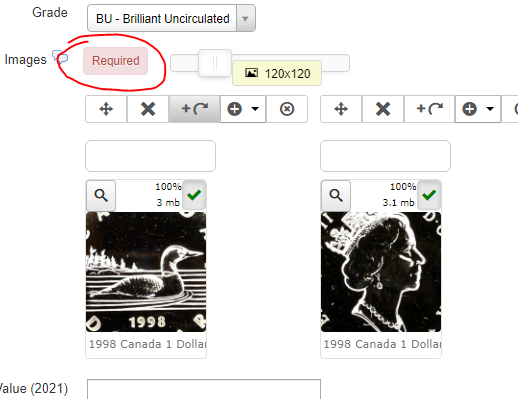
"Required" notice when trying to upload multiple images

More
4 years 5 months ago #80922 by dan40
I had a crash recently, but was able to keep my database for my website, and re-import it using phpmyadmin. There hadn't been any changes to it since the last time I uploaded anything to it.  However, when I tried to upload images to my article as I have always done, I now get a "Required" box pop open to the left of where I have uploaded my images and I'm not sure how to fix it.  I have thousands of records in my database... if I could only figure this out, then I won't have to delete and re-upload all of my images and basically have to do everything from scratch again. I set IUSR to have "modify" permissions, but this doesn't seem to help.  Attached is an image of where I have uploaded my images and when I click "Add and Close" at the bottom of the Article form, that's what I get.  Any help would be truly accepted!  Thanks!

Please Log in or Create an account to join the conversation.

More
4 years 5 months ago #80923 by micker
check your image field configuration in editing tab you have an option required try to disable it

FLEXIcontent is Free but involves a very big effort on our part.
Like the our support? (for a bug-free FC, despite being huge extension) Like the features? Like the ongoing development and future commitment to FLEXIcontent?
-- Add your voice to the FLEXIcontent JED listing reviews. Thanks![/size]

Please Log in or Create an account to join the conversation.

More
4 years 5 months ago #80924 by dan40
Thanks, I did that, and it took me to one of those generic Joomla 'not found' pages.

Please Log in or Create an account to join the conversation.

More
4 years 5 months ago #80925 by micker
Sorry i dont understand Can you put a link or a screenshots ?

FLEXIcontent is Free but involves a very big effort on our part.
Like the our support? (for a bug-free FC, despite being huge extension) Like the features? Like the ongoing development and future commitment to FLEXIcontent?
-- Add your voice to the FLEXIcontent JED listing reviews. Thanks![/size]

Please Log in or Create an account to join the conversation.

More
4 years 5 months ago - 4 years 5 months ago #80927 by dan40
Micker, I sent you a PM a few days ago but you never responded. I'm still having this issue. Please contact me in a PM and I'll give you access to my backend if you want a look at it. I can't move forward on my site until this is resolved. We can even Teams or Zoom if you prefer. Thanks!
Last edit: 4 years 5 months ago by dan40.

Please Log in or Create an account to join the conversation.

More
4 years 5 months ago - 4 years 5 months ago #80928 by dan40
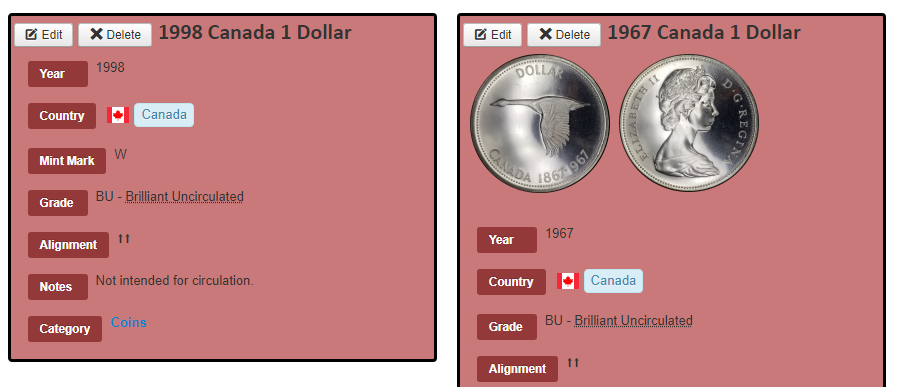
When I remove the "Required" attribute from the Image field, I end up with an article submission with no images, even though I know I uploaded the images.  And yet when I turn the "Required" field back on, I can't submit the form without images.  I'd like to keep it a required field if I can. If I change the "name" of the Field, all of my images disappear, leaving only the article without the images, until I put the old name back in the name field.  :(  I also made a copy of the existing Image field, and it does the same thing but doesn't keep the images because you can't duplicate the "name" attribute.  You can see this on my site, coincollection.dansmith.ca .
Last edit: 4 years 5 months ago by dan40.

Please Log in or Create an account to join the conversation.

More
4 years 5 months ago #80931 by micker
hello you can send me access here, confidential tag (mp doesn't send any notification component bug)

FLEXIcontent is Free but involves a very big effort on our part.
Like the our support? (for a bug-free FC, despite being huge extension) Like the features? Like the ongoing development and future commitment to FLEXIcontent?
-- Add your voice to the FLEXIcontent JED listing reviews. Thanks![/size]

Please Log in or Create an account to join the conversation.

More
4 years 5 months ago #80944 by dan40
Thanks, see below.

This message contains confidential information


Please Log in or Create an account to join the conversation.

More
4 years 5 months ago - 4 years 5 months ago #80948 by ggppdk
Hello

i have modified the temporary folder (Joomla configuration) of your website because i could not install extensions

So both item form is working and installing extension are working now
... meaning the "required" flag will be auto-cleared if you upload a file (i have enabled required in the field)

Regarding the error, here is an explanation
we get this error after file has been uploaded
0 DirectoryIterator::__construct(C:\Windows\temp\fc_fileselement,C:\Windows\temp\fc_fileselement): Access is denied. (code: 5)

Because of the above error, server response is broken and JS code that "clears" the required flag was not executed !


-- Flexicontent is Free but involves a big effort on our part.
Like the our support? (for a bug-free FC, despite having a long list of functions) Like the features? Like the ongoing development and future commitment to FLEXIcontent?
-- Add your voice to the FLEXIcontent JED listing with a 5-star review. Thanks!
Last edit: 4 years 5 months ago by ggppdk.

Please Log in or Create an account to join the conversation.

More
4 years 5 months ago - 4 years 5 months ago #80949 by dan40
Oh my goodness, you guys are awesome! Brilliant! This was bugging me like you wouldn't believe! I can upload images again!

Where do I send your cheque? :)

Thank you SO MUCH!
Last edit: 4 years 5 months ago by dan40.

Please Log in or Create an account to join the conversation.

Moderators: vistamediajoomlacornerggppdk
Cookies user preferences
We use cookies to ensure you to get the best experience on our website. If you decline the use of cookies, this website may not function as expected.
Accept all
Decline all
Essential
These cookies are needed to make the website work correctly. You can not disable them.
Display
Accept
Analytics
Tools used to analyze the data to measure the effectiveness of a website and to understand how it works.
Google Analytics
Accept
Decline
Save