Flexi content and website template

More
12 years 8 months ago #37606 by makeitalia
Hi,
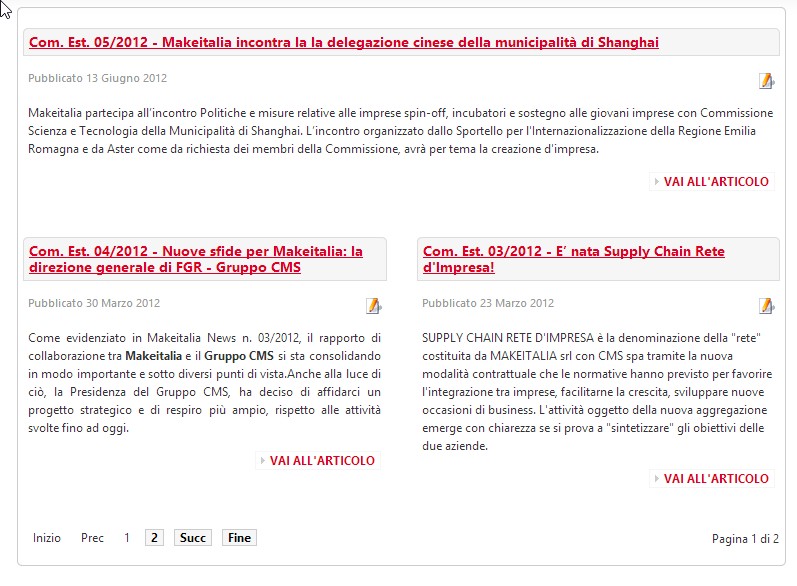
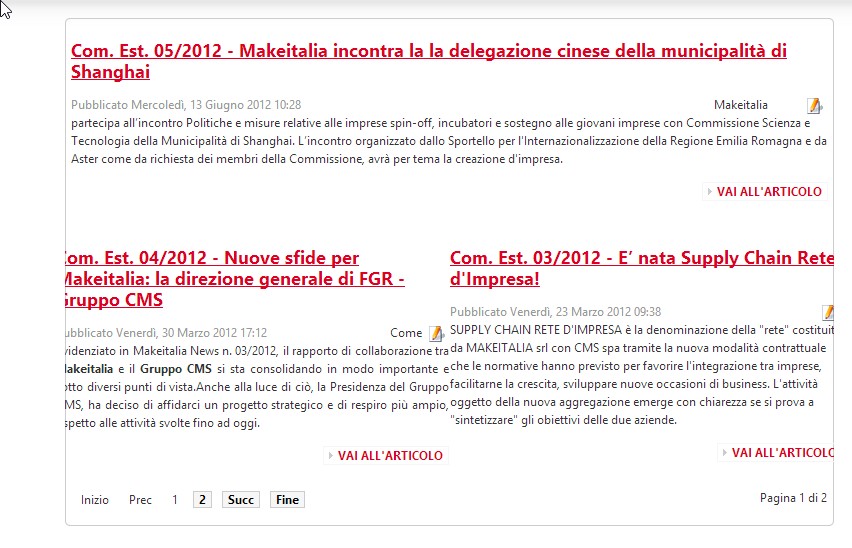
flexicontent is a great component, it does everything i need, but i have a big problem: when i install flexicontent, my content are displayed in a wrong way, with text going outside of its space and other css properties are broken.

To explain better, look at the images i added.
One shows the way articles were shown before i installed flexi, the other shows how i see articles with flexi installed (on joomla 2.5).

I've seen there's a configuration to enable or disable flexi css, but this doesn't change anything.

Is there a simple way to solve this problem? I've looked at every configuration but i didn't find a solution.

Thank you for your work and your support.

Federico

Please Log in or Create an account to join the conversation.

More
12 years 8 months ago #37607 by ggppdk
Hello

- in your site,
the component area + modules positions, are shaped and style by Joomla template

- when using FLEXIcontent the component area is shaped and style by FLEXIcontent template layout

i see that you posted pictures of category view,
please note that your categories by default they use the 'blog' category layout

1. so edit your category , and if you want to stick to 'blog' category layout at bottom right you can set its parameters to shape it.
at this area you can configure your images either extra from description or use an image field

2. all FC templates have positions to assign fields to templates go to template manager and edit the category layouyt
it looks like you are using the 'blog' template


-- Flexicontent is Free but involves a big effort on our part.
Like the our support? (for a bug-free FC, despite having a long list of functions) Like the features? Like the ongoing development and future commitment to FLEXIcontent?
-- Add your voice to the FLEXIcontent JED listing with a 5-star review. Thanks!

Please Log in or Create an account to join the conversation.

More
12 years 8 months ago #37611 by micker
think to read tutorial and faq in our site ;)

FLEXIcontent is Free but involves a very big effort on our part.
Like the our support? (for a bug-free FC, despite being huge extension) Like the features? Like the ongoing development and future commitment to FLEXIcontent?
-- Add your voice to the FLEXIcontent JED listing reviews. Thanks![/size]

Please Log in or Create an account to join the conversation.

More
12 years 8 months ago #37616 by makeitalia
Hi,
thank you for your answer. It's clear for me how to manage the template configuration that you described which i can use to change the columns, add image or other fields to the blog template of the category.
I think my problem is connected to the different css of flexi that overrides in some way the one of the com_content, changing the quality of the view: as you can see in the image, the text goes outside of the space and the background (light gray)of the titles has disappeared. I need to replicate the same structure/css of the original com_content and this is what i'm not able to do. Is it necessary to modify the stylesheets of flexi?

Thank you
Federico

Please Log in or Create an account to join the conversation.

More
12 years 8 months ago #37619 by Rooney
Hi,
actually FlexiContent adds own CSS classes and they might override the Joomla template ones. Please read here for the best way to modify css classes: www.flexicontent.org/documentati ... ntent.html
Rooney

Joomla! 3.9.24 and FC 3.3.9

Please Log in or Create an account to join the conversation.

More
12 years 8 months ago #37721 by makeitalia
Hi,
i tried this solution descripted in your link(created joomla_folder/templates/mytemplate/css/flexicontent.css with my css code) but it does't seem to have any effect (i've also deleted the cache to be sure that it doesn't load old files).

Have you got any other suggestions?

Thank you very much
Federico

Please Log in or Create an account to join the conversation.

More
12 years 8 months ago #37722 by Rooney
Can you have a look in the header (source code) if the css file is actually loaded?
If not you have to include the file in the template!
Rooney

Joomla! 3.9.24 and FC 3.3.9

Please Log in or Create an account to join the conversation.

More
12 years 8 months ago #37723 by ggppdk
Hello,
whether a CSS rule is applied is not relevant to FLEXIcontent ...

please make sure,
1. you rule is of higher precedence
e.g. copy a the FC CSS rule

#flexicontent .someclass {...}
and make it:
body #flexicontent .someclass {...}

2. Make sure you have no syntax error

3. Make sure you target HTML Tag is correct
e.g. correct is
#flexicontent .someclass1
and not
#flexicontent .someclass2

-- To examine if your CSS rule is applied or not use firebug or any other similar tool, just take some minutes to watch a firebug tutorial video, online

Regards


-- Flexicontent is Free but involves a big effort on our part.
Like the our support? (for a bug-free FC, despite having a long list of functions) Like the features? Like the ongoing development and future commitment to FLEXIcontent?
-- Add your voice to the FLEXIcontent JED listing with a 5-star review. Thanks!

Please Log in or Create an account to join the conversation.

More
12 years 8 months ago #37726 by makeitalia
Hi,
in the source code of the page i don't see flexicontent css (i don't know how it overrides the default template). The website uses a template based on JAT3 so it's not so simple for me to understand it very well.
I put this code (after reading some documentation about it) in the configuration in the admin panel:
<?xml version="1.0" encoding="utf-8"?>
<layout name="desktop">
<!--Extra css load for this layout-->
<stylesheets>
<file>css/flexicontent.css</file>
</stylesheets>

<blocks name="top" style="xhtml">
<block name="absolute" type="modules" style="raw">absolute</block>
<block name="top-panel" type="modules" style="raw" main-inner="1">top-panel</block>
<block name="header" type="header" main-inner="1"></block>
<block name="mainnav" type="mainnav" main-inner="1"></block>
<block name="cpanel" type="usertools/cpanel"></block>
<block name="topsl" type="spotlight" main-inner="1">user1,user2,user3,user4,user5</block>
</blocks>
<blocks name="middle" colwidth="20">
<block name="left1">left</block>
<block name="right1" style="jarounded">right</block>
</blocks>
<blocks name="bottom" style="xhtml">
<block name="botsl" type="spotlight" main-inner="1">user6,user7,user8,user9,user10</block>
<block name="navhelper" type="navhelper" main-inner="1"></block>
<block name="footer" type="footer"></block>
</blocks>
</layout>

The piece of code i added is in bold.
The file flexicontent.css i added is in the css folder in the template folder (as the instructions suggest).

In the source code of the page(right click on the page->show source code) i don't see the original flexicontent css too. So i can't understand how it works in modifying the webite template, moving text out of its place and changing the content header style.

It can't be an error in html because i have another backup installation with the same content (the only difference is that one has flexicontent installed, as you can see in the images i posted at the beginning of this topic).

I don't know what to do, i've tried in many ways to solve this problem but i didn't find the solution. :?

If you have any other suggestion i'll try it.
Thanks for your help.
Federico

Please Log in or Create an account to join the conversation.

More
12 years 8 months ago #37728 by ggppdk
Hello
here are detailed instructions:

[url=
www.flexicontent.org/documentati ... ntent.html ]How to customize CSS styles of FLEXIcontent[/url]

Regards


-- Flexicontent is Free but involves a big effort on our part.
Like the our support? (for a bug-free FC, despite having a long list of functions) Like the features? Like the ongoing development and future commitment to FLEXIcontent?
-- Add your voice to the FLEXIcontent JED listing with a 5-star review. Thanks!

Please Log in or Create an account to join the conversation.

Moderators: vistamediajoomlacornerggppdk
Cookies user preferences
We use cookies to ensure you to get the best experience on our website. If you decline the use of cookies, this website may not function as expected.
Accept all
Decline all
Essential
These cookies are needed to make the website work correctly. You can not disable them.
Display
Accept
Analytics
Tools used to analyze the data to measure the effectiveness of a website and to understand how it works.
Google Analytics
Accept
Decline
Save