[TESTED, works] Filters : sliders[range] seem not to work (v 3.0.5)

More
10 years 6 months ago - 10 years 6 months ago #56464 by woluweb
Hi !

I was quite excited to use the new Sliders possibility for the filters, introduced in v 3.0.5 !

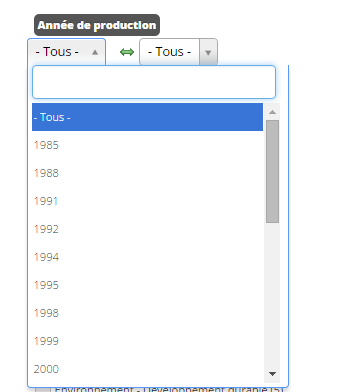
I used to have Dropdown [range] (and they work on my site), but Sliders [range] are definitely a better solution.

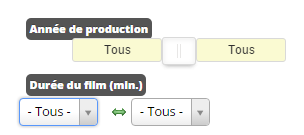
Still, I have tested and for some reason it seems not to work...

Attached are 3 screenshots :
1. dropdown working
2. sliders not working
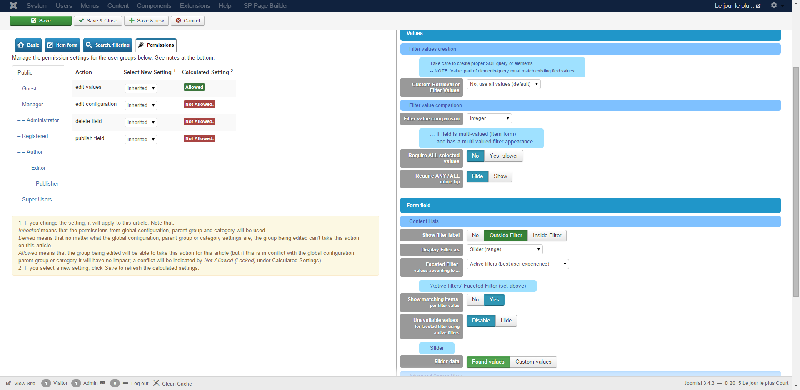
3. settings of the field in the backend

Is it a problem of my settings ? Or a more general problem ?
Txs !
Last edit: 10 years 6 months ago by ggppdk.

Please Log in or Create an account to join the conversation.

More
10 years 6 months ago #56469 by ggppdk
Hello

have tested with a few fields
which type of field are you using?

the full page picture is not visible, (the resolution of forum pictures is limited)


-- Flexicontent is Free but involves a big effort on our part.
Like the our support? (for a bug-free FC, despite having a long list of functions) Like the features? Like the ongoing development and future commitment to FLEXIcontent?
-- Add your voice to the FLEXIcontent JED listing with a 5-star review. Thanks!

Please Log in or Create an account to join the conversation.

More
10 years 6 months ago #56475 by woluweb
sorry, I was not aware that the image uploads were so drastically reduced ! :-)
Here is a proper full size screenshot :
screenpresso.com/=7TjTd

As you can see on the screenshot, it is a TEXT field
(here is it used for showing years, namely 2015 2014 2013 etc, but I also use another TEXT field to show for example the duration of the films : 1 2 3 4 5 (minutes)

Txs Georgios ! :-)

Please Log in or Create an account to join the conversation.

More
10 years 6 months ago #56480 by micker
j'ai changé les reglages des images pour le forum
on devrait y voir plus clair

FLEXIcontent is Free but involves a very big effort on our part.
Like the our support? (for a bug-free FC, despite being huge extension) Like the features? Like the ongoing development and future commitment to FLEXIcontent?
-- Add your voice to the FLEXIcontent JED listing reviews. Thanks![/size]

Please Log in or Create an account to join the conversation.

More
10 years 6 months ago #56497 by ggppdk
Hello

i tested and it worked,

- also note that there is 2 set of parameters
a. category, category-like views
b. search view

the pictute is showing the category, category-like views (content lists)

you may also post (or send via PM a link to the frontend),
i do not know by looking at the picture , if the slider is empty or is displaying as a single slider or other


-- Flexicontent is Free but involves a big effort on our part.
Like the our support? (for a bug-free FC, despite having a long list of functions) Like the features? Like the ongoing development and future commitment to FLEXIcontent?
-- Add your voice to the FLEXIcontent JED listing with a 5-star review. Thanks!

Please Log in or Create an account to join the conversation.

More
10 years 6 months ago #56519 by ggppdk
Hello

your page has HTML TAGS misclosed,

misclosed tags will have unaccepted results,

-- i tested the SLIDER RANGE filter display type in your website and it worked

1. i displayed the filters in the component area
2. then also added to the URL (to have a view of only the compoent):
?tmpl=component
or
&tmpl=component


-- Flexicontent is Free but involves a big effort on our part.
Like the our support? (for a bug-free FC, despite having a long list of functions) Like the features? Like the ongoing development and future commitment to FLEXIcontent?
-- Add your voice to the FLEXIcontent JED listing with a 5-star review. Thanks!

Please Log in or Create an account to join the conversation.

More
10 years 6 months ago #56529 by woluweb
Hi !

I have investigated further (even after my last PM).
And I found the cause of the issue : some css conflict !
"simply" I would say...

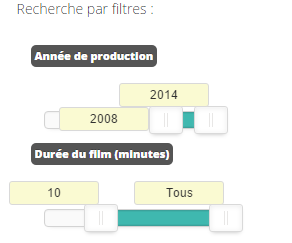
See now what it gives in attachment. PERFECT !

Still, now that I see the result, I have a minor question : for all my fields, as soon as I change filters, they are immediately triggered.
For the fields YEAR and DURATION, which are now Sliders[range], nothing happens when I change the selection : I have to click on GO manually.
(If I reset them to Dropdown[interval], then it behaves as expected, namely the filter gets automatically applied)
Have I missed something ? How can the filter be triggered automatically when using Sliders[range] ?
(if it is not foreseen, it probably should because users don't expect a different behaviour according to the field : checkbox, dropdown, sliders)

Txs a lot for all the improvements you have already introduced since 3.0.0 beta :-)

Marc

Please Log in or Create an account to join the conversation.

More
10 years 6 months ago #56532 by ggppdk


-- Flexicontent is Free but involves a big effort on our part.
Like the our support? (for a bug-free FC, despite having a long list of functions) Like the features? Like the ongoing development and future commitment to FLEXIcontent?
-- Add your voice to the FLEXIcontent JED listing with a 5-star review. Thanks!

Please Log in or Create an account to join the conversation.

More
10 years 6 months ago #56533 by woluweb
txs !
The sky is the limit :-D

Please Log in or Create an account to join the conversation.

More
10 years 6 months ago #56534 by woluweb
Hi again,

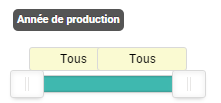
I realise something : by default, the sliders show "all" & "all" ("tous" & "tous"). See screenshot.
Wouldn't it be better to show the first & last values instead ?
It is a detail, but I'm not sure that it is intuitive for a visitor to see "all" & "all".
Seeing "1984" & "2015" would be more explicit and is more an invitation to filter.
Besides, one would immediately see what the range is (here you have to slightly move each handle one millimeter to see the first & last values).

I don't know what you think of it...

Yours,

Marc

Please Log in or Create an account to join the conversation.

Moderators: vistamediajoomlacornerggppdk
Cookies user preferences
We use cookies to ensure you to get the best experience on our website. If you decline the use of cookies, this website may not function as expected.
Accept all
Decline all
Essential
These cookies are needed to make the website work correctly. You can not disable them.
Display
Accept
Analytics
Tools used to analyze the data to measure the effectiveness of a website and to understand how it works.
Google Analytics
Accept
Decline
Save