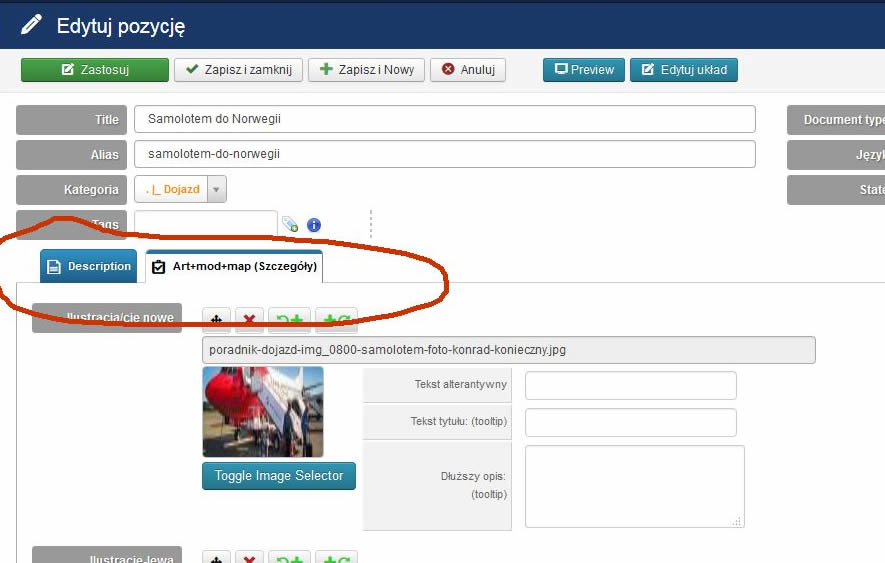
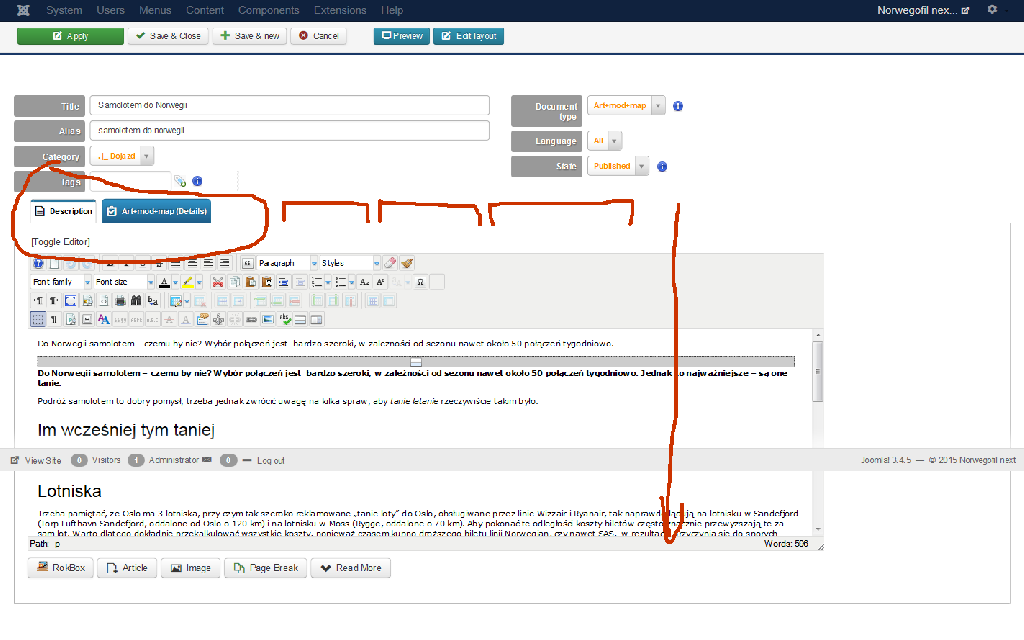
[SOLVED, due misclosed custom HTML] Backend editing TABs of item form are missing

More
10 years 1 month ago - 10 years 4 weeks ago #59052 by tadzio
Last edit: 10 years 4 weeks ago by ggppdk.

Please Log in or Create an account to join the conversation.

More
10 years 1 month ago - 10 years 4 weeks ago #59081 by tadzio
Also this picture
Last edit: 10 years 4 weeks ago by ggppdk.

Please Log in or Create an account to join the conversation.

More
10 years 1 month ago - 10 years 4 weeks ago #59085 by ggppdk
Hello

- the HTML syntax is broken either misclosed quotes or miclosed tags

are there any quotes in article type name ? or in any of the other TAB titles
e.g. you made a language override of some of the string of the TAB titles ?


-- Flexicontent is Free but involves a big effort on our part.
Like the our support? (for a bug-free FC, despite having a long list of functions) Like the features? Like the ongoing development and future commitment to FLEXIcontent?
-- Add your voice to the FLEXIcontent JED listing with a 5-star review. Thanks!
Last edit: 10 years 4 weeks ago by ggppdk.

Please Log in or Create an account to join the conversation.

More
10 years 1 month ago - 10 years 4 weeks ago #59122 by ggppdk
Hello

it can be an update field that is adding misclosed HTML tags
or maybe you added custom HTML via the field:
Tabs / Fieldsets / Custom HTML ?

if you have the above field then temporarily unpublish all field of the type


-- Flexicontent is Free but involves a big effort on our part.
Like the our support? (for a bug-free FC, despite having a long list of functions) Like the features? Like the ongoing development and future commitment to FLEXIcontent?
-- Add your voice to the FLEXIcontent JED listing with a 5-star review. Thanks!
Last edit: 10 years 4 weeks ago by ggppdk.

Please Log in or Create an account to join the conversation.

More
10 years 1 month ago - 10 years 4 weeks ago #59203 by tadzio
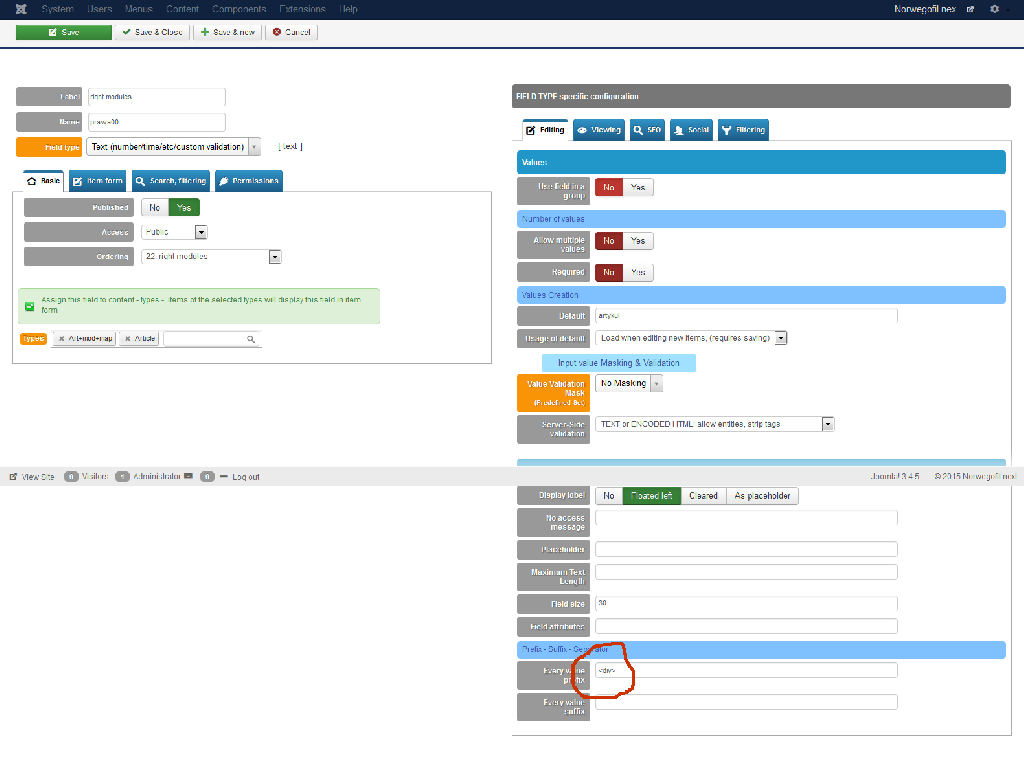
Prefix - Suffix - Separator in field "prawa00"
Every value prefix : <div>
when I clear this tabs display OK.

Last edit: 10 years 4 weeks ago by ggppdk.

Please Log in or Create an account to join the conversation.

More
10 years 4 weeks ago #59217 by ggppdk
Hello

Every value prefix : <div>
when I clear this tabs display OK.


The above explains it, openning a <div> and then not closing it , is like a car with a wheel missing from one side, it will not function properly

- just remember to always close custom HTML tags that you open
e.g. in your case you need to also add </div> to the every value suffix, so that it gets closed

Thanks for feedback, it confirms that there is no bug

Regards


-- Flexicontent is Free but involves a big effort on our part.
Like the our support? (for a bug-free FC, despite having a long list of functions) Like the features? Like the ongoing development and future commitment to FLEXIcontent?
-- Add your voice to the FLEXIcontent JED listing with a 5-star review. Thanks!

Please Log in or Create an account to join the conversation.

More
10 years 4 weeks ago #59222 by tadzio
But the idea was mine so, that one field open second field is closing. Example <div> in field00 and </div> in field09.
I thank for the devoted time.

Please Log in or Create an account to join the conversation.

More
10 years 4 weeks ago #59223 by ggppdk
Hello

before another field is reached several other HTML tags are open and closed, if you do "view HTML source" you see this, so your idea is impossible

but you can do what you thought in much more powerful way:

1. create 2 new fields of type :
- Tabs / Fieldsets / Custom HTML
and assign them to the desired Item TYPE e.g. to type "Announcement"

2.
Name (=label) 1st field : customDIVopen
Name (=label) 1st field : customDIVclose

then in 1st of them set custom HTML "<div>"
and in 2nd of them set custom HTML "</div>"

2. In Fields manager filter by Item TYPE "Announcement"

3. Order the fields so that you have this order:
...
customDIVopen
myfield1
myfield2
customDIVclose
...

NOTE
- the field above besides custom HTML can also create TAB-sets and Field-sets
- you can use fieldgroup field to create multi-value group of fields


-- Flexicontent is Free but involves a big effort on our part.
Like the our support? (for a bug-free FC, despite having a long list of functions) Like the features? Like the ongoing development and future commitment to FLEXIcontent?
-- Add your voice to the FLEXIcontent JED listing with a 5-star review. Thanks!

Please Log in or Create an account to join the conversation.

Moderators: vistamediajoomlacornerggppdk
Cookies user preferences
We use cookies to ensure you to get the best experience on our website. If you decline the use of cookies, this website may not function as expected.
Accept all
Decline all
Essential
These cookies are needed to make the website work correctly. You can not disable them.
Display
Accept
Analytics
Tools used to analyze the data to measure the effectiveness of a website and to understand how it works.
Google Analytics
Accept
Decline
Save