FLEXIcontent menu item

More
16 years 2 weeks ago #3251 by vlester
Replied by vlester on topic FLEXIcontent menu item
Well I think you should read documentation about the different menu types. It's really the base you have to know before jump into flexicontent.

Select your menu ("photography" for example) and click on "change the type" (item -> to Flexicontent) [attachment=2:32a6muek]<!-- ia2 -->1.png<!-- ia2 -->[/attachment:32a6muek]

Then choose the type Flexicontent > category
[attachment=0:32a6muek]<!-- ia0 -->4.png<!-- ia0 -->[/attachment:32a6muek]

Then you point this menu to the category "photography".
[attachment=1:32a6muek]<!-- ia1 -->2.png<!-- ia1 -->[/attachment:32a6muek]


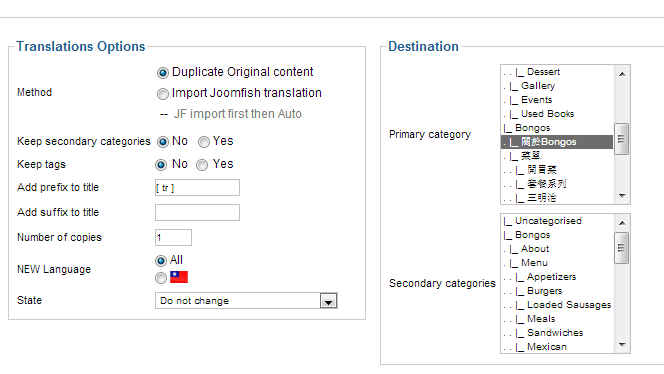
Then in the dashboard of Flexicontent, edit the category "photography", look for the paramaters on the right side and select "blog" for the template.


If you want to customize your template, select template in the dashboard. You can read documentation about that on this website.

Good luck for the following steps

Please Log in or Create an account to join the conversation.

More
16 years 2 weeks ago #3255 by galleryrx
Replied by galleryrx on topic FLEXIcontent menu item
Viester,
Thank you again! Amazing. Every bit of information clears it up for me. I did not know you could change type. In my menu, I changed "History of Awards" in the Home tab to a Flexi category, as you suggested. Now when I click on it I get an error message. I will try to figure this out.

Well this is what I ended up after my own attempt - hahaha.
Article Manager - 756 (this includes duplicates)
Front Page Articles - 9
Section - 12
Category - 131

And in the Flexicontent:
Category - 71
Item - 375

And, I now have the second menu - Top Menu - which I mistakingly created. I guess i need to get rid of a bunch of stuff and the menu. Do you recommend a first step? I believe the Magazine Menu is pointing to the Section and Categories - which are not Flexi yet.

Perhaps you should look at the back end?

Please Log in or Create an account to join the conversation.

More
16 years 2 weeks ago #3256 by bsky92
Replied by bsky92 on topic FLEXIcontent menu item
Hi

I'm stepping in the middle of this conversation to insist on the advice Vlester gave you : read as much information as you can about joomla - and not only flexicontent - and try things on a test site

Experimenting on an online website when you are n ot sure what your actions will result in is not a good idea :) And a lot of your questions are not really FC issues :)

Please Log in or Create an account to join the conversation.

More
16 years 2 weeks ago #3265 by galleryrx
Replied by galleryrx on topic FLEXIcontent menu item
Thank you for your comment. I am reading about both Joomla and FlexiCONTENT. But I can't find important information about Flexi - for example, when I import the Joomla structure - I end up with double number of articles. The warning said be sure to delete the com_content structure so this doesn't happen. I don't know where and how to do this. I can't find a good installation document leading me through these FlexiCONTENT steps. Secondly, I got the impression from Viester that I should create a new menu, which I did not have to do in the end. Now I am wondering how to convert my menu to respond to the new FlexiCONTENT. Again, I can't find the manual or guide to show me how to do this.

Please Log in or Create an account to join the conversation.

Moderators: vistamediajoomlacornerggppdk
Cookies user preferences
We use cookies to ensure you to get the best experience on our website. If you decline the use of cookies, this website may not function as expected.
Accept all
Decline all
Essential
These cookies are needed to make the website work correctly. You can not disable them.
Display
Accept
Analytics
Tools used to analyze the data to measure the effectiveness of a website and to understand how it works.
Google Analytics
Accept
Decline
Save