dealing with downloadable files

More
7 years 9 months ago #73325 by mauriciocgpereira@gmail.com
Hello,
I've got a field that it's supposed to have files users may download.
In the front end it renders in a strange way, as you can see.
Where can I customize this, what's the php file used to render this links to download files?
Thanks

Please Log in or Create an account to join the conversation.

More
7 years 9 months ago #73331 by micker
hello
you have css conflict just try to ovrride css rules or go to file field admin
display tab
you have a dropdown for template file and explain how to do

FLEXIcontent is Free but involves a very big effort on our part.
Like the our support? (for a bug-free FC, despite being huge extension) Like the features? Like the ongoing development and future commitment to FLEXIcontent?
-- Add your voice to the FLEXIcontent JED listing reviews. Thanks![/size]

Please Log in or Create an account to join the conversation.

More
7 years 9 months ago #73340 by mauriciocgpereira@gmail.com
I edited the field admin and introduced the value prefix and sufix and also a opening and ending texts for the field. Yet I noticed that the generated code places the files link after this values.

Please see the generated code in this page: padmakara.brandful.pt/biblioteca/item/119-retiro-outono-2017 and go to where is the link "Download" and you can see that generated code is:

<!-- BOF transcriptionFile block -->
<p class="uk-text-small uk-margin-small-top">
</p>
<div class="fcfile_actions">
<a href="/biblioteca/download/1/119/160" class=" fcfile_downloadFile" title="Click to download this file">Download</a>
</div>
<p></p>
<!-- EOF transcriptionFile block -->

where it should be:

<!-- BOF transcriptionFile block -->
<p class="uk-text-small uk-margin-small-top">
<a href="/biblioteca/download/1/119/160" class=" fcfile_downloadFile" title="Click to download this file">Download</a>
</p>
<!-- EOF transcriptionFile block -->

the div shouldn't appear and also the last <p></p> shouldn't appear

Probably the only way to achieve this is to change the file that handles the downloads.

Please Log in or Create an account to join the conversation.

More
7 years 9 months ago #73344 by ggppdk
Hello

if you cannot do it with parameters and CSS
then you can duplicate the layout file of the file field and customize it


-- Flexicontent is Free but involves a big effort on our part.
Like the our support? (for a bug-free FC, despite having a long list of functions) Like the features? Like the ongoing development and future commitment to FLEXIcontent?
-- Add your voice to the FLEXIcontent JED listing with a 5-star review. Thanks!

Please Log in or Create an account to join the conversation.

More
7 years 9 months ago #73346 by mauriciocgpereira@gmail.com
Yes, that was the ideia, but how do I know what's the file used to render that particular field?

Thanks

Please Log in or Create an account to join the conversation.

More
7 years 9 months ago #73349 by ggppdk
Hello

you mean you have multiple fields of type "file" ?

if you have 3 fields of type file
then let the 2 fields use the default layout and only edit the 3rd field and select the new layout there and save field configuration


-- Flexicontent is Free but involves a big effort on our part.
Like the our support? (for a bug-free FC, despite having a long list of functions) Like the features? Like the ongoing development and future commitment to FLEXIcontent?
-- Add your voice to the FLEXIcontent JED listing with a 5-star review. Thanks!

Please Log in or Create an account to join the conversation.

More
7 years 9 months ago #73351 by mauriciocgpereira@gmail.com
Hello,
I think that there's a small confusion here! :-)
When I edit the field where do I see what's the layout file so that I can edit it?
Thanks

Please Log in or Create an account to join the conversation.

More
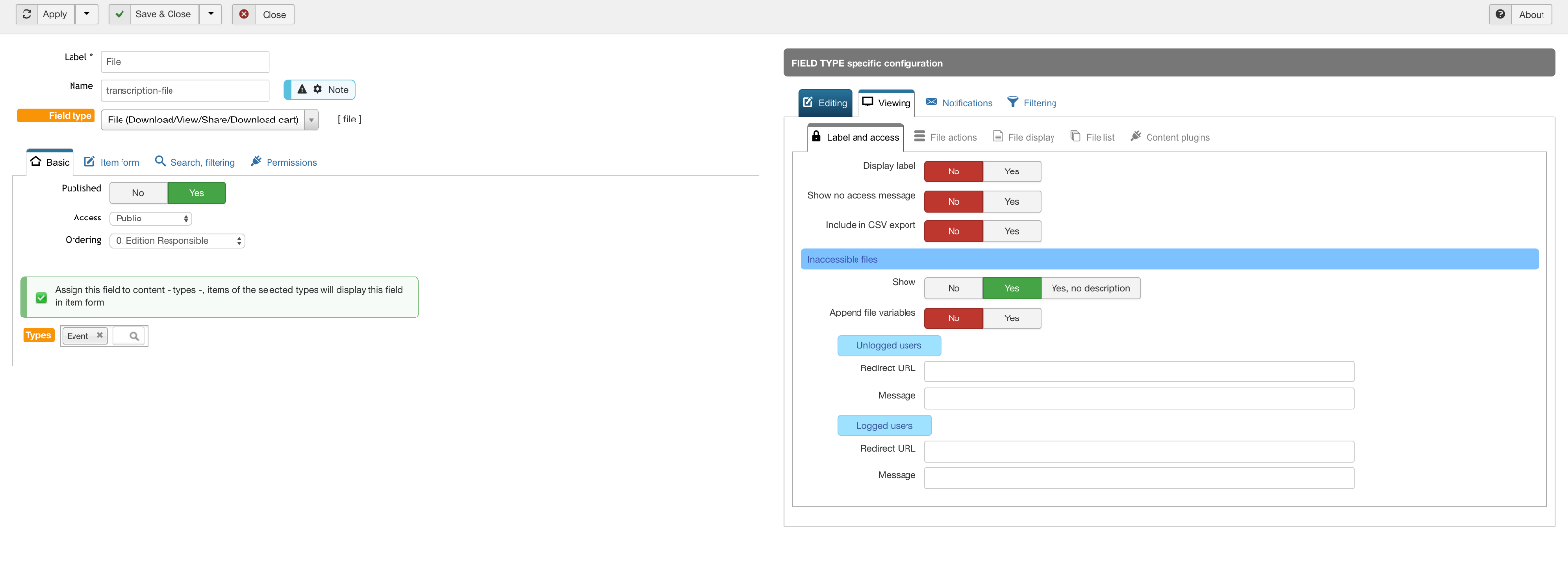
7 years 9 months ago #73354 by ggppdk
Hello

the layout -file- selction is inside

Viewing TAB / File display TAB

Inside the TAB, the first parameter is the layout selection

Read the popup description
and copy the layout file

value_inlineboxes.php
to the same folder or to Joomla template and name it , e.g. as
value_devicemanual.php
or
value_myspecialdisplay.php

and then customize it


-- Flexicontent is Free but involves a big effort on our part.
Like the our support? (for a bug-free FC, despite having a long list of functions) Like the features? Like the ongoing development and future commitment to FLEXIcontent?
-- Add your voice to the FLEXIcontent JED listing with a 5-star review. Thanks!

Please Log in or Create an account to join the conversation.

More
7 years 9 months ago #73356 by mauriciocgpereira@gmail.com

Please Log in or Create an account to join the conversation.

Moderators: vistamediajoomlacornerggppdk
Cookies user preferences
We use cookies to ensure you to get the best experience on our website. If you decline the use of cookies, this website may not function as expected.
Accept all
Decline all
Essential
These cookies are needed to make the website work correctly. You can not disable them.
Display
Accept
Analytics
Tools used to analyze the data to measure the effectiveness of a website and to understand how it works.
Google Analytics
Accept
Decline
Save