Category Template

More
14 years 3 months ago #19556 by lukass2000
Category Template was created by lukass2000
Hello!
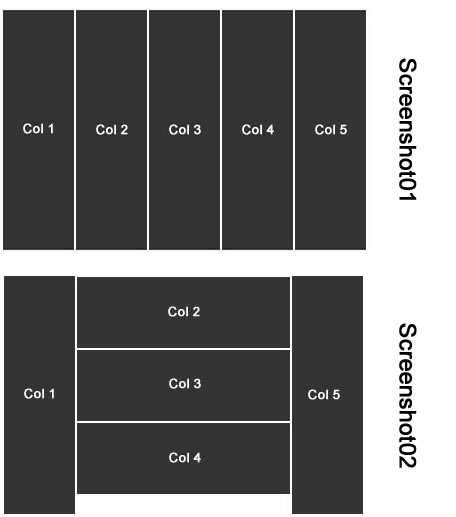
The default category template looks like in the "Screenshot01"
Can I change the Template to look like on "Screenshot02"?
THANK YOU!

Please Log in or Create an account to join the conversation.

More
14 years 3 months ago #19558 by micker
Replied by micker on topic Category Template
You can do this with css modification
Use width and float left value for each colone
regards

FLEXIcontent is Free but involves a very big effort on our part.
Like the our support? (for a bug-free FC, despite being huge extension) Like the features? Like the ongoing development and future commitment to FLEXIcontent?
-- Add your voice to the FLEXIcontent JED listing reviews. Thanks![/size]

Please Log in or Create an account to join the conversation.

More
14 years 3 months ago #19561 by ggppdk
Replied by ggppdk on topic Category Template
micker, he is talking about the category Layout of the 'default' template, which uses a html table, not of blog template.

So only with css it will not work.

Inside loop (category_items.php file)
that outputs one row per item,
you would change the code
to output 3 rows per items like this:
(you must have some knowledge to do this, or maybe ask me, since this is simple code for a developer):

ITEM LOOP:

<tr>
<td rowspan="3">col1 data</td>
<td>col2 data</td>
<td rowspan="3">col5 data</td>
</tr>

<tr>
<td>col3 data</td>
</tr>

<tr>
<td>col4 data</td>
</tr>

END ITEM LOOP

Regards


-- Flexicontent is Free but involves a big effort on our part.
Like the our support? (for a bug-free FC, despite having a long list of functions) Like the features? Like the ongoing development and future commitment to FLEXIcontent?
-- Add your voice to the FLEXIcontent JED listing with a 5-star review. Thanks!

Please Log in or Create an account to join the conversation.

More
14 years 3 months ago #19566 by lukass2000
Replied by lukass2000 on topic Category Template
Hi!

Is it better i create a new "default-1" Template?
Is it then the same code, or must i change then only CSS?
If yes, what must i change in category-template?
THANKS!

Please Log in or Create an account to join the conversation.

More
14 years 3 months ago #19567 by ggppdk
Replied by ggppdk on topic Category Template
Yes, avoid change the default template !!!

Duplicate e.g. as default-1 or some name
and then change it !!!


-- Flexicontent is Free but involves a big effort on our part.
Like the our support? (for a bug-free FC, despite having a long list of functions) Like the features? Like the ongoing development and future commitment to FLEXIcontent?
-- Add your voice to the FLEXIcontent JED listing with a 5-star review. Thanks!

Please Log in or Create an account to join the conversation.

More
14 years 3 months ago #19569 by lukass2000
Replied by lukass2000 on topic Category Template
Okay, I've now done.

But where do I add the code in the "category_items.php" now?

THANKS!

Please Log in or Create an account to join the conversation.

More
14 years 3 months ago #19570 by ggppdk
Replied by ggppdk on topic Category Template
OK, i will help you since it is not so difficult for me, but you know this is more like some custom development, if i have a lot of people asking this i will not have time to make a living, i am supposed to only respond to bugs, and such questions as yours should be answered by the community :D ...

I hope other people will find useful this too ...

I will give you code for each item:
-- Will put first and last field like what in your image show as col1 and col5
-- and all in between fields will outputted as one per row
OK?


-- Flexicontent is Free but involves a big effort on our part.
Like the our support? (for a bug-free FC, despite having a long list of functions) Like the features? Like the ongoing development and future commitment to FLEXIcontent?
-- Add your voice to the FLEXIcontent JED listing with a 5-star review. Thanks!

Please Log in or Create an account to join the conversation.

More
14 years 3 months ago #19577 by lukass2000
Replied by lukass2000 on topic Category Template
Hi ggppdk :)

GREAT THANK YOU :) :) :)

"YES" -- Will put first and last field like what in your image show as col1 and col5
"YES"-- and all in between fields will outputted as one per row

Please Log in or Create an account to join the conversation.

More
14 years 3 months ago #19578 by ggppdk
Replied by ggppdk on topic Category Template
Replace code (in category_items.php:
Code:
<?php if ($this->params->get('show_title', 1) || count($columns)) : ?> <table id="flexitable" class="flexitable" width="100%" border="0" cellspacing="0" cellpadding="0" summary="<?php echo $this->category->name; ?>"> ... <?php endif; ?>
with
Code:
<?php if ($this->params->get('show_title', 1) || count($columns)) : ?> <table id="flexitable" class="flexitable" width="100%" border="0" cellspacing="0" cellpadding="0" summary="<?php echo $this->category->name; ?>"> <tbody> <?php foreach ($items as $item) : ?> <?php $cnt=0; foreach ($columns as $name => $label) : $cols[$cnt] = $name; $cnt++; endforeach; $midcols_count=count($columns)-2; if ($midcols_count<1) $midcols_count=1; ?> <!-- BOF item fields 1,2,last --> <tr class="sectiontableentry"> <?php if( count($cols)<1 ) continue; ?> <td rowspan="<?php echo $midcols_count;?>"><?php echo isset($item->positions['table']->{$cols[0]}->display) ? $item->positions['table']->{$cols[0]}->display : ''; ?></td> <?php if( count($cols)<2 ) continue; ?> <td><?php echo isset($item->positions['table']->{$cols[1]}->display) ? $item->positions['table']->{$cols[1]}->display : ''; ?></td> <?php if( count($cols)<3 ) continue; ?> <td rowspan="<?php echo $midcols_count;?>"><?php echo isset($item->positions['table']->{$cols[count($cols)-1]}->display) ? $item->positions['table']->{$cols[count($cols)-1]}->display : ''; ?></td> </tr> <!-- EOF item fields 1,2,last--> <!-- BOF item fields 3,4,...last-1 --> <?php for ($cnt=2; $cnt < count($cols)-1; $cnt++) : ?> <tr class="sectiontableentry"> <td><?php echo isset($item->positions['table']->{$cols[$cnt]}->display) ? $item->positions['table']->{$cols[$cnt]}->display : ''; ?></td> </tr> <?php endfor; ?> <!-- EOF item fields 3,4,...last-1 --> <?php endforeach; ?> </tbody> </table> <?php else : ?> <div class="nocols"><?php echo JText::_( 'NO FIELDS IN TEMPLATE' ); ?></div> <?php endif; ?>


-- Flexicontent is Free but involves a big effort on our part.
Like the our support? (for a bug-free FC, despite having a long list of functions) Like the features? Like the ongoing development and future commitment to FLEXIcontent?
-- Add your voice to the FLEXIcontent JED listing with a 5-star review. Thanks!

Please Log in or Create an account to join the conversation.

More
14 years 3 months ago #19586 by micker
Replied by micker on topic Category Template
please read this for tutoriel ! ;)
extensions.netassopro.com/9-tutorials
regards

FLEXIcontent is Free but involves a very big effort on our part.
Like the our support? (for a bug-free FC, despite being huge extension) Like the features? Like the ongoing development and future commitment to FLEXIcontent?
-- Add your voice to the FLEXIcontent JED listing reviews. Thanks![/size]

Please Log in or Create an account to join the conversation.

Moderators: vistamediajoomlacornerggppdk
Cookies user preferences
We use cookies to ensure you to get the best experience on our website. If you decline the use of cookies, this website may not function as expected.
Accept all
Decline all
Essential
These cookies are needed to make the website work correctly. You can not disable them.
Display
Accept
Analytics
Tools used to analyze the data to measure the effectiveness of a website and to understand how it works.
Google Analytics
Accept
Decline
Save