[solved]Description and an Image field in the same zone.

More
12 years 6 months ago #38469 by kspoddar
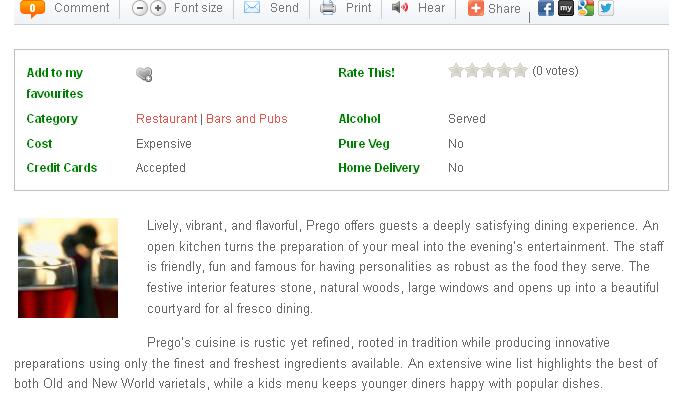
Hi - I am using Flexicontent 2.0.2 ver 1680. I am attaching a screenshot to illustrate what I am looking for.

Let me know if you need more inputs.

Cheers!
Kirti

Please Log in or Create an account to join the conversation.

More
12 years 6 months ago #38470 by ggppdk
Hello

OK image gives information about what you described, but where is the online link to the page ?


-- Flexicontent is Free but involves a big effort on our part.
Like the our support? (for a bug-free FC, despite having a long list of functions) Like the features? Like the ongoing development and future commitment to FLEXIcontent?
-- Add your voice to the FLEXIcontent JED listing with a 5-star review. Thanks!

Please Log in or Create an account to join the conversation.

More
12 years 6 months ago #38536 by kspoddar
Sorry for the delay as I had this site in localhost.

here are the link:

1) Which is the default FC template
mumbai.hotkhana.com/restaurant/t ... olaba.html

What I am looking for is the text wrapped around the image

Cheers!
Kirti

Please Log in or Create an account to join the conversation.

More
12 years 6 months ago #38537 by micker
hello
at first don't use image position in your template
1 duplicate your template
2 create a new position betteween description position in your template
use css width, float and marging to finish it
read this
www.flexicontent.org/documentati ... late-.html
and this
www.flexicontent.org/documentati ... cture.html
to create your position (in php and xml)
regards

FLEXIcontent is Free but involves a very big effort on our part.
Like the our support? (for a bug-free FC, despite being huge extension) Like the features? Like the ongoing development and future commitment to FLEXIcontent?
-- Add your voice to the FLEXIcontent JED listing reviews. Thanks![/size]

Please Log in or Create an account to join the conversation.

More
12 years 6 months ago #38538 by ggppdk
In item.php of new template, (please copy modular.php inside it as instructions inside item.php say, and then:)

FIND:
Code:
<?php if (isset($item->positions['image'])) : ?> <!-- BOF image block --> <?php foreach ($item->positions['image'] as $field) : ?> <div class="flexi image field_<?php echo $field->name; ?>"> <?php echo $field->display; ?> <div class="clear"></div> </div> <?php endforeach; ?> <!-- EOF image block --> <?php endif; ?>

and remove:
<div class="clear"></div>

and then place both your image field and description inside the position image, then you will be able to use CSS to style them using CSS rules:
Code:
.flexi.image.field_field43 { display: block; float:left !important; // ... } .flexi.image.field_description { // ... }


-- Flexicontent is Free but involves a big effort on our part.
Like the our support? (for a bug-free FC, despite having a long list of functions) Like the features? Like the ongoing development and future commitment to FLEXIcontent?
-- Add your voice to the FLEXIcontent JED listing with a 5-star review. Thanks!

Please Log in or Create an account to join the conversation.

More
12 years 6 months ago #38542 by kspoddar
Hi - I am sorry but I couldn't understand exactly as I was getting an error. Perhaps, this link is where it will make it clear. :geek:

mumbai.hotkhana.com/restaurants/ ... /test.html

I want to have the text aligned to the image under the tab "about us"

Thanks once again

Cheers!
Kirti

Please Log in or Create an account to join the conversation.

More
12 years 6 months ago #38543 by ggppdk
Hello,
you have 2 fields (image and description) inside the bottom tabs.
you can achieve the desired result by removing "float" CSS attribute out of the containers in the FIRST tab of bottom tabs:

SOLUTION all types (this will effect only the FIRST tab out of the BOTTOM tabset)
Code:
#fc_bottom_tab1 .flexi.element, #fc_bottom_tab1 .flexi.value { float: none !important; }
Also to make this effect only CONTENT TYPE 7 do:
Code:
#flexicontent.fctype7 #fc_bottom_tab1 .flexi.element, #flexicontent.fctype7 #fc_bottom_tab1 .flexi.value { float: none !important; }
-- Also you can always edit the template code to do what you need e.g. alter the code that output the FIRST TAB of the bottom tabs (just after foreach):
Code:
<?php if ($tc==1) { echo $field->display; continue; } ?>

Regards


-- Flexicontent is Free but involves a big effort on our part.
Like the our support? (for a bug-free FC, despite having a long list of functions) Like the features? Like the ongoing development and future commitment to FLEXIcontent?
-- Add your voice to the FLEXIcontent JED listing with a 5-star review. Thanks!

Please Log in or Create an account to join the conversation.

More
12 years 6 months ago #38546 by kspoddar
Thanks. Could you help me out by letting me know which css file I need to make these changes in?

sorry for being such a newbie! :-)

Cheers!
Kirti

Please Log in or Create an account to join the conversation.

More
12 years 6 months ago #38547 by ggppdk
Hello,
never change CSS files that come with the FLEXIcontent or any other extensions, they will be overwritten when you upgrade

- you can place custom inside any CSS file, e.g. in a file loaded by your Joomla template

BUT Recommended place is :
joomla_folder/templates/mytemplate/css/flexicontent.css

please, read our FAQ article for more information:
How to customize CSS styles of FLEXIcontent

Regards


-- Flexicontent is Free but involves a big effort on our part.
Like the our support? (for a bug-free FC, despite having a long list of functions) Like the features? Like the ongoing development and future commitment to FLEXIcontent?
-- Add your voice to the FLEXIcontent JED listing with a 5-star review. Thanks!

Please Log in or Create an account to join the conversation.

More
12 years 6 months ago #38565 by kspoddar
Thanks for the inputs. I am not able to solve it.

However, I will try this later and give a feedback to you.

Cheers!
Kirti

Please Log in or Create an account to join the conversation.

Moderators: vistamediajoomlacornerggppdk
Cookies user preferences
We use cookies to ensure you to get the best experience on our website. If you decline the use of cookies, this website may not function as expected.
Accept all
Decline all
Essential
These cookies are needed to make the website work correctly. You can not disable them.
Display
Accept
Analytics
Tools used to analyze the data to measure the effectiveness of a website and to understand how it works.
Google Analytics
Accept
Decline
Save