fields within tabs on blog template

More
11 years 10 months ago - 11 years 9 months ago #46337 by webiedesign
I have read information in the FAQ, searched the forums, etc. I have been successful in adding some basic new fields in the blog template, however, I have not been successful in adding field positions within a tab. Any suggestions on how I can accomplish this are welcomed.

Mary
webie design
Last edit: 11 years 9 months ago by webiedesign.

Please Log in or Create an account to join the conversation.

More
11 years 9 months ago #46349 by ggppdk
Hello

-- category layout of blog template does not have TABs

-- other FLEXIcontent category layoutstemplates do have tabs e.g. category layout of "presentation" template

Regards


-- Flexicontent is Free but involves a big effort on our part.
Like the our support? (for a bug-free FC, despite having a long list of functions) Like the features? Like the ongoing development and future commitment to FLEXIcontent?
-- Add your voice to the FLEXIcontent JED listing with a 5-star review. Thanks!

Please Log in or Create an account to join the conversation.

More
11 years 9 months ago #46367 by webiedesign
This would be for the item templates, not the category. Perhaps there is a different way to accomplish what I am trying to do.
A page like this
web-designer-developer.com/Regga ... Itemid=164
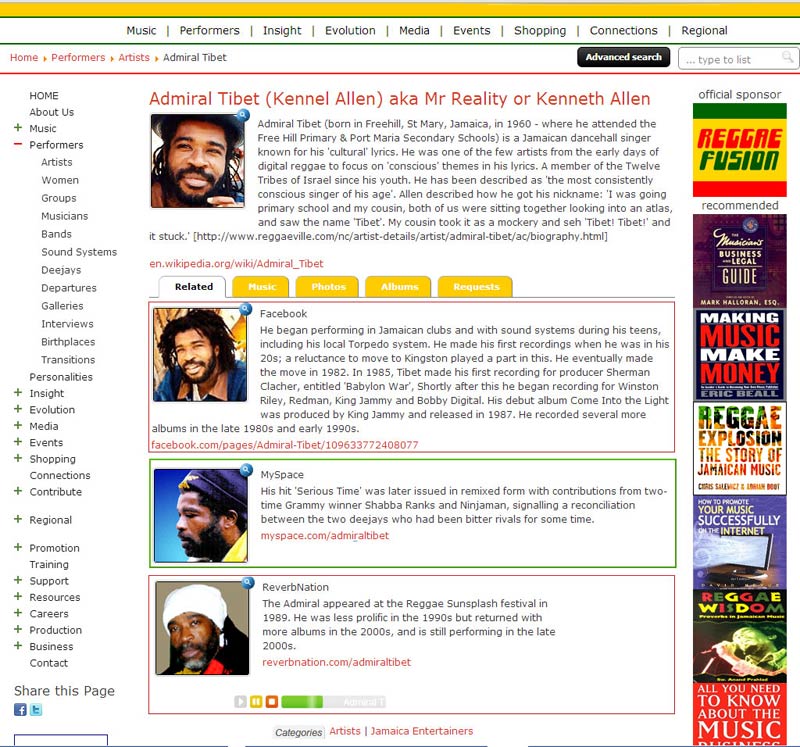
needs to have parts of the information enclosed within either a red or green css border similar to this:
www.reggaefusion.com/modules.php ... 241&cid=39

any ideas appreciated....

Mary
webie design

Please Log in or Create an account to join the conversation.

More
11 years 9 months ago #46373 by ggppdk
Hello

presentation template has a category layout that has TABs


-- Flexicontent is Free but involves a big effort on our part.
Like the our support? (for a bug-free FC, despite having a long list of functions) Like the features? Like the ongoing development and future commitment to FLEXIcontent?
-- Add your voice to the FLEXIcontent JED listing with a 5-star review. Thanks!

Please Log in or Create an account to join the conversation.

More
11 years 9 months ago #46391 by webiedesign
Thanks, but again this is for items and not the categories.

Mary
webie design

Please Log in or Create an account to join the conversation.

More
11 years 9 months ago #46393 by ggppdk
Hello

no, the category layout of presentation template has tabs, and it is almost identical to the item layout


-- Flexicontent is Free but involves a big effort on our part.
Like the our support? (for a bug-free FC, despite having a long list of functions) Like the features? Like the ongoing development and future commitment to FLEXIcontent?
-- Add your voice to the FLEXIcontent JED listing with a 5-star review. Thanks!

Please Log in or Create an account to join the conversation.

More
11 years 9 months ago #46411 by webiedesign
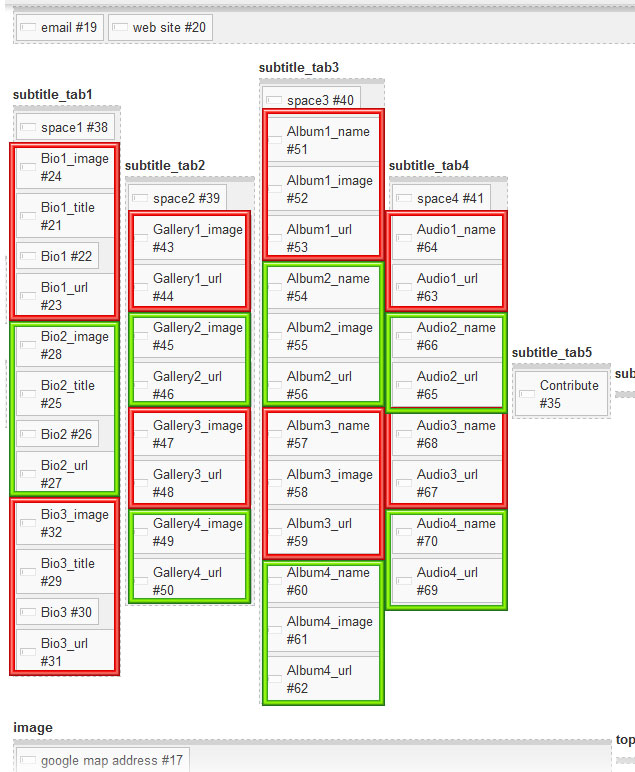
I really must not be explaining myself well- each of these red and green boxes represent "positions" or "groupings of fields" I would like to create within each tab so as they can each be styled differently.

Mary
webie design

Please Log in or Create an account to join the conversation.

More
11 years 9 months ago #46417 by ggppdk
Hello

you would like to create TAB sets inside a TAB ?


-- Flexicontent is Free but involves a big effort on our part.
Like the our support? (for a bug-free FC, despite having a long list of functions) Like the features? Like the ongoing development and future commitment to FLEXIcontent?
-- Add your voice to the FLEXIcontent JED listing with a 5-star review. Thanks!

Please Log in or Create an account to join the conversation.

More
11 years 9 months ago #46431 by webiedesign
No, (not tabs within tabs) just individual groupings so I can style them differently within the tabs. (In this case a border)

I originally thought that "groumarker fields" would work, however, I am finding they only work for the form entry and not the front end display.

Mary
webie design

Please Log in or Create an account to join the conversation.

More
11 years 9 months ago #46435 by ggppdk
Hello

1. place your field in RENDER-ONLY position

2. and then output them manually inside the category_items.php

using:
Code:
echo $item->fields['fieldname']->display;


-- Flexicontent is Free but involves a big effort on our part.
Like the our support? (for a bug-free FC, despite having a long list of functions) Like the features? Like the ongoing development and future commitment to FLEXIcontent?
-- Add your voice to the FLEXIcontent JED listing with a 5-star review. Thanks!

Please Log in or Create an account to join the conversation.

Moderators: vistamediajoomlacornerggppdk
Cookies user preferences
We use cookies to ensure you to get the best experience on our website. If you decline the use of cookies, this website may not function as expected.
Accept all
Decline all
Essential
These cookies are needed to make the website work correctly. You can not disable them.
Display
Accept
Analytics
Tools used to analyze the data to measure the effectiveness of a website and to understand how it works.
Google Analytics
Accept
Decline
Save