[SOLVED] category view - field stopped showing

More
9 years 3 months ago #64477 by manchine

micker wrote: yes ! needed if you change option in image field (size)


I don't understand this bit.
As far as I can tell. the small / medium / large versions of each file are already present in images/stories/flexicontent.
In the category view of the template. I assume that FC is going to pick images from this folder, not from the uploads folder.

Isn't components/com_flexicontent/uploads/ just a temporary folder?

I must add the Image Source mode hasn't changed. It has always been set to "Item+Field Specific Folder".

Please Log in or Create an account to join the conversation.

More
9 years 3 months ago #64479 by micker
not just ... fc use this folder to check if upload exist
for exemple in your image field you change small image rezize to crop ... flexicontent use upload image to re create image

FLEXIcontent is Free but involves a very big effort on our part.
Like the our support? (for a bug-free FC, despite being huge extension) Like the features? Like the ongoing development and future commitment to FLEXIcontent?
-- Add your voice to the FLEXIcontent JED listing reviews. Thanks![/size]

Please Log in or Create an account to join the conversation.

More
9 years 3 months ago #64481 by manchine
I would think that components/com_flexicontent/uploads/ is not relevant to this matter, since it contains no images in any of the older backups of the site that I have analysed (and the thumbnails would still work in the category view, because they are taken from images/stories/flexicontent).

Please Log in or Create an account to join the conversation.

More
9 years 3 months ago #64483 by manchine
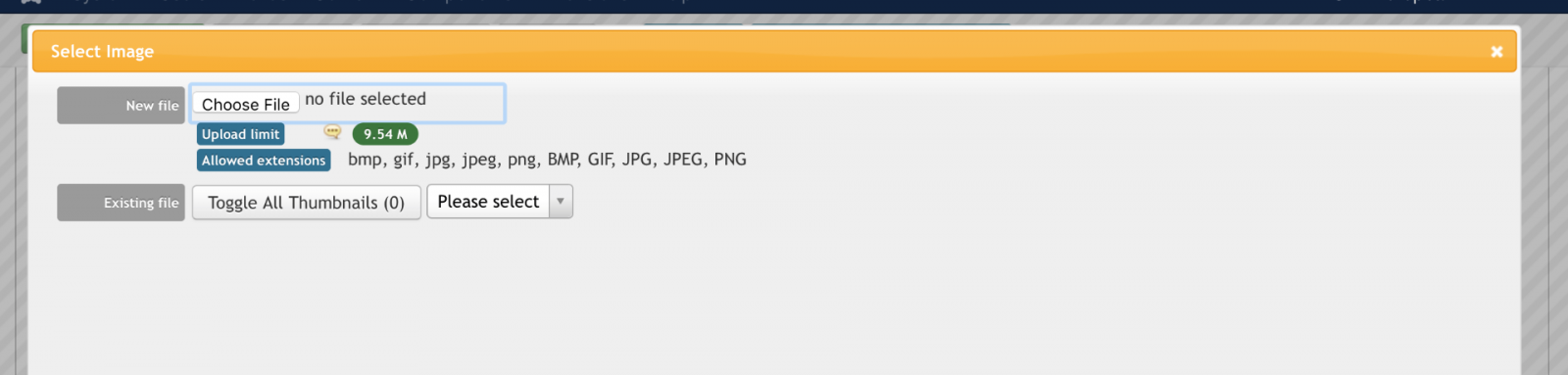
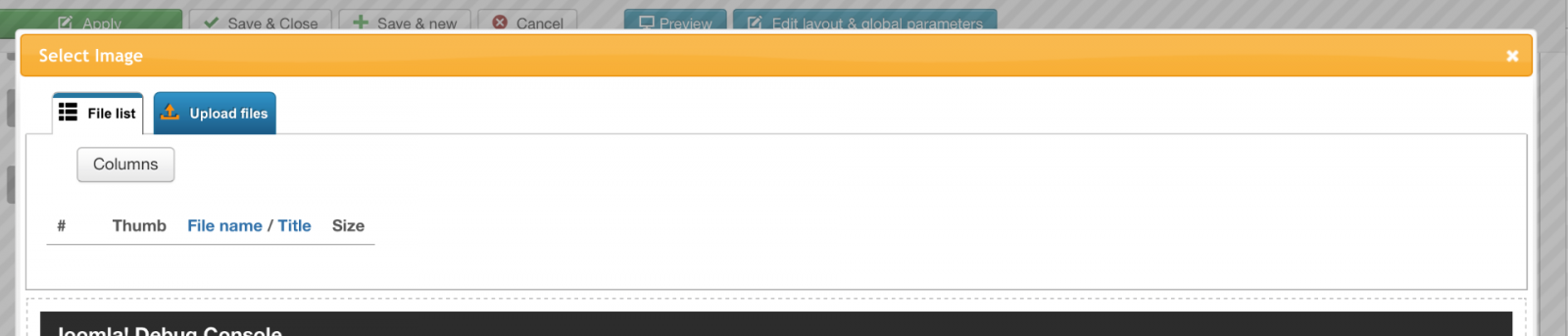
Even more mysterious and unsettling is the fact the same version of FC (3.1.0-rc2) is displaying 2 different versions of the upload pop on two different versions of the site.

On an older copy (running 3.1.0-rc2), the image upload dialog looks like this:


And on the newer copy of the site, also running FC 3.1.0-rc2, it looks like this:


In both cases, the Image Source mode is set to Item+Field Specific Folder.

Please Log in or Create an account to join the conversation.

More
9 years 3 months ago #64484 by manchine
Sorry for the food of messages, but it really important for us to sort this issue.

In the image upload dialog I have noticed that FC tries to upload the original image file to images/stories/flexicontent/item_XXX_field_19/original, not to components/com_flexicontent/uploads/

I've got this info from the session debugger.

"fc_upload_path_19_231": "\/path\/to\/main\/2016\/images\/stories\/flexicontent\/item_231_field_19\/original"

Please Log in or Create an account to join the conversation.

More
9 years 3 months ago #64485 by micker
yes in new version we update folder mode with multiupload system

FLEXIcontent is Free but involves a very big effort on our part.
Like the our support? (for a bug-free FC, despite being huge extension) Like the features? Like the ongoing development and future commitment to FLEXIcontent?
-- Add your voice to the FLEXIcontent JED listing reviews. Thanks![/size]

Please Log in or Create an account to join the conversation.

More
9 years 3 months ago #64486 by manchine
Another detail I have noticed is that the image upload dialog changes from the older version of the interface to the newer upon saving the Cover Image field, even without changing any parameter.

We are back to the beginning.

Saving the image field is ultimately what caused all this mayhem.
Something gets misconfigured behind the scenes.
This looks most definitely like a bug in FC.

Please Log in or Create an account to join the conversation.

More
9 years 3 months ago - 9 years 3 months ago #64487 by ggppdk
Hello

by your last 2 topics is see what happened
- your image field was in "DB-mode" as "Image source"

but now it seems to be in "Folder mode"
please edit the field configuration and make sure it is in "DB-mode", and then save it


-- Flexicontent is Free but involves a big effort on our part.
Like the our support? (for a bug-free FC, despite having a long list of functions) Like the features? Like the ongoing development and future commitment to FLEXIcontent?
-- Add your voice to the FLEXIcontent JED listing with a 5-star review. Thanks!
Last edit: 9 years 3 months ago by ggppdk.

Please Log in or Create an account to join the conversation.

More
9 years 3 months ago #64488 by manchine
I've just tried that, but still no luck.

Plus, I'm pretty positive that the Image Source upload mode has always been set to "Item+Field Specific Folder".
I draw this conclusion from analysing previous backups if the site, from before the field disappeared.

Please Log in or Create an account to join the conversation.

More
9 years 3 months ago #64489 by manchine
Also, when an item with field Cover Image is saved, the image then disappears from the Item details view.
Before saving it, however, the image still displays as expected.
It would appear that the item (also the category view) is looking for a different image path than the one it should.

As noted in an earlier post, this mess started happening when the Cover Image filed was save *without any modifications.

Please Log in or Create an account to join the conversation.

Moderators: vistamediajoomlacornerggppdk
Cookies user preferences
We use cookies to ensure you to get the best experience on our website. If you decline the use of cookies, this website may not function as expected.
Accept all
Decline all
Essential
These cookies are needed to make the website work correctly. You can not disable them.
Display
Accept
Analytics
Tools used to analyze the data to measure the effectiveness of a website and to understand how it works.
Google Analytics
Accept
Decline
Save