[SOLVED] About floating image left/right in news template of universal content module

More
10 years 10 months ago - 10 years 10 months ago #54043 by esinet
Hello,
With v2, images in template News were under the title and left or right of the text.
[IMG


i think that i tried all positions of images in layout:News to put image like in v2, but image is before the title ...
[IMG

Do you know how put it like before in V2 (after the title
Thanks for your help

Joomla 3.9.14 /3.6.5 FLEXIcontent v 3.3.1.6
Last edit: 10 years 10 months ago by ggppdk.

Please Log in or Create an account to join the conversation.

More
10 years 10 months ago - 10 years 10 months ago #54061 by micker
i think you can update to v3 version and check option => you can choose position of ime betteween text

FLEXIcontent is Free but involves a very big effort on our part.
Like the our support? (for a bug-free FC, despite being huge extension) Like the features? Like the ongoing development and future commitment to FLEXIcontent?
-- Add your voice to the FLEXIcontent JED listing reviews. Thanks![/size]
Last edit: 10 years 10 months ago by ggppdk.

Please Log in or Create an account to join the conversation.

More
10 years 10 months ago - 10 years 10 months ago #54064 by ggppdk
hello

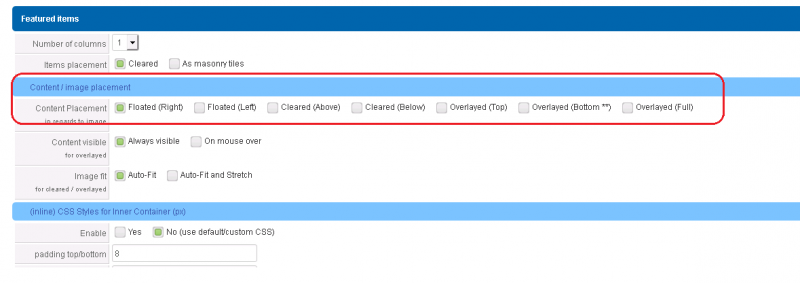
1. there is a parameter to float image left


2. please try this news.php (you may want to also get new.css):
(but since floating left / right , can beignored, in some cases and it was fixed here:)
raw.githubusercontent.com/FLEXIcontent/f...ontent/tmpl/news.php

download locally rename the old files and test with new one

(you may want to also get new.css)


-- Flexicontent is Free but involves a big effort on our part.
Like the our support? (for a bug-free FC, despite having a long list of functions) Like the features? Like the ongoing development and future commitment to FLEXIcontent?
-- Add your voice to the FLEXIcontent JED listing with a 5-star review. Thanks!
Last edit: 10 years 10 months ago by ggppdk.

Please Log in or Create an account to join the conversation.

More
10 years 10 months ago - 10 years 10 months ago #54067 by esinet
Thanks
i'll try this as soon as i can

Joomla 3.9.14 /3.6.5 FLEXIcontent v 3.3.1.6
Last edit: 10 years 10 months ago by ggppdk.

Please Log in or Create an account to join the conversation.

More
10 years 10 months ago - 10 years 10 months ago #54068 by ggppdk
Hello

floating the image is common
-- thus we have parameter
and it must work, almost all cases without css conflict,

you can also send a PM,
to check if the CSS class is there or is missing
(the bug in v3 Beta 6b, that i said above that in some cases the CSS class for floating the image is not added)


-- Flexicontent is Free but involves a big effort on our part.
Like the our support? (for a bug-free FC, despite having a long list of functions) Like the features? Like the ongoing development and future commitment to FLEXIcontent?
-- Add your voice to the FLEXIcontent JED listing with a 5-star review. Thanks!
Last edit: 10 years 10 months ago by ggppdk.

Please Log in or Create an account to join the conversation.

More
10 years 10 months ago - 10 years 10 months ago #54075 by esinet
I tried the new news.php but i don't find the position to put image under the title and on the left (or right) of the text description, like before in v221
is this exist ?
Thanks a lot

Joomla 3.9.14 /3.6.5 FLEXIcontent v 3.3.1.6
Last edit: 10 years 10 months ago by esinet.

Please Log in or Create an account to join the conversation.

More
10 years 10 months ago - 10 years 10 months ago #54079 by ggppdk
Please check the setting of this parameter for both of featured and standard


-- Flexicontent is Free but involves a big effort on our part.
Like the our support? (for a bug-free FC, despite having a long list of functions) Like the features? Like the ongoing development and future commitment to FLEXIcontent?
-- Add your voice to the FLEXIcontent JED listing with a 5-star review. Thanks!
Last edit: 10 years 10 months ago by ggppdk.

Please Log in or Create an account to join the conversation.

More
10 years 10 months ago #54083 by esinet
i don'use featured but i checked the setting for both. But i don't have the image under the title ...
If the number of characters of the title is less than 41 (two columns), image is on the left of all (title and introduction). If it's more than 41 characters, image is above the title.
It seems to be correct for the carrousel ...(except the style, i'll work on it after)
[IMG

i will prepare my test-site to give you an access ... and send you a Mp when it's ready

Joomla 3.9.14 /3.6.5 FLEXIcontent v 3.3.1.6

Please Log in or Create an account to join the conversation.

More
10 years 10 months ago #54089 by ggppdk
Hello

that is not our intended behaviour

please test/apply this fix:
in news.php

replace (exists in 2 places, for both featured and standard):
Code:
<div class="fc_inline_block fcitem_title">
with:
Code:
<div class="fc_inline fcitem_title">


-- Flexicontent is Free but involves a big effort on our part.
Like the our support? (for a bug-free FC, despite having a long list of functions) Like the features? Like the ongoing development and future commitment to FLEXIcontent?
-- Add your voice to the FLEXIcontent JED listing with a 5-star review. Thanks!

Please Log in or Create an account to join the conversation.

More
10 years 10 months ago #54104 by esinet
It doesn't change the place of images.
I took the news.php of the v221 and i put it in my templates/html/mod_flexicontent folder. Like this, i've got the image at the place i want.
But where can i put the news.css of v221 ? i tried to put it in the same folder but it doesn't work.
If i replace the news.css v3, it's ok ... but is it possible to put it on the templates/html/ folder ?
Thanks for your help .

Joomla 3.9.14 /3.6.5 FLEXIcontent v 3.3.1.6

Please Log in or Create an account to join the conversation.

Moderators: vistamediajoomlacornerggppdk
Cookies user preferences
We use cookies to ensure you to get the best experience on our website. If you decline the use of cookies, this website may not function as expected.
Accept all
Decline all
Essential
These cookies are needed to make the website work correctly. You can not disable them.
Display
Accept
Analytics
Tools used to analyze the data to measure the effectiveness of a website and to understand how it works.
Google Analytics
Accept
Decline
Save