How to centre item title to image in blog view

More
10 years 5 months ago #57309 by keepachris
Hi, How can i centre the item title above image in blog view?

Please Log in or Create an account to join the conversation.

More
10 years 5 months ago #57310 by ggppdk
You can try this CSS
Code:
#flexicontent .fc_item_title { display: block; text-align: left; width: 100%; margin-left: 40px; }

the above is just an example, you may need more CSS depending on your Joomla template too

- also try changing:
margin-left: 40px;
to some other, e.g.
margin-left: 20px;

Please note that most styling in FLEXIcontent requires CSS knowledge !


-- Flexicontent is Free but involves a big effort on our part.
Like the our support? (for a bug-free FC, despite having a long list of functions) Like the features? Like the ongoing development and future commitment to FLEXIcontent?
-- Add your voice to the FLEXIcontent JED listing with a 5-star review. Thanks!

Please Log in or Create an account to join the conversation.

More
10 years 5 months ago #57326 by keepachris
Hi I have a basic knowledge of css. When inspecting the css I can't find the above #flexicontent .fc_item_title {

Please Log in or Create an account to join the conversation.

More
10 years 5 months ago - 10 years 5 months ago #57327 by germany_bw
Hello

In FC 3.x you should find it in http://yoururl/components/com_flexicontent/assets/css/flexi_frontend.css in line 108.

update:

sry, about line 108, I have edited the frontend.css.
Last edit: 10 years 5 months ago by germany_bw.

Please Log in or Create an account to join the conversation.

More
10 years 5 months ago #57329 by Rooney

keepachris wrote: Hi I have a basic knowledge of css. When inspecting the css I can't find the above #flexicontent .fc_item_title {

Could you post link to the page?
Rooney

Joomla! 3.9.24 and FC 3.3.9

Please Log in or Create an account to join the conversation.

More
10 years 5 months ago - 10 years 5 months ago #57331 by germany_bw
Some Browsers has a function that is called "inspect elements". This function shows you many informations about the css-rules and the html-code for your page.

With this function you can also modificate the css-rules and the html-code to test your modification before you edit your page. It also shows you the place where you can find the css-riules for your html-code.

This video shows you how to use this function:

Last edit: 10 years 5 months ago by germany_bw.

Please Log in or Create an account to join the conversation.

More
10 years 5 months ago #57333 by keepachris
Hi, i've tried to use the Inspect Elements it always throws me to a CSS file i can't find on the server. the link to the page is... www.leicestershirelostandfound.co.uk/los...ls/view-lost-animals

i would like to display the names above the images and remove the "read more"

Please Log in or Create an account to join the conversation.

More
10 years 5 months ago #57334 by keepachris
Hi, i've tried to use the Inspect Elements it always throws me to a CSS file i can't find on the server. the link to the page is... www.leicestershirelostandfound.co.uk/los...ls/view-lost-animals

i would like to display the names above the images and remove the "read more"

Please Log in or Create an account to join the conversation.

More
10 years 5 months ago #57336 by Rooney
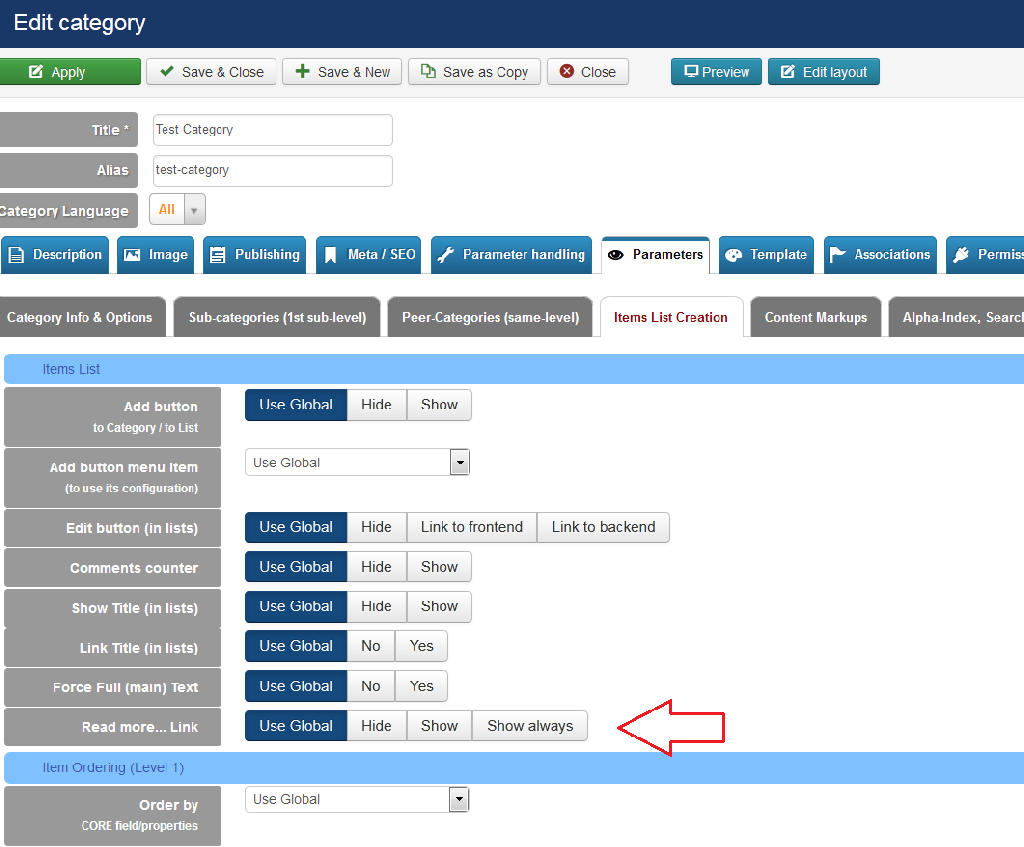
Using Firebug I found the following: Anyway, the read more links can be removed in the category settings the articles are assigned to.
Rooney

Joomla! 3.9.24 and FC 3.3.9

Please Log in or Create an account to join the conversation.

More
10 years 5 months ago - 10 years 5 months ago #57339 by ggppdk
Hello

there is a parameter to disable readmore in
- component parameter
- in category parameters (which inherit from parent categories, and then from component)

e.g. a picture in a category:


- if you want to disable for a category subtree, then edit the TOP category of the subtree, thus all categories will be effected
- if you want to disable for ALL categories, then edit the component parameters, (click configuration button)


-- Flexicontent is Free but involves a big effort on our part.
Like the our support? (for a bug-free FC, despite having a long list of functions) Like the features? Like the ongoing development and future commitment to FLEXIcontent?
-- Add your voice to the FLEXIcontent JED listing with a 5-star review. Thanks!
Last edit: 10 years 5 months ago by ggppdk.

Please Log in or Create an account to join the conversation.

Moderators: vistamediajoomlacornerggppdk
Cookies user preferences
We use cookies to ensure you to get the best experience on our website. If you decline the use of cookies, this website may not function as expected.
Accept all
Decline all
Essential
These cookies are needed to make the website work correctly. You can not disable them.
Display
Accept
Analytics
Tools used to analyze the data to measure the effectiveness of a website and to understand how it works.
Google Analytics
Accept
Decline
Save