[SOLVED] addressint map on mobile issue

More
10 years 3 weeks ago - 10 years 2 weeks ago #60069 by Macjoomla
Hello FC Team,
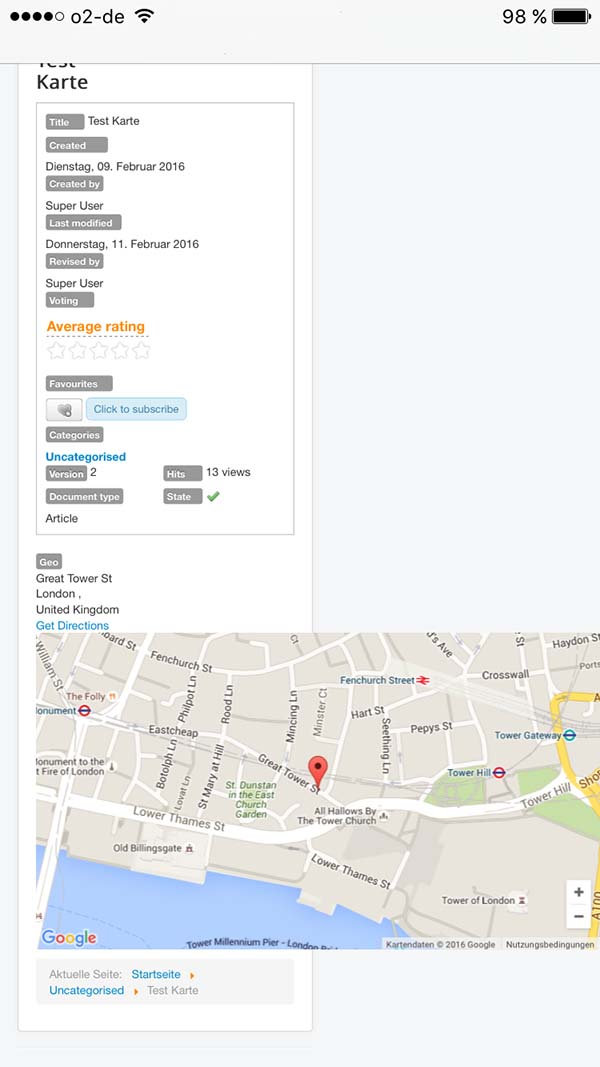
there is an issue with map view of field addressint in detail view of Theme default on mobile responsive view.


Thank you and best regards, Macjoomla
Last edit: 10 years 2 weeks ago by ggppdk.

Please Log in or Create an account to join the conversation.

More
10 years 3 weeks ago #60075 by micker
... google map isnt responsive... need some trick not official solution

FLEXIcontent is Free but involves a very big effort on our part.
Like the our support? (for a bug-free FC, despite being huge extension) Like the features? Like the ongoing development and future commitment to FLEXIcontent?
-- Add your voice to the FLEXIcontent JED listing reviews. Thanks![/size]

Please Log in or Create an account to join the conversation.

More
10 years 2 weeks ago #60087 by Macjoomla
What kind of trick are you suggesting ? How about integrating it in FlexiContent?

micker wrote: ... google map isnt responsive... need some trick not official solution

Please Log in or Create an account to join the conversation.

More
10 years 2 weeks ago #60092 by micker

FLEXIcontent is Free but involves a very big effort on our part.
Like the our support? (for a bug-free FC, despite being huge extension) Like the features? Like the ongoing development and future commitment to FLEXIcontent?
-- Add your voice to the FLEXIcontent JED listing reviews. Thanks![/size]

Please Log in or Create an account to join the conversation.

More
10 years 2 weeks ago #60093 by Macjoomla
Thank you micker, but i am not embedding a google map, instead i am using the flexicontent field for international addresses and google map. Wouldn it make sense to make it responsive in flexicontent itself? Or do i not get, what you are pointing out?

Best regards, Macjoomla

Please Log in or Create an account to join the conversation.

More
10 years 2 weeks ago #60094 by micker
is that i say i didn't find a good way to finish this ... it's only specific tricks ... i didn't think a good solution to add light tips and i prefer an api solution

FLEXIcontent is Free but involves a very big effort on our part.
Like the our support? (for a bug-free FC, despite being huge extension) Like the features? Like the ongoing development and future commitment to FLEXIcontent?
-- Add your voice to the FLEXIcontent JED listing reviews. Thanks![/size]

Please Log in or Create an account to join the conversation.

More
10 years 2 weeks ago - 10 years 2 weeks ago #60098 by ggppdk
It is responsive (see below),
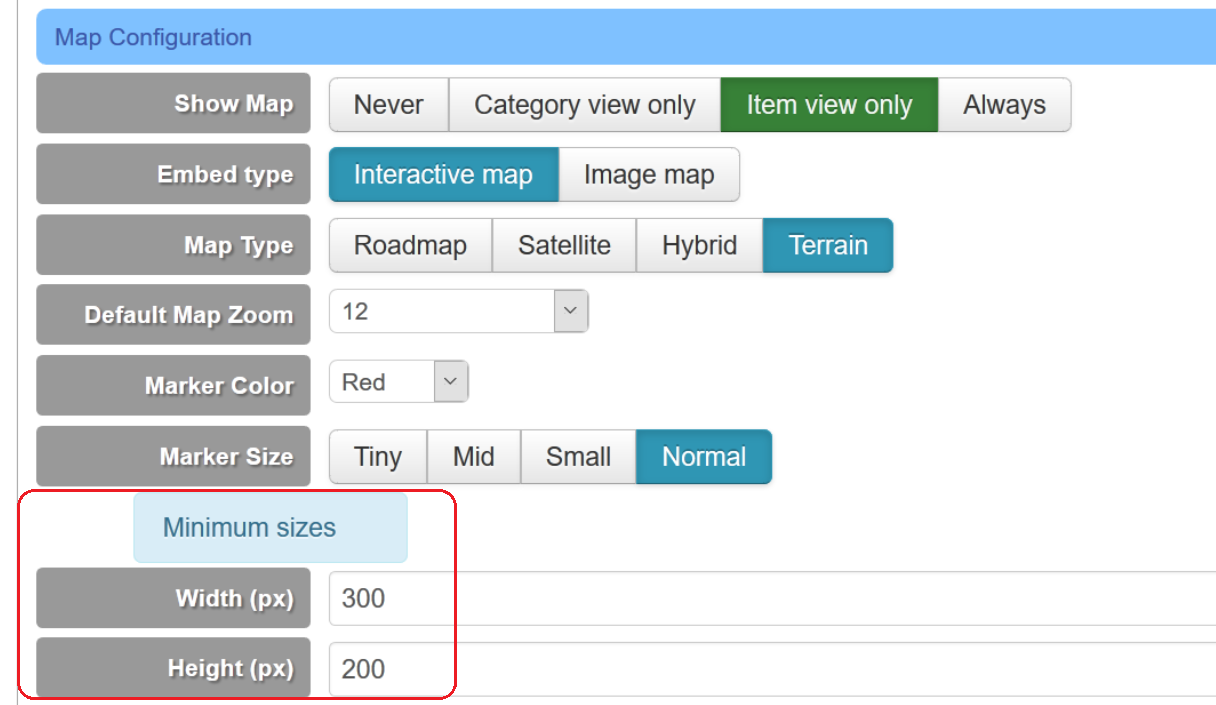
- but you can enable field configuration that forces minimum width / height

Please set low limits, e.g. 200x150
(maybe you save field with the defaults which are a bit high 640x480)


- i will set new MIN defaults (200x150) in next release
Code:
/* External container */ div .fc_addressint_map { box-sizing: border-box; height: 100%; margin: 0; padding: 0; width: 100%; } /* Internal container */ div .fc_addressint_map_canvas { box-sizing: border-box; height: 100%; margin: 0; padding: 0; width: 100%; }


-- Flexicontent is Free but involves a big effort on our part.
Like the our support? (for a bug-free FC, despite having a long list of functions) Like the features? Like the ongoing development and future commitment to FLEXIcontent?
-- Add your voice to the FLEXIcontent JED listing with a 5-star review. Thanks!
Last edit: 10 years 2 weeks ago by ggppdk.

Please Log in or Create an account to join the conversation.

More
10 years 2 weeks ago #60101 by Macjoomla
Hello ggppdk, your completely right, thank you for clarifying this. After the change it works fine :)

Just one thought, field configuration that forces minimum width / height is always enabled, so with this, the height is staying minimum size ever, no matter where you look at it. Just the width is changing to fit the device.

Thank you and best regards, Macjoomla

ggppdk wrote: It is responsive (see below),
- but you can enable field configuration that forces minimum width / height
Please set low limits, e.g. 200x150
(maybe you save field with the defaults which are a bit high 640x480)
- i will set new MIN defaults (200x150) in next release

Please Log in or Create an account to join the conversation.

Moderators: vistamediajoomlacornerggppdk
Cookies user preferences
We use cookies to ensure you to get the best experience on our website. If you decline the use of cookies, this website may not function as expected.
Accept all
Decline all
Essential
These cookies are needed to make the website work correctly. You can not disable them.
Display
Accept
Analytics
Tools used to analyze the data to measure the effectiveness of a website and to understand how it works.
Google Analytics
Accept
Decline
Save