Hide links in main menu

More
15 years 10 months ago #4424 by vfro
Hide links in main menu was created by vfro
Hello

I followed your indication and i modified default.php file from mytemplate/html/mod_mainmenu. I need to hide menu from users who are not allow to view certain categories

Here is my real example:

3 main categories added to main menu (direct sales, corporate stores, telesales). For each categories i created a group of users who can see information, so DS group should see only DS content, CS only Corporate, TS only Telesales.

Can i do that with Flexiacces?

Thank you

Please Log in or Create an account to join the conversation.

More
15 years 10 months ago #4434 by micker
Replied by micker on topic Hide links in main menu
ye you can
created your group and allow the autorisation bien contenu type and menu (in flexicontent)

FLEXIcontent is Free but involves a very big effort on our part.
Like the our support? (for a bug-free FC, despite being huge extension) Like the features? Like the ongoing development and future commitment to FLEXIcontent?
-- Add your voice to the FLEXIcontent JED listing reviews. Thanks![/size]

Please Log in or Create an account to join the conversation.

More
15 years 10 months ago #4437 by vfro
Replied by vfro on topic Hide links in main menu
I'm sorry, but i don't understand..can you give me an example based on my configuration?

Please Log in or Create an account to join the conversation.

More
15 years 10 months ago #4450 by micker
Replied by micker on topic Hide links in main menu
hello
1 you create your group
2 in flexiaccess you selected frontend and article
3 in the tree you selected article (contenu) you do some rule group in categorie
4 in the tree you selected the rulle of menu for group
++

FLEXIcontent is Free but involves a very big effort on our part.
Like the our support? (for a bug-free FC, despite being huge extension) Like the features? Like the ongoing development and future commitment to FLEXIcontent?
-- Add your voice to the FLEXIcontent JED listing reviews. Thanks![/size]

Please Log in or Create an account to join the conversation.

More
15 years 10 months ago #4548 by vfro
Replied by vfro on topic Hide links in main menu
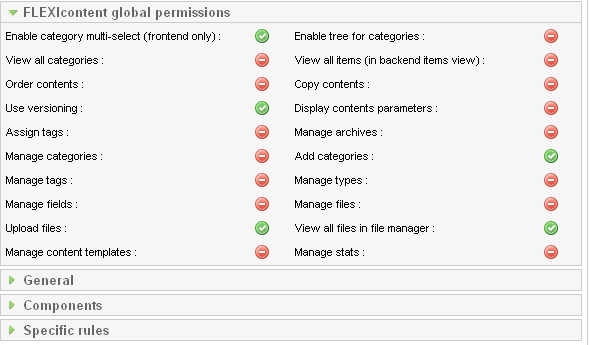
i think it's a problem here, see attached image

Please Log in or Create an account to join the conversation.

More
15 years 10 months ago #4552 by vistamedia
Replied by vistamedia on topic Hide links in main menu
It should, your config is correct. On this website this is for example the registered users menu:
[img

Click for full size - Uploaded with plasq's Skitch

This is the subscribers menu:
[img

Click for full size - Uploaded with plasq's Skitch

And this is the configuration in frontend permissions:
[img

Click for full size - Uploaded with plasq's Skitch

It should work normally :?: :?:

FLEXIcontent lead developer.
www.vistamedia.fr web agency and custom development.
www.joomla.fr co-administrator.
Please no PM for support request, use the forum for that!!!

Please Log in or Create an account to join the conversation.

More
15 years 10 months ago #4553 by vfro
Replied by vfro on topic Hide links in main menu
Unfortunately, it doesn't, i change templates (after i copied default.php file), same problem.

I observed something: in your last screenshot, Public group have an icon as an X sign. How did you get this permission, because i can only activate/deactivate (red/green icon, not the X icon)

Please Log in or Create an account to join the conversation.

More
15 years 10 months ago #4586 by vfro
Replied by vfro on topic Hide links in main menu
Emmanuel, i try to do same things in a fresh Joomla installation, same problem.

Here is what i did:

- new joomla 1.5.15 version - > installed sample content -> created a new user as Registered - >added a group which include this user->tried to display "Web Links" link from mainmenu only for this group..does't work untill i enable View option for Registered group also.

My config: Joomla 1.5.15, Windows 2003 Server, IIS6, PHP 5.2.9

More, i tried to do same thins on another website (Joomla 1.5.15, Apache, Linux, PHP 5.3.0), same problem: untill Registered group is not activated, user cannot see hidden links in menu. If is activated, then all users can see all hidden links.

forgot to mention that i made modification in rhuk_milkyway\html\mod_mainmenu\default.php file

Please Log in or Create an account to join the conversation.

More
15 years 10 months ago #4592 by vfro
Replied by vfro on topic Hide links in main menu
Ok, i think i was solved this problem, again was a problem with SSO plugins. I don't know why but i cannot use SSO login..not a very big problem (users will not be automatically logged in), maybe someone will find a way to solve it.

Please Log in or Create an account to join the conversation.

More
15 years 10 months ago #5158 by p.meertens
Replied by p.meertens on topic Hide links in main menu
Same here,

..... until i replaced the default.php in \mod_mainmenu.....

silly!

Please Log in or Create an account to join the conversation.

Moderators: vistamediajoomlacornerggppdk
Cookies user preferences
We use cookies to ensure you to get the best experience on our website. If you decline the use of cookies, this website may not function as expected.
Accept all
Decline all
Essential
These cookies are needed to make the website work correctly. You can not disable them.
Display
Accept
Analytics
Tools used to analyze the data to measure the effectiveness of a website and to understand how it works.
Google Analytics
Accept
Decline
Save