Missing backend menus in FlexiAccess

More
15 years 2 months ago #11528 by gmomo
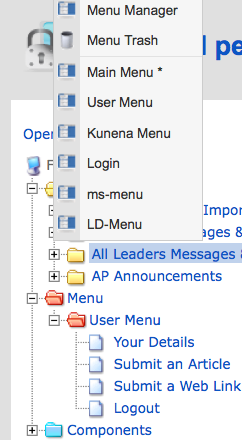
Hi folks, in FlexiAccess, as shown here, I have 6 Menu's but only 1 (user) is visible. It was there, and now its gone though I'm logged in as an admin. Is there a way to reset to the default installation settings?
Thanks

[attachment=0:3e7afe5t]<!-- ia0 -->Missing Menu.png<!-- ia0 -->[/attachment:3e7afe5t]

Please Log in or Create an account to join the conversation.

More
15 years 2 weeks ago #13065 by marcelim
I have the same problem.

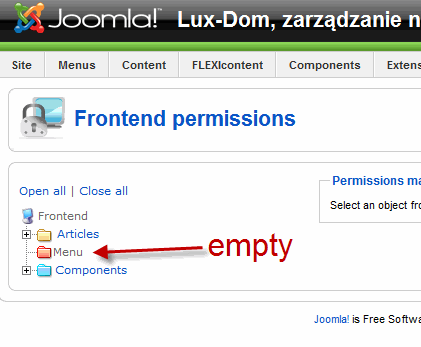
My menus are not visible in back-end on "frontend permissions page".

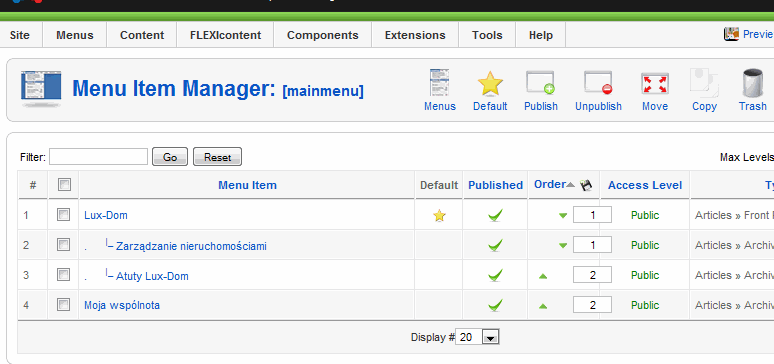
Screen with menus:
[attachment=1:1mfkdmuu]<!-- ia1 -->menu.gif<!-- ia1 -->[/attachment:1mfkdmuu]

Screen with frontend permissions page:

[attachment=0:1mfkdmuu]<!-- ia0 -->flexi.gif<!-- ia0 -->[/attachment:1mfkdmuu]

I have modified my menu structure couple of times and I've deleted items and created new items. FlexiAccess do not show menus. New menus are not visible. Please help.

Please Log in or Create an account to join the conversation.

More
15 years 1 week ago #13218 by marcelim
Hi, is there any chance to get help? This is annoying that it disappears, every time when something changes in menu (new item is added or deleted) there is no way expand menu in FLEXIaccess options. I have to remove menu and create new from the beginning.

Please help me.

Please Log in or Create an account to join the conversation.

More
15 years 1 week ago #13225 by marcelim
Hi is this forum dead? I need support which I paid for. Please read my bug-report and answer something.

Please Log in or Create an account to join the conversation.

More
15 years 1 week ago #13232 by micker
hello
at first clean cache and expired cache
desactived plugin for mootools compatibility
with phpmyadmin check repair and optimise your BDD
regards

FLEXIcontent is Free but involves a very big effort on our part.
Like the our support? (for a bug-free FC, despite being huge extension) Like the features? Like the ongoing development and future commitment to FLEXIcontent?
-- Add your voice to the FLEXIcontent JED listing reviews. Thanks![/size]

Please Log in or Create an account to join the conversation.

More
15 years 1 week ago #13238 by marcelim
Hi, thank you for your reply.

micker wrote: at first clean cache and expired cache

Done, nothing changed

micker wrote: desactived plugin for mootools compatibility

Which exactly plugin? i have deactivated "System - Mootools Upgrade" (the only one with 'mootols' I have) but nothing changed.

micker wrote: with phpmyadmin check repair and optimise your BDD

What you mean BDD? What is BDD? I have repaired and optymalized all tables in database, nothing changed.

any other ideas? I have installed:
- flexiaccess
- flexicontent
- articles anywhere
- superfish menu
- acy mailing

Please Log in or Create an account to join the conversation.

More
15 years 1 week ago #13241 by micker
ok for all
try to desintall flexiaccess and flexicontent (your configuration is save)
after clean cache and expired cache
install flexiaccess
after clean cache and expired cache
install flexicontent
after clean cache and expired cache
deconnect and reconnect
your are in local mode or inline ?
regards

FLEXIcontent is Free but involves a very big effort on our part.
Like the our support? (for a bug-free FC, despite being huge extension) Like the features? Like the ongoing development and future commitment to FLEXIcontent?
-- Add your voice to the FLEXIcontent JED listing reviews. Thanks![/size]

Please Log in or Create an account to join the conversation.

More
15 years 1 week ago #13242 by marcelim
Hi, thanks, but still nothing :(

I did exactly as you described, but nothing. Menu is still empty. In addition, after this operation began to appear warnings:

Warning: array_push() [function.array-push]: First argument should be an array in /[mypath]/plugins/system/flexiaccess/flexiaccessclass.php on line 1359
Warning: array_intersect() [function.array-intersect]: Argument #1 is not an array in /[mypath]/plugins/system/flexiaccess/flexiaccessclass.php on line 1362
Warning: array_unique() [function.array-unique]: The argument should be an array in /[mypath]/plugins/system/flexiaccess/flexiaccessclass.php on line 1392
Warning: array_push() [function.array-push]: First argument should be an array in /[mypath]/plugins/system/flexiaccess/flexiaccessclass.php on line 1359
Warning: array_diff() [function.array-diff]: Argument #1 is not an array in /[mypath]/plugins/system/flexiaccess/flexiaccessclass.php on line 1364
Warning: in_array() [function.in-array]: Wrong datatype for second argument in /[mypath]/administrator/modules/mod_famenu/helper.php on line 235

I did the procedure ‘after install’ as described somewhere on forum (publish all plugins from flexicontent panel -> import Joomla structure to flexicontent -> open and save configuration -> logout and login) but warnings not disappear. They remain.

Now I do not have ability to set ACL to menu and warnings in administrator panel.

Yes my site is on the hosting, online, on server. luxdom-test.urzad.net Fortunately it is a development site (pre-production), but I have to finish building this site yet, my time is running out :(

Regards

Please Log in or Create an account to join the conversation.

More
15 years 1 week ago #13243 by marcelim
and something else: yes, I can create new site with claen new database, but I did it once.
After I’ve installed flexicontent and flexiaccess on clean new instalation, I've started to create menu items. When I was creating the n-th menu item, I've noticed that the problem is back. My menu disapered from flexiaccess.

So I’m afraid new clean installation will not resolve this problem. Maybe I am doing something wrong?

Please Log in or Create an account to join the conversation.

More
15 years 1 week ago #13244 by micker
try whitout special caractere

FLEXIcontent is Free but involves a very big effort on our part.
Like the our support? (for a bug-free FC, despite being huge extension) Like the features? Like the ongoing development and future commitment to FLEXIcontent?
-- Add your voice to the FLEXIcontent JED listing reviews. Thanks![/size]

Please Log in or Create an account to join the conversation.

Moderators: vistamediajoomlacornerggppdk
Cookies user preferences
We use cookies to ensure you to get the best experience on our website. If you decline the use of cookies, this website may not function as expected.
Accept all
Decline all
Essential
These cookies are needed to make the website work correctly. You can not disable them.
Display
Accept
Analytics
Tools used to analyze the data to measure the effectiveness of a website and to understand how it works.
Google Analytics
Accept
Decline
Save