403 - You are not authorised to view this resource.

More
15 years 3 months ago #11725 by intra
Problem is, that I set up an article directly in FlexiContent and get the following error message

"403 - You are not authorised to view this resource."

only when I am logged in, regardless if I log in as Super Admin or Registered Frontend user. When I log out I can access the article without any problem.

So, logged in > 403
not logged in > Article shows up

What's the problem?

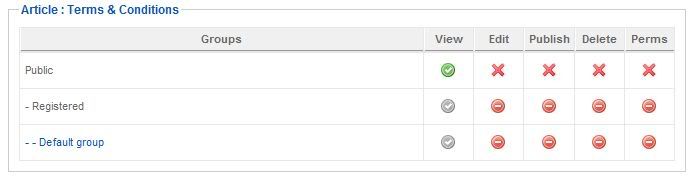
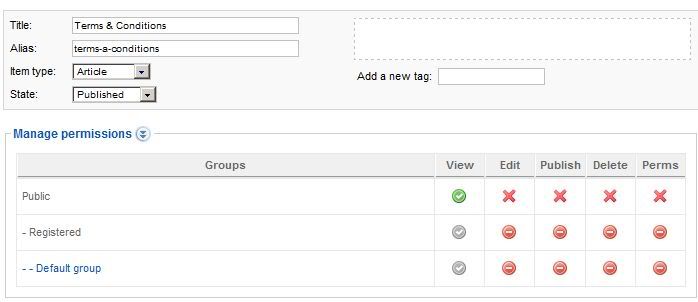
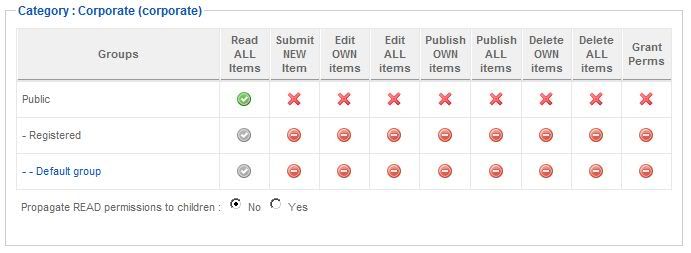
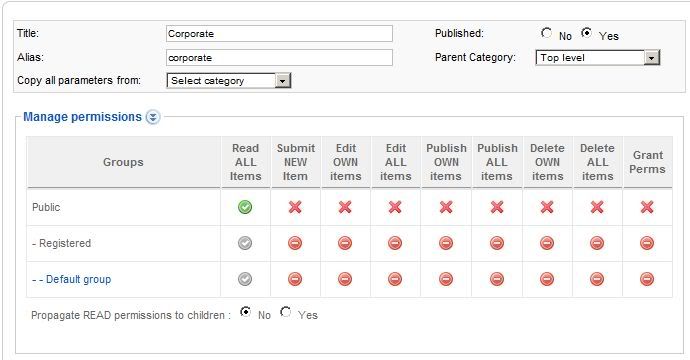
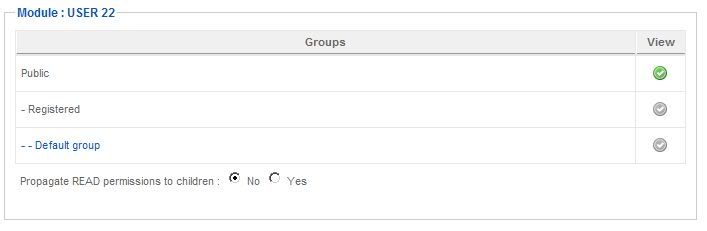
Have latest version of FlexiAccess and Content installed in Joomla 1.5.22 - Both users are in the registered group, not the default group - Permissions for the article, category and so on are on green for viewing by public users, registered users and default group users.

Thanks upfront!

Please Log in or Create an account to join the conversation.

More
15 years 3 months ago #11729 by micker
can you give the link to view this problem ?
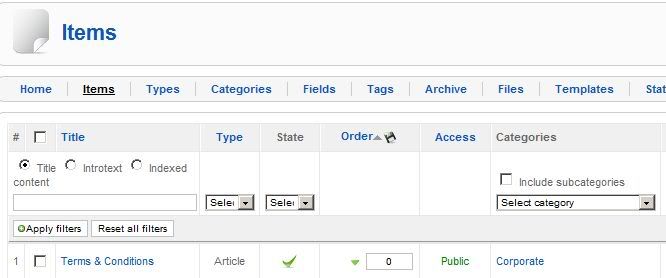
post some screenshot of of your configuration
flexiaccess group
flexiaccess menu
flexiaccess article
autorization on joomla menu
regards

FLEXIcontent is Free but involves a very big effort on our part.
Like the our support? (for a bug-free FC, despite being huge extension) Like the features? Like the ongoing development and future commitment to FLEXIcontent?
-- Add your voice to the FLEXIcontent JED listing reviews. Thanks![/size]

Please Log in or Create an account to join the conversation.

More
15 years 3 months ago #11745 by intra
Thanks for answering.

It is the absolute default flexi configuration, nothing changed after the install of flexi.

All Joomla Articles are unpublished.

Also all Joomla Categories and Sections are unpublished.

The Flexi Article and Category are free to view by Anyone.

All Flexi Plugins are installed and published.

The users are not part of a Flexi Group!

- NO ACCESS TO FLEXI CONTENT (ARTICLE, CATEGORY, DIRECTORY) WHEN LOGGED IN AS SUPER ADMINISTRATOR

- NO ACCESS TO FLEXI CONTENT (ARTICLE, CATEGORY, DIRECTORY) WHEN LOGGED IN AS REGISTERED USER

- ACCESS TO FLEXI CONTENT (ARTICLE, CATEGORY, DIRECTORY) WHEN NOT LOGGED IN AS PUBLIC VISITOR

I dont know what more information I can give :?:

I mean that is totally bogus, anyone who is not registered can access Flexi content and anyone who is registered and logged in is not allowed to access.


Please Log in or Create an account to join the conversation.

More
15 years 3 months ago #11748 by micker

intra wrote: All Joomla Articles are unpublished.

Also all Joomla Categories and Sections are unpublished.

why ?
you need one section (flexicontent) has publish ..
please do some screenshot and post in forum
now you didn't give any information ...
di you have a real link to see it ?

FLEXIcontent is Free but involves a very big effort on our part.
Like the our support? (for a bug-free FC, despite being huge extension) Like the features? Like the ongoing development and future commitment to FLEXIcontent?
-- Add your voice to the FLEXIcontent JED listing reviews. Thanks![/size]

Please Log in or Create an account to join the conversation.

More
15 years 3 months ago #11755 by intra
The Flexi category is published and also the article, all the Joomla categories and old articles from com_content are unpublished.

I dont know what I shall show you, it is right out of the box when installed and I can see the article when I am logged out but not when I log in (?). :)

I will see if I can make same screenshots but those will show that it is like when installed.

Please Log in or Create an account to join the conversation.

More
15 years 3 months ago #11756 by intra
Note that when clicking "Propagate READ permissions to children : No Yes" to YES, after saving the changes it is again showing NO.


Again, when logged out I can see the article, when logging in, I cannot see and get 403 error code. This site is on localhost btw.

Please Log in or Create an account to join the conversation.

More
15 years 3 months ago #11761 by intra
Sorry, I cant understand something like that. This component is so full of bugs that it should still be beta. When I browse the forum, I see so many possible errors and I assume that not everyone even spots those and thinks the site works okay.

Now I wanted to go to "Files" in the Flexi Admin, it tells me there is a catchable fatal error and Flashuploader is not active, it is all correctly set up.

Then I want to uninstall the component completely and it tells me that there was an error uninstalling, manual uninstall is needed, while the flexi tab is still active in the backend but no links working anymore.

I thought this is a stable alternative to com_content or K2 and works with Flexi Access perfectly for file downloads too, so you dont need DocMan for downloads.

I think this is still beta, as when I use K2 there is no conflict with so many other extensions. Hope Flexi Access works without issues and I have not burned another 20 bucks on it.

Sorry, but this is very unenjoyable!

Please Log in or Create an account to join the conversation.

More
15 years 3 months ago #11766 by micker
hello
sorry for you but when i see your configuration... you didn't create an admin group !!!
8-)
this is the explain ....
flexiaccess is powerfull but if you don't prepared all of your configuration (groupe user categorie .. etc)it seems to don't work ...

Actualy we have some but with javascript conflict we need some dev to help manu ... be patient or use other component (we like k2 or sebcblog)
but the first feature of flexicontent : it the more simple to use CCK
regards

FLEXIcontent is Free but involves a very big effort on our part.
Like the our support? (for a bug-free FC, despite being huge extension) Like the features? Like the ongoing development and future commitment to FLEXIcontent?
-- Add your voice to the FLEXIcontent JED listing reviews. Thanks![/size]

Please Log in or Create an account to join the conversation.

Moderators: vistamediajoomlacornerggppdk
Cookies user preferences
We use cookies to ensure you to get the best experience on our website. If you decline the use of cookies, this website may not function as expected.
Accept all
Decline all
Essential
These cookies are needed to make the website work correctly. You can not disable them.
Display
Accept
Analytics
Tools used to analyze the data to measure the effectiveness of a website and to understand how it works.
Google Analytics
Accept
Decline
Save