Comment fonctionne FLEXIbreak ? (pagination)

More
10 years 5 months ago #56802 by flodariege
Bonjour,
J'essaie de comprendre comment fonctionne les sauts de page FLEXIbreak, et certaines choses me résistent...

1: Comment avoir des boutons de navigation pour aller d'une page à l'autre de l'article ? (j'ai des boutons de navigation, mais pour aller d'un article à l'autre, rien ne s'affiche pour naviguer à l'intérieur de l'article, si ce n'est le sommaire bien sûr)

2: comment faire pour remplacer "Table of contents" par "Sommaire" ?

Merci !

Dare to dream, believe the unbelievable, never take no for an answer

Please Log in or Create an account to join the conversation.

More
10 years 5 months ago #56804 by micker
il n'y a pas de bouton il n'y a que le sommaire

FLEXIcontent is Free but involves a very big effort on our part.
Like the our support? (for a bug-free FC, despite being huge extension) Like the features? Like the ongoing development and future commitment to FLEXIcontent?
-- Add your voice to the FLEXIcontent JED listing reviews. Thanks![/size]

Please Log in or Create an account to join the conversation.

More
10 years 5 months ago #56819 by flodariege
Dommage, c'est pourtant pratique des boutons ou des numéros de page...
Peut-être un jour cette fonctionnalité pourra-t-elle être ajoutée à FLEXIcontent ?
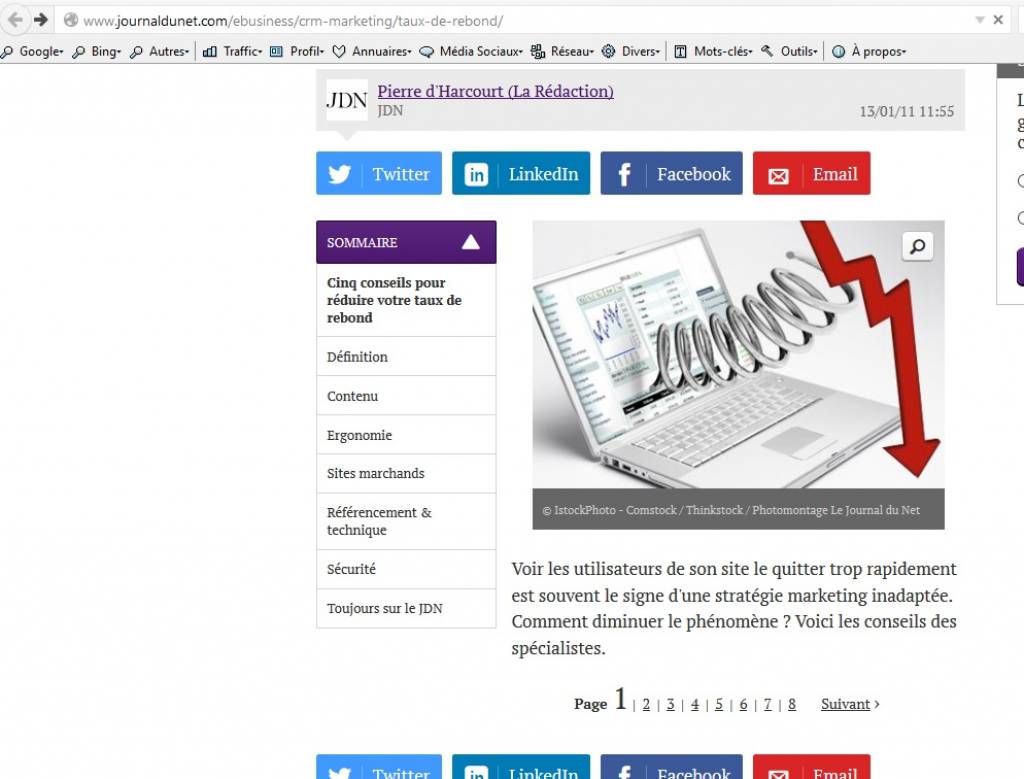
(voir l'excellent exemple du Journal du Net, ici : www.journaldunet.com/ebusiness/crm-marketing/taux-de-rebond/ )

Comment traduire Table of contents pour avoir Sommaire à la place ?

Dois-je modifier un fichier de langue (et si oui lequel) ?
Ou bien y a-t-il un fichier de langue à installer en plus d ela mise à jour 3.0.7 (j'ai quelques étiquettes en anglais depuis la mise à jour)

Merci.
Flo

Dare to dream, believe the unbelievable, never take no for an answer

Please Log in or Create an account to join the conversation.

More
10 years 5 months ago #56823 by ggppdk
Hello

i do not understand what you ask

-- the table of content is part of the article, it is text inside the article and it is written in the language of the article

do you mean to translate the phrase: "Table of contents"
just the text: "Table of contents"


-- Flexicontent is Free but involves a big effort on our part.
Like the our support? (for a bug-free FC, despite having a long list of functions) Like the features? Like the ongoing development and future commitment to FLEXIcontent?
-- Add your voice to the FLEXIcontent JED listing with a 5-star review. Thanks!

Please Log in or Create an account to join the conversation.

More
10 years 5 months ago #56854 by micker
he want a feature => next and prev button in flexibreak plugin

pour la traduction utilise la substitution de langue de joomla et recherche ce string

FLEXIcontent is Free but involves a very big effort on our part.
Like the our support? (for a bug-free FC, despite being huge extension) Like the features? Like the ongoing development and future commitment to FLEXIcontent?
-- Add your voice to the FLEXIcontent JED listing reviews. Thanks![/size]

Please Log in or Create an account to join the conversation.

More
10 years 5 months ago #56855 by micker
he want a feature => next and prev button in flexibreak plugin

pour la traduction utilise la substitution de langue de joomla et recherche ce string

FLEXIcontent is Free but involves a very big effort on our part.
Like the our support? (for a bug-free FC, despite being huge extension) Like the features? Like the ongoing development and future commitment to FLEXIcontent?
-- Add your voice to the FLEXIcontent JED listing reviews. Thanks![/size]

Please Log in or Create an account to join the conversation.

More
10 years 5 months ago #56935 by flodariege

ggppdk wrote: Hello

i do not understand what you ask
(...)
do you mean to translate the phrase: "Table of contents"
just the text: "Table of contents"


Yes :)
I only want to translate 'Table of contents' into 'Sommaire' (same in french)
And then I was just asking if maybe someday we could have navigation button and/or page numbers to navigate between different pages of flexibreak.
Something like this:

Dare to dream, believe the unbelievable, never take no for an answer

Please Log in or Create an account to join the conversation.

More
10 years 5 months ago - 10 years 5 months ago #56941 by heden
Hello,

Le Plugin PagebreakMyjspace pourra être utile.
Il est Compatible avec FLEXIcontent.
Voir sur le site de l'Auteur : softs.saulme.fr/index.php/joomla/pagebreakmyjspace.html

Joomla 3.4.8
FLEXIcontent v3.0.10-RC2g
Last edit: 10 years 5 months ago by heden.

Please Log in or Create an account to join the conversation.

More
10 years 5 months ago - 10 years 5 months ago #56942 by ggppdk
Hello

-- either translate these in Joomla overrides manager for: (French, Frontend)

FLEXIBREAK_TABLE_OF_CONTENT="Table of Contents"
FLEXIBREAK_PREVIOUS_PAGE="Previous Page"
FLEXIBREAK_NEXT_PAGE="Next Page"
FLEXIBREAK_INTRO_TEXT="Intro Text"
FLEXIBREAK_ALL_PAGES="All pages"


- or copy

administrator/language/en-GB/en-GB.plg_content_flexibreak.ini

as (and edit to make your translations)

administrator/language/fr-FR/fr-FR.plg_content_flexibreak.ini


-- Flexicontent is Free but involves a big effort on our part.
Like the our support? (for a bug-free FC, despite having a long list of functions) Like the features? Like the ongoing development and future commitment to FLEXIcontent?
-- Add your voice to the FLEXIcontent JED listing with a 5-star review. Thanks!
Last edit: 10 years 5 months ago by ggppdk.

Please Log in or Create an account to join the conversation.

More
10 years 5 months ago - 10 years 5 months ago #56950 by flodariege

heden wrote: Hello,

Le Plugin PagebreakMyjspace pourra être utile.
Il est Compatible avec FLEXIcontent.
Voir sur le site de l'Auteur : softs.saulme.fr/index.php/joomla/pagebreakmyjspace.html


Oui, merci heden, j'ai vu moi aussi ce plugin qui est compatible avec FC, mais je trouve quand même dommage, avec un outil aussi puissant que FC, de devoir installer (encore !) une extension juste pour pouvoir afficher une pagination cohérente à l'intérieur d'un article multipages.
Je m'y prends peut-être mal, mais pour l'instant ce que j'obtiens, ce sont les boutons de navigation habituels qui mènent à l'article suivant/précédent, pas à la page suivante/précédente. Très "confusing" pour l'internaute. La seule parade serait de les désactiver, mais du coup on perd la possibilité de naviguer entre articles.
On devrait pouvoir afficher des boutons similaires A L'INTERIEUR de l'article, pour naviguer d'une page à l'autre.
J'espère que ça viendra avec une prochaine mise à jour de FC ;)

EDIT : je suis en train de regarder les réglages du plugin flexibreak et apparemment il y a tout ce qu'il faut là dedans pour afficher :
- la navigation entre pages
- le compte des pages
Le problème c'est que j'ai beau activé ces 2 options, rien ne s'affiche au pied de l'article...
Il doit falloir faire quelque chose, mais quoi ??

Merci quand même. J'insiste encore un peu en essayant au maximum de personnaliser flexibreak, et si vraiment je n'obtiens pas le résultat escompté, c'est bien vers pagebreakmyjspace que je pense m'orienter.


Dare to dream, believe the unbelievable, never take no for an answer
Last edit: 10 years 5 months ago by flodariege.

Please Log in or Create an account to join the conversation.

Moderators: vistamediajoomlacornerggppdk
Cookies user preferences
We use cookies to ensure you to get the best experience on our website. If you decline the use of cookies, this website may not function as expected.
Accept all
Decline all
Essential
These cookies are needed to make the website work correctly. You can not disable them.
Display
Accept
Analytics
Tools used to analyze the data to measure the effectiveness of a website and to understand how it works.
Google Analytics
Accept
Decline
Save