[Solved] image uploaded but not linked to the item

More
11 years 2 months ago - 11 years 2 months ago #51010 by boulij
Hello,

I have seen several topics with the same problem but no one solved my issue.

I have an image field (File mode, not DB mode). The upload of the picture is going well but the image is not linked to the item.

This is not working neither on my OVH servor nor on localhost.

I suppose it's a parameter but I cannot manage to find which one.
Could you help me please?

Thanks
Last edit: 11 years 2 months ago by boulij.

Please Log in or Create an account to join the conversation.

More
11 years 2 months ago #51013 by micker
automatic link doesn't work with multi upload feature (not coded)
need to do it ;)

FLEXIcontent is Free but involves a very big effort on our part.
Like the our support? (for a bug-free FC, despite being huge extension) Like the features? Like the ongoing development and future commitment to FLEXIcontent?
-- Add your voice to the FLEXIcontent JED listing reviews. Thanks![/size]

Please Log in or Create an account to join the conversation.

More
11 years 2 months ago #51014 by ggppdk

micker wrote: automatic link doesn't work with multi upload feature (not coded)
need to do it ;)


You mean you have enabled parameter:
"Auto-assign new image"

- this works for single file upload, for multi-upload is not implemented


-- Flexicontent is Free but involves a big effort on our part.
Like the our support? (for a bug-free FC, despite having a long list of functions) Like the features? Like the ongoing development and future commitment to FLEXIcontent?
-- Add your voice to the FLEXIcontent JED listing with a 5-star review. Thanks!

Please Log in or Create an account to join the conversation.

More
11 years 2 months ago #51015 by boulij
Yes, the "auto assign new image" is enabled.

I also have authorised the "File - upload new files" and "Fields - edit value" right in ACL.

It's the same result if I upload one or several images.

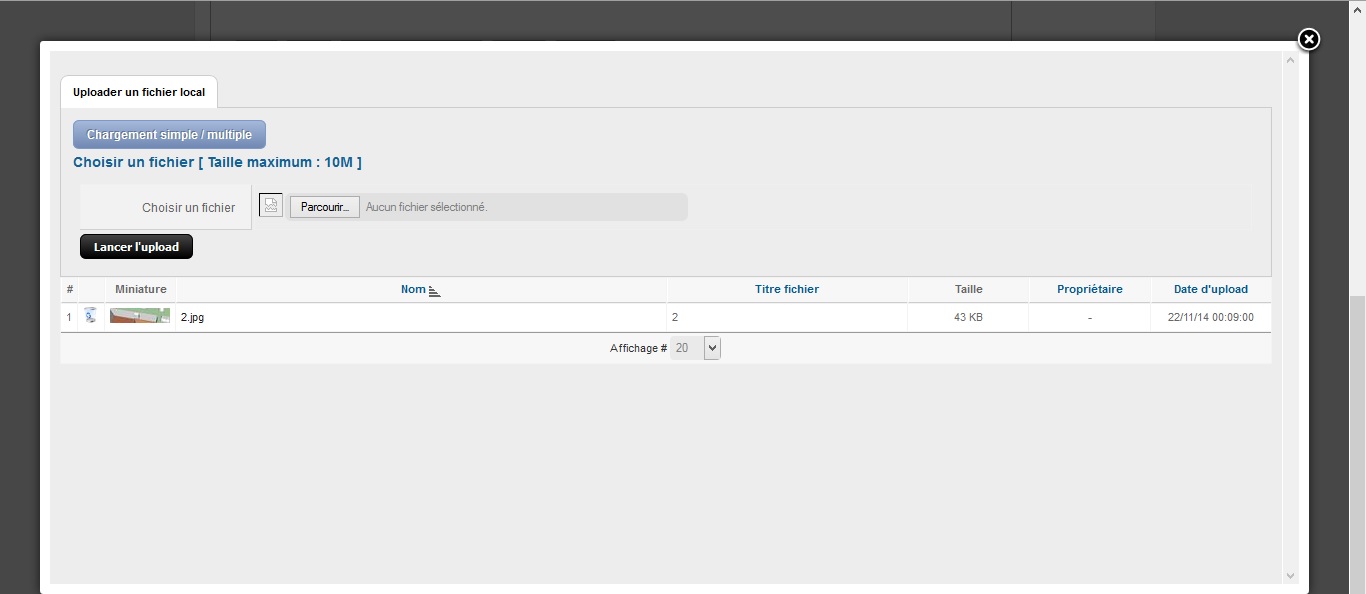
On the image attached, you can see the screen I have when I upload one image. I don't have any button to validate. The only way to go back to the item form is to use the cross on the right top to close the popup.

Please Log in or Create an account to join the conversation.

More
11 years 2 months ago #51016 by ggppdk
Hello

i meant if you used the multi-uploader to upload 1 or multiple files


so even if you use multi-uploader to upload 1 file, it will not be auto-selected,


only if you use the single file upload, it should be auto-selected


-- Flexicontent is Free but involves a big effort on our part.
Like the our support? (for a bug-free FC, despite having a long list of functions) Like the features? Like the ongoing development and future commitment to FLEXIcontent?
-- Add your voice to the FLEXIcontent JED listing with a 5-star review. Thanks!

Please Log in or Create an account to join the conversation.

More
11 years 2 months ago #51022 by boulij
Hello,

I tried both ways, single and multiple. Same result.

Just to be sure I use it the right way, can you confirm me that on the picture attached in my previous post, I'm using the single file upload please.

Please Log in or Create an account to join the conversation.

More
11 years 2 months ago #51024 by ggppdk
Hello

if you have 2 image/gallery field make sure you have enabled in the correct field (sorry we get some false reports)


is it frontend or backend ?


-- you may send a PM with
a. site url
b. super admin access,
c. field id
d. some short instructions on how to view the issue


-- Flexicontent is Free but involves a big effort on our part.
Like the our support? (for a bug-free FC, despite having a long list of functions) Like the features? Like the ongoing development and future commitment to FLEXIcontent?
-- Add your voice to the FLEXIcontent JED listing with a 5-star review. Thanks!

Please Log in or Create an account to join the conversation.

More
11 years 2 months ago #51045 by ggppdk
Hello

after upgrading the web-site to v2.2.0 / v2.2.1 rc1


tested with Firefox, Chrome, IE11
with both English and French and it works


i have used the single image uploader on the "Logo" image/gallery field:
-- the image is uploaded and
-- as soon as the upload finished, the modal popup closes immediately, and the image is auto-selected


Regards


-- Flexicontent is Free but involves a big effort on our part.
Like the our support? (for a bug-free FC, despite having a long list of functions) Like the features? Like the ongoing development and future commitment to FLEXIcontent?
-- Add your voice to the FLEXIcontent JED listing with a 5-star review. Thanks!

Please Log in or Create an account to join the conversation.

More
11 years 2 months ago #51055 by boulij
Hello,

I don't get it. I just tried on two differents computers with Firefox, Chrome and IE.
I still have the problem.

It should be a parameter on the computer or the navigator.
Do you have an idea where it could come from?

Thank you anyway and sorry for the time lost.

Please Log in or Create an account to join the conversation.

More
11 years 2 months ago #51060 by ggppdk
Hello

did you use/click "Chargement Simple/Multiple" for uploading ?


if you did, then it will not be auto selected,

instead you should you the file selector below and then click:

"lancer l'upload"


-- Flexicontent is Free but involves a big effort on our part.
Like the our support? (for a bug-free FC, despite having a long list of functions) Like the features? Like the ongoing development and future commitment to FLEXIcontent?
-- Add your voice to the FLEXIcontent JED listing with a 5-star review. Thanks!

Please Log in or Create an account to join the conversation.

Moderators: vistamediajoomlacornerggppdk
Cookies user preferences
We use cookies to ensure you to get the best experience on our website. If you decline the use of cookies, this website may not function as expected.
Accept all
Decline all
Essential
These cookies are needed to make the website work correctly. You can not disable them.
Display
Accept
Analytics
Tools used to analyze the data to measure the effectiveness of a website and to understand how it works.
Google Analytics
Accept
Decline
Save