Can the Field Navigation (Next/Previous Item) Pages be determined by another FLEXIContent Field? 06-28-2021

More
4 years 7 months ago - 4 years 7 months ago #80398 by tazzarkin
I searched your forum, but couldn't find an answer for this.

Right now, I think the Field Type "Navigation (Next/Previous Item)" is determined by the Article ID.  Is that correct?

So, when you click the buttons, it gives you the next Article ID or previous Article ID.

Can we change it to something else?  For example, if you create an integer field with numbers, can you change the "Navigation (Next/Previous Item)" to go up and down (next or previous) according to those numbers?

Example:
Article 1:  1980
Article 2:  1981
Article 3:  1982

So, then the article would go "next" or "previous" depending on the year.

Can we make the "Navigation (Next/Previous Item)" go up and down (next or previous) based on our FLEXIContent Custom Field?
Last edit: 4 years 7 months ago by tazzarkin.

Please Log in or Create an account to join the conversation.

More
4 years 7 months ago #80401 by micker
hello
the navigation field use the ordering of the category
if you need a custom ordering, use ordering by category position => articles are ordered via item poistion in list (using drag and drop)
or you can use a flexicontent field to ordering you category

FLEXIcontent is Free but involves a very big effort on our part.
Like the our support? (for a bug-free FC, despite being huge extension) Like the features? Like the ongoing development and future commitment to FLEXIcontent?
-- Add your voice to the FLEXIcontent JED listing reviews. Thanks![/size]

Please Log in or Create an account to join the conversation.

More
4 years 7 months ago #80402 by tazzarkin

hello
the navigation field use the ordering of the category
if you need a custom ordering, use ordering by category position => articles are ordered via item poistion in list (using drag and drop)
or you can use a flexicontent field to ordering you category
I am a little confused.

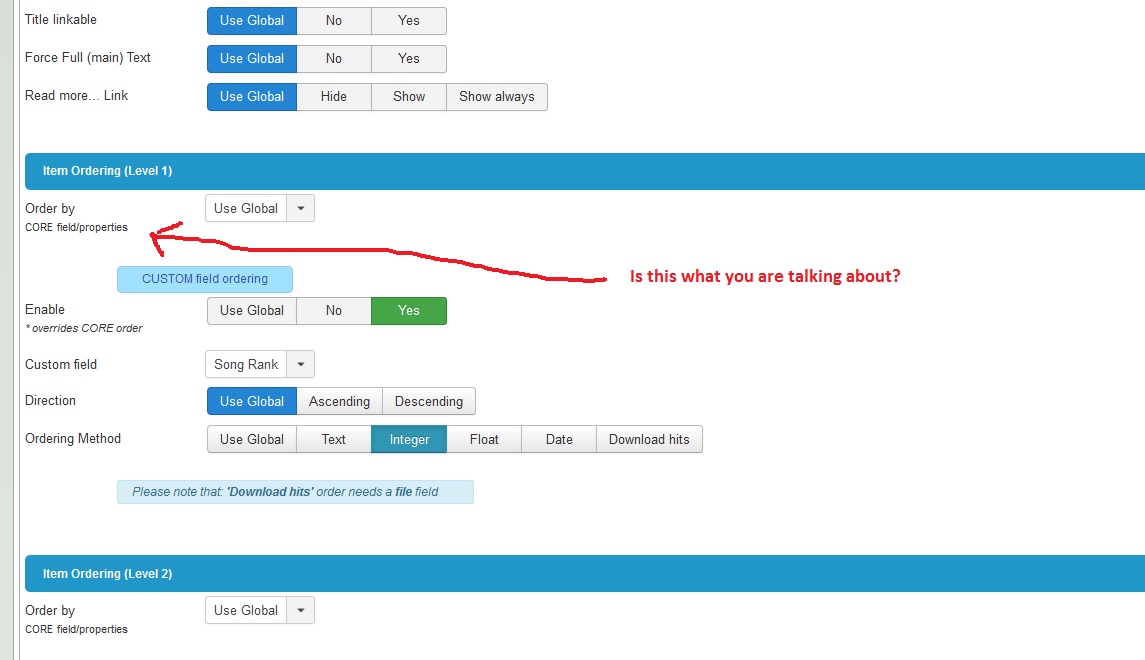
For "ordering by category", do you mean that I sort the category by my custom field?  (see picture below)   I tried it and it does not work.

What area are you talking about?


Please Log in or Create an account to join the conversation.

More
4 years 7 months ago - 4 years 7 months ago #80404 by tazzarkin
Thank you for the help!!

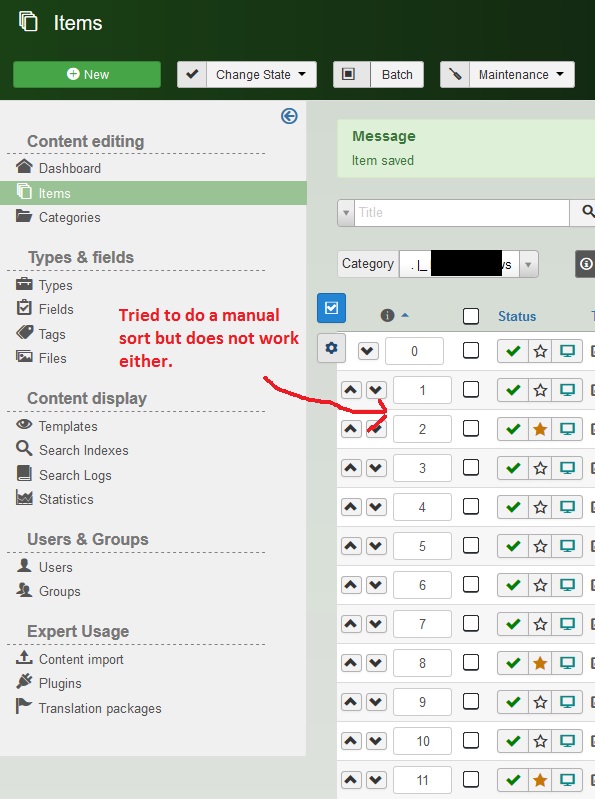
I also tried doing a sort in the Back End Manually (by the Category), but that does not work either. (See the picture)

Can you please explain what you mean?


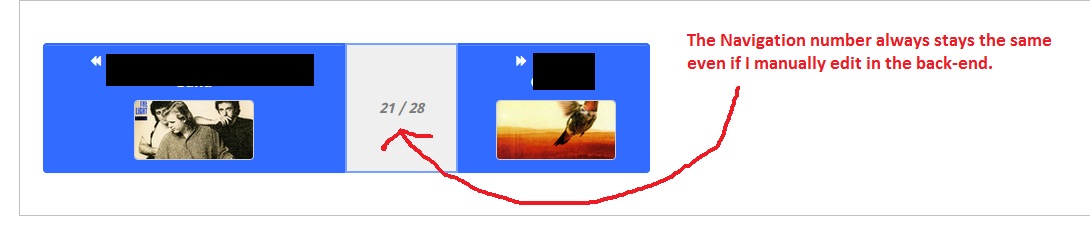
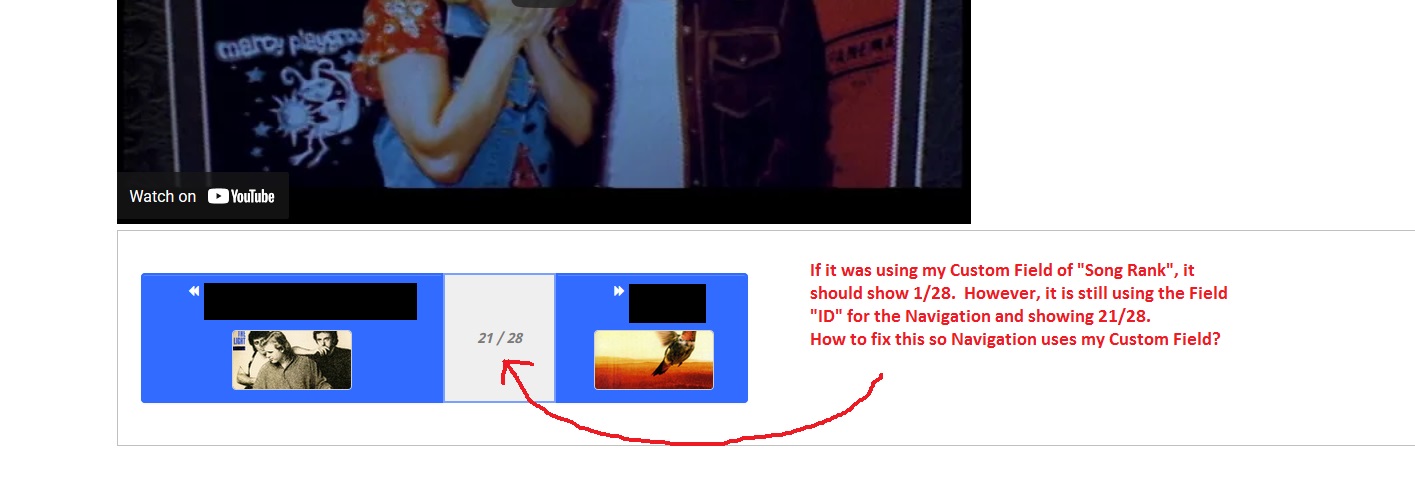
The Navigation Number always stays the same even if I manually edit by Category in the Back-end.  The Navigation always goes by "ID".  (See Picture)

Is there any way to change the order of the Navigation?

 
Last edit: 4 years 7 months ago by tazzarkin.

Please Log in or Create an account to join the conversation.

More
4 years 7 months ago #80406 by tazzarkin
I am really sorry to bother you.  FLEXIContent is a great product!!

Can you please explain your last answer?  Please?

I tried doing the things you told me.  Can you please help?

Please Log in or Create an account to join the conversation.

More
4 years 7 months ago #80407 by micker
Hello sorry think that flexi et support are free... Need waiting sometimes...
You need to select thé good ordering in your screen not defaut

FLEXIcontent is Free but involves a very big effort on our part.
Like the our support? (for a bug-free FC, despite being huge extension) Like the features? Like the ongoing development and future commitment to FLEXIcontent?
-- Add your voice to the FLEXIcontent JED listing reviews. Thanks![/size]

Please Log in or Create an account to join the conversation.

More
4 years 7 months ago #80408 by tazzarkin

Hello sorry think that flexi et support are free... Need waiting sometimes...
I sent your web site a message over a week ago.  I asked about your subscription and premium support.  No one answered me.

Please check your messages from a week ago, and you will see that I asked you.


You need to select thé good ordering in your screen not defaut


I am very sorry.  I do not know what "good order in your screen not defaut" means.

I think that maybe it is language communication problem.  I will try to guess what you mean.  Let me check and I will try to find the "good order in my screen".

Please Log in or Create an account to join the conversation.

More
4 years 7 months ago #80409 by tazzarkin
I am very, very sorry.

Where is "good order on my screen" ? What screen are you talking about?

Please Log in or Create an account to join the conversation.

More
4 years 7 months ago #80413 by ggppdk
Hello

the ordering of the Next / Previous item can be determined by another field in some cases

e.g. you have a category, and you have configured the category to use a custom field for its ordering
then the Next and Previous Item should be using the ordering you have configured in the category


-- Flexicontent is Free but involves a big effort on our part.
Like the our support? (for a bug-free FC, despite having a long list of functions) Like the features? Like the ongoing development and future commitment to FLEXIcontent?
-- Add your voice to the FLEXIcontent JED listing with a 5-star review. Thanks!

Please Log in or Create an account to join the conversation.

More
4 years 7 months ago #80414 by tazzarkin

Hello

the ordering of the Next / Previous item can be determined by another field in some cases

e.g. you have a category, and you have configured the category to use a custom field for its ordering
then the Next and Previous Item should be using the ordering you have configured in the category


Thank you for answering.

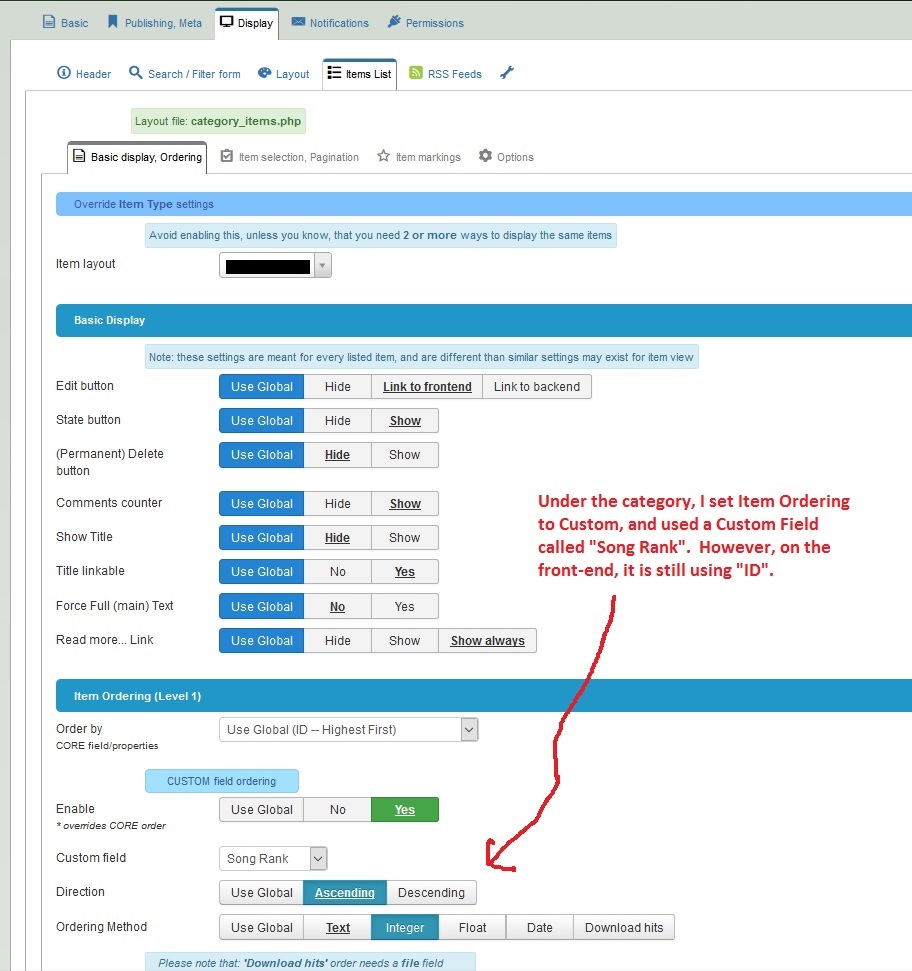
I edited the category and used my flexicontent custom field called "Song Rank" to order the data, but it Navigation is still using "ID" to order the data.  (You can see in the picture below.)

How can I fix this?


After changing the ordering to "Song Rank", Navigation is still using "ID" to order the data.  (You can see in the picture below).

How can I fix this?


I did everything you guys told me to do.  But Navigation is still using "ID" to sort the data.

How can I fix this?

Thank you so much.

Please Log in or Create an account to join the conversation.

Moderators: vistamediajoomlacornerggppdk
Cookies user preferences
We use cookies to ensure you to get the best experience on our website. If you decline the use of cookies, this website may not function as expected.
Accept all
Decline all
Essential
These cookies are needed to make the website work correctly. You can not disable them.
Display
Accept
Analytics
Tools used to analyze the data to measure the effectiveness of a website and to understand how it works.
Google Analytics
Accept
Decline
Save