Create and link custom field 'Author' to CB user profile

More
7 years 7 months ago - 7 years 7 months ago #73620 by alog
Hello,
many thanks it works great !  
but yes i have to re-save all items :(
I'm revisiting the translation issue for value suffix on frontend, i'd like to resolve it but language strings don't seem to work ? 
Last edit: 7 years 7 months ago by alog.

Please Log in or Create an account to join the conversation.

More
7 years 7 months ago #73637 by micker
did you actived language string option in display tab ?

FLEXIcontent is Free but involves a very big effort on our part.
Like the our support? (for a bug-free FC, despite being huge extension) Like the features? Like the ongoing development and future commitment to FLEXIcontent?
-- Add your voice to the FLEXIcontent JED listing reviews. Thanks![/size]

Please Log in or Create an account to join the conversation.

More
7 years 7 months ago - 7 years 7 months ago #73638 by ggppdk
Hello

BETTER solution
- no need to edit / re-save items
- you can easily use translations
- you can easily customize it in the future


You can just
1. Create a new field of type 'text' and name it "Author profile 2"
2. Create 1 custom layout for the 'text' field type and name it 'value_author_profile.php'
3. Add in it
Code:
<?php echo '   <a href="index.php?option=com_flexicontent&view=category&layout=author&authorid= ' . $item->created_by . 'alt="' . JText::_('MY_STRING_THIS_AUTHOR_CONTENT') . '">' . JText::_('MY_STRING_MORE_CONTENT_FROM_THIS_AUTHOR') . '   </a>'; ?>
4. Edit the field "Author profile 2"and select the layout (inside the viewing TAB) 'value_author_profile.php'
5. Add new field in a template position of the ITEM layout (that your items are using for being displayed)


-- Flexicontent is Free but involves a big effort on our part.
Like the our support? (for a bug-free FC, despite having a long list of functions) Like the features? Like the ongoing development and future commitment to FLEXIcontent?
-- Add your voice to the FLEXIcontent JED listing with a 5-star review. Thanks!
Last edit: 7 years 7 months ago by ggppdk.

Please Log in or Create an account to join the conversation.

More
7 years 7 months ago - 7 years 7 months ago #73648 by alog
Hello,
it sounds good.. Thanks for the hint.
I have just attempted  to create a new custom layout 'valueauthor_profile.php' for the FC 'text' field type in:
 /plugins/flexicontent_fields/text/valueauthor_profile.php

but my new custom layout 'valueauthor_profile.php' is not found underneath 'default' layout selection.

Besides i'm not be able to create and edit a new text field = error page ...  with url :  /en/administrator/index.php.   (??)
what do it happens ?
Last edit: 7 years 7 months ago by alog.

Please Log in or Create an account to join the conversation.

More
7 years 7 months ago #73649 by ggppdk
Hello

i forgot the underscore,
filename should be

value_author_profile.php
instead of
valueauthor_profile.php


about saving the new field, and having this redirection to
 /en/administrator/index.php. 
it is some custom rule in your server , same problem occurs when you try to edit a file with phoca commander too and you click close


-- Flexicontent is Free but involves a big effort on our part.
Like the our support? (for a bug-free FC, despite having a long list of functions) Like the features? Like the ongoing development and future commitment to FLEXIcontent?
-- Add your voice to the FLEXIcontent JED listing with a 5-star review. Thanks!

Please Log in or Create an account to join the conversation.

More
7 years 7 months ago - 7 years 7 months ago #73690 by alog
Hello,
I find this method most viable, but sorry, it does not work...
as described i created a custom layout for the 'text' field type and (re)name it 'value_author_profile.php'
then I'm trying to set layout but the new layout 'value_author_profile' doesn't appear on the drop down select in the values layout. Only default layout value is present.
Any ideas?

And should we add add Prefix/Suffix values and removed space as suggested in the FAQ article ?
Last edit: 7 years 7 months ago by alog.

Please Log in or Create an account to join the conversation.

More
7 years 7 months ago - 7 years 7 months ago #73695 by ggppdk
Hello

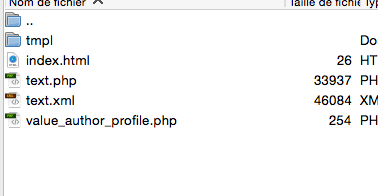
your posted picture helps

the template file , that you created, must inside sub-folder
/tmpls/
then it will appear inside the layout selector at the Viewing Tab

And then i forgot

STEP 6
6. Inside field you need to set a default value inside the Editing Tab / Values Tab
(it can be anything in our case because it will not be shown)
So set default value e.g. '...'
and inside parameter "Usage of default" , select option
The above and also display instead of empty

Also remember to assing the field in ALL item types that you want it to appear


-- Flexicontent is Free but involves a big effort on our part.
Like the our support? (for a bug-free FC, despite having a long list of functions) Like the features? Like the ongoing development and future commitment to FLEXIcontent?
-- Add your voice to the FLEXIcontent JED listing with a 5-star review. Thanks!
Last edit: 7 years 7 months ago by ggppdk.

Please Log in or Create an account to join the conversation.

More
7 years 7 months ago - 7 years 7 months ago #73697 by ggppdk
Hello

i am sorry if you test of latest suggestions was confusing
i was editing the field with the same account as you were editing the field

you only forgot to set default value to '...' (i have edited field and added)

It is working now,
- you just need to add you language strings
- plus i will give you proper code to have nicer you SEF URL for the "Authored" items page

i mean urls like  that have
/content-page/authored/ 973
instead of
index.php?option=com_flexicontent&view=category&layout=author&authorid=973


-- Flexicontent is Free but involves a big effort on our part.
Like the our support? (for a bug-free FC, despite having a long list of functions) Like the features? Like the ongoing development and future commitment to FLEXIcontent?
-- Add your voice to the FLEXIcontent JED listing with a 5-star review. Thanks!
Last edit: 7 years 7 months ago by ggppdk.

Please Log in or Create an account to join the conversation.

More
7 years 7 months ago - 7 years 7 months ago #73698 by ggppdk
Hello

ok also created a menu item "Authored items" with menu item alias
authored
... and i have selected it as default in "Configuration" inside "Default menus" for "Authored items" pages

So you urls are now shorter e.g.
/fr/authored/973

Finally you should rename the field from
"Author profile 2" to "Authored Items" (or similar) as it is more proper name


-- Flexicontent is Free but involves a big effort on our part.
Like the our support? (for a bug-free FC, despite having a long list of functions) Like the features? Like the ongoing development and future commitment to FLEXIcontent?
-- Add your voice to the FLEXIcontent JED listing with a 5-star review. Thanks!
Last edit: 7 years 7 months ago by ggppdk.

Please Log in or Create an account to join the conversation.

More
7 years 7 months ago - 7 years 7 months ago #73757 by alog
Hello,
thanks for all your help, 
although I would have liked the link to point directly to the CB profile.

But now i’d like to show username instead of name
and i don't know why i’m not able to change FC category template in layout parameters of the menu item "Authored".
And oddly i can’t display this new field in ‘subtitle3’ template position, in frontend it is displayed and fixed above ‘subtitle1/image’ ??

Besides the multilingual association to associate every item with the other  per language doesn’t work with this menu item.it doesn't recognize linked language menu items? When i switch the display from French to English and conversely i get 404 error page.
Last edit: 7 years 7 months ago by alog.

Please Log in or Create an account to join the conversation.

Moderators: vistamediajoomlacornerggppdk
Cookies user preferences
We use cookies to ensure you to get the best experience on our website. If you decline the use of cookies, this website may not function as expected.
Accept all
Decline all
Essential
These cookies are needed to make the website work correctly. You can not disable them.
Display
Accept
Analytics
Tools used to analyze the data to measure the effectiveness of a website and to understand how it works.
Google Analytics
Accept
Decline
Save